Syncfusion.Blazor.InteractiveChat
34.2.9
Prefix Reserved
dotnet add package Syncfusion.Blazor.InteractiveChat --version 34.2.9
NuGet\Install-Package Syncfusion.Blazor.InteractiveChat -Version 34.2.9
<PackageReference Include="Syncfusion.Blazor.InteractiveChat" Version="34.2.9" />
<PackageVersion Include="Syncfusion.Blazor.InteractiveChat" Version="34.2.9" />
<PackageReference Include="Syncfusion.Blazor.InteractiveChat" />
paket add Syncfusion.Blazor.InteractiveChat --version 34.2.9
#r "nuget: Syncfusion.Blazor.InteractiveChat, 34.2.9"
#:package Syncfusion.Blazor.InteractiveChat@34.2.9
#addin nuget:?package=Syncfusion.Blazor.InteractiveChat&version=34.2.9
#tool nuget:?package=Syncfusion.Blazor.InteractiveChat&version=34.2.9
Syncfusion Blazor Interactive Chat Components
This package contains the Blazor Interactive Chat components for Blazor applications. It includes AI AssistView, Chat UI, and Inline AI Assist components for building conversational AI interfaces and chat applications with seamless AI service integration.
Using this package with an AI coding agent
Before generating Syncfusion code, ask your AI coding agent to run the Syncfusion setup using the following prompt:
Set up this project for Syncfusion before generating code. Fetch and follow the official instructions at https://ai.syncfusion.com, then report the detected platform, installed skill pack, MCP status, and any required licensing action.The setup detects your project's platform and loads the appropriate Syncfusion skill pack. No Syncfusion account or MCP key is required to install or read Syncfusion agent skills.
Platform reference: https://ai.syncfusion.com/blazor/llms.txt
Supported Components
This package includes the following components:
Blazor AI AssistView Component
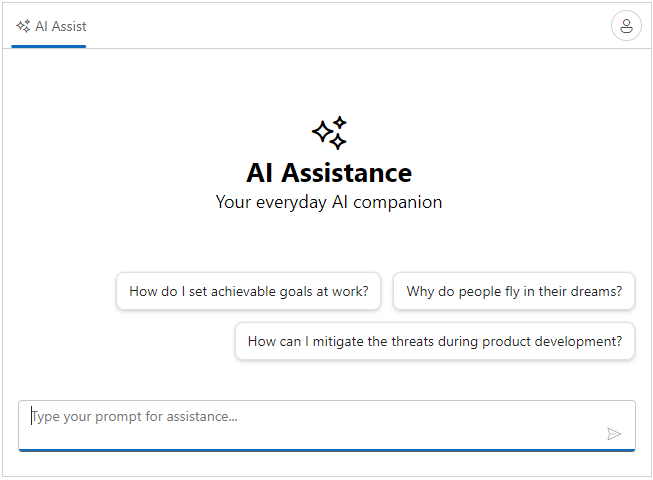
The Blazor AI AssistView Component is a versatile and modern UI tool designed to seamlessly integrate AI services into your web applications.
Key Features:
- Prompt Input: Enable users to send prompts and queries to AI services
- AI Response Display: Effortlessly display AI-generated responses in a user-friendly interface
- Data Binding: Bind to local data, API responses, and observable collections
- Custom Templates: Rich templates for rendering prompts and responses
- Keyboard Navigation: Full keyboard support (Arrow keys, Enter, Escape) for accessibility
- Theming and Styling: Custom CSS, themes, and styling options for seamless integration
- Accessibility: Full keyboard navigation and ARIA support for screen readers
Documentation:
- Getting Started with Blazor Web App
- Getting Started with Blazor WebAssembly
- API Reference
- Blazor AI AssistView Component Features Overview
- Blazor AI AssistView Component Demos
- Blazor AI AssistView Component Video Tutorials
Blazor Chat UI Component
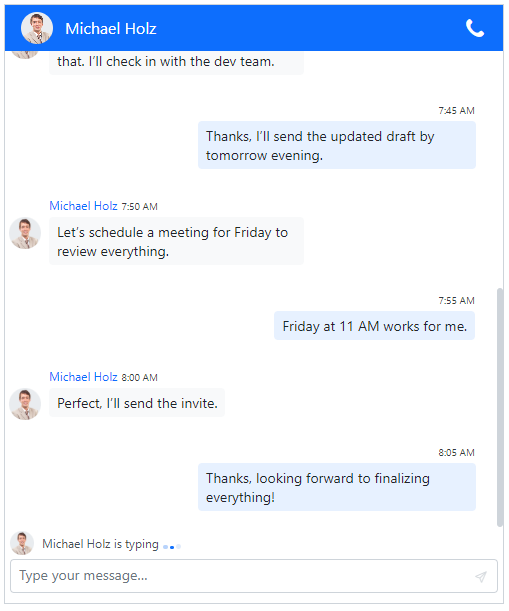
The Blazor Chat UI Component is a versatile and modern UI tool designed to seamlessly integrate AI services into your web applications.
Key Features:
- Interactive Conversations: Build responsive chat interfaces for user-AI interactions
- Message Display: Render user and AI messages with different visual styles
- AI Response Rendering: Display AI-generated responses in a user-friendly interface
- Data Binding: Support for arrays, API data, and observable collections
- Custom Templates: Rich templates for rendering messages and content
- Keyboard Navigation: Full keyboard support for accessibility
- Theming and Styling: Custom CSS, themes, and styling options for seamless integration
Documentation:
- Getting Started with Blazor Web App
- Getting Started with Blazor WebAssembly
- API Reference
- Blazor Chat UI Component Features Overview
- Blazor Chat UI Component Demos
- Blazor Chat UI Component Video Tutorials
Blazor Inline AI Assist Component
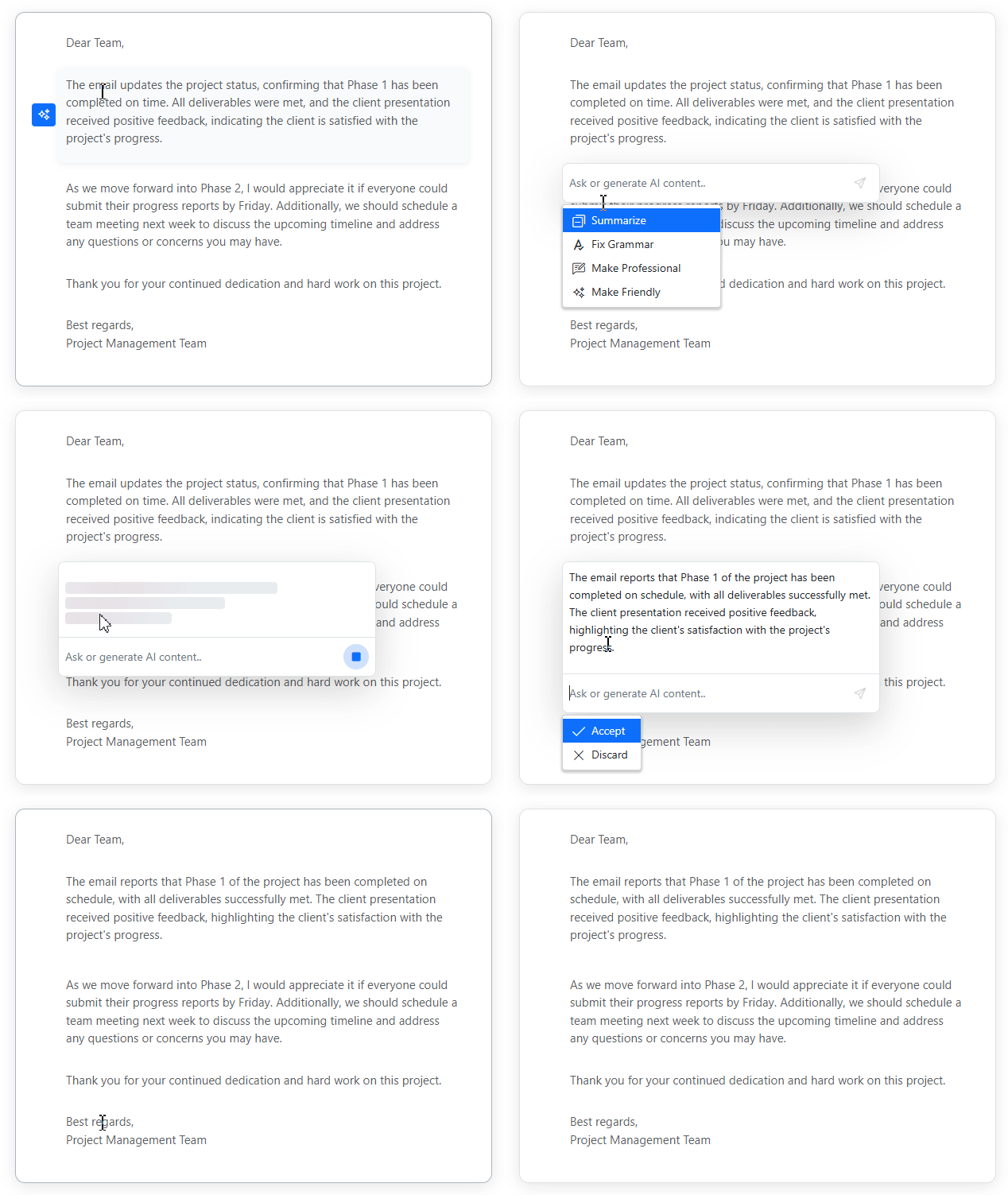
The Blazor Inline AI Assist Component is a versatile, integrated AI-powered assistant component for modern web applications. It enables users to prompt AI services and receive intelligent responses directly within their interface, with flexible display modes and extensive customization options.
Key Features:
- Dual Response Modes: Display AI responses inline at the cursor position or in a popup overlay for flexible UI integration.
- Command Actions: Display predefined commands and quick-action suggestions using mention-style popups with customizable grouping and icons via CommandMenu.
- Response Actions: Configurable actions such as Accept, Discard, and custom items using ResponseActions to manage AI-generated content.
- Action Toolbar: Includes a toolbar in the prompt input area with a send button and custom actions.
- Markdown: Automatic conversion of Markdown responses to HTML for rich content rendering.
- Streaming Responses: Supports word-by-word or chunk-based streaming with real-time visual feedback and stop controls.
- Indicators: Shows processing states using inline indicators and skeleton loading in popup mode.
- Customization: Supports customization of templates, appearance, and response rendering.
Documentation:
- Getting Started with Blazor Web App
- Getting Started with Blazor WebAssembly
- API Reference
- Blazor Inline AI Assist Component Features Overview
- Blazor Inline AI Assist Component Demos
- Blazor Inline AI Assist Component Video Tutorials
System Requirements
- .NET 8.0 or later (Blazor Server, Blazor Web App, Blazor WebAssembly, Blazor Hybrid)
- See full requirements: System Requirements
Installation
Install the Interactive Chat package and the themes package, which provides the stylesheets referenced below:
dotnet add package Syncfusion.Blazor.InteractiveChat
dotnet add package Syncfusion.Blazor.Themes
Add Stylesheet and Script References
For Blazor Web App / Blazor Server, add these to Components/App.razor or App.razor. For Blazor WebAssembly, add these to wwwroot/index.html:
<link href="_content/Syncfusion.Blazor.Themes/fluent2.css" rel="stylesheet" />
<script src="_content/Syncfusion.Blazor.Core/scripts/syncfusion-blazor.min.js" type="text/javascript"></script>
Quick Start
Register the Syncfusion Blazor services in Program.cs:
using Syncfusion.Blazor;

builder.Services.AddSyncfusionBlazor();
AI AssistView
@using Syncfusion.Blazor.InteractiveChat

<div class="aiassist-container" style="height: 350px; width: 650px;">
    <SfAIAssistView></SfAIAssistView>
</div>
Chat UI
@using Syncfusion.Blazor.InteractiveChat

<div style="height: 400px; width: 400px;">
    <SfChatUI ID="chatUser" User="CurrentUserModel" Messages="ChatUserMessages"></SfChatUI>
</div>

@code {
    private static UserModel CurrentUserModel = new UserModel() { ID = "User1", User = "Albert" };
    private static UserModel MichaleUserModel = new UserModel() { ID = "User2", User = "Michale Suyama" };

    private List<ChatMessage> ChatUserMessages = new List<ChatMessage>()
    {
        new ChatMessage() { Text = "Want to get coffee tomorrow?", Author = CurrentUserModel },
        new ChatMessage() { Text = "Sure! What time?", Author = MichaleUserModel },
        new ChatMessage() { Text = "How about 10 AM?", Author = CurrentUserModel }
    };
}
Inline AI Assist
@using Syncfusion.Blazor.InteractiveChat

<button class="e-btn" @onclick="@handleButtonClick">Open Inline AI Assist</button>
<div id="inlineAssistTarget"></div>
<SfInlineAIAssist @ref="InlineAssistObj" RelateTo="#inlineAssistTarget" PromptRequested="@onPromptRequest">
    <ResponseActions ItemSelect="@onResponseItemSelect"></ResponseActions>
</SfInlineAIAssist>

@code {
    private SfInlineAIAssist InlineAssistObj;
    private async Task handleButtonClick()
    {
        await InlineAssistObj.ShowPopupAsync();
    }
    private async Task onResponseItemSelect()
    {
        await InlineAssistObj.HidePopupAsync();
    }
    private async Task onPromptRequest()
    {
        await Task.Delay(1000);
        await InlineAssistObj.UpdateResponseAsync("For real-time prompt processing, connect the Inline AI Assist control to your preferred AI service.");
    }
}
Support and Feedback
- For queries, reach our Syncfusion support team or post them through the community forums.
- Request new features through the Syncfusion feedback portal.
Other Popular Blazor Components
Explore other popular Syncfusion Blazor components curated from UI components, standalone SDKs, and document solution suites.
| UI components | Standalone UI SDK's | Document Processing |
|---|---|---|
| Blazor Charts<br/> Blazor File Manager<br/> Blazor DataGrid<br/> | Blazor Gantt Chart<br/> Blazor Diagram<br/> Blazor Scheduler<br/> Blazor RichTextEditor | Blazor DOCX Editor<br/> Blazor PDF Viewer<br/> Blazor Spreadsheet Editor |
License
This is a commercial product and requires a paid license for possession or use. Syncfusion licensed software, including this component, is subject to the terms and conditions of the Syncfusion EULA. You can purchase a license here or start a free 30-day trial here.
About Syncfusion
Founded in 2001 and headquartered in Research Triangle Park, N.C., Syncfusion has more than 29,000 customers and more than 1 million users, including large financial institutions, Fortune 500 companies, and global IT consultancies.
Today, we provide 1800+ components and frameworks for web, mobile, and desktop development across multiple platforms:
Web: Blazor | ASP.NET Core | ASP.NET MVC | JavaScript | Angular | React | Vue
Desktop: WinForms | WPF | WinUI
Learn more at www.syncfusion.com.
sales@syncfusion.com | Toll Free: 1-888-9-DOTNET
| Product | Versions Compatible and additional computed target framework versions. |
|---|---|
| .NET | net8.0 is compatible. net8.0-android was computed. net8.0-browser was computed. net8.0-ios was computed. net8.0-maccatalyst was computed. net8.0-macos was computed. net8.0-tvos was computed. net8.0-windows was computed. net9.0 is compatible. net9.0-android was computed. net9.0-browser was computed. net9.0-ios was computed. net9.0-maccatalyst was computed. net9.0-macos was computed. net9.0-tvos was computed. net9.0-windows was computed. net10.0 is compatible. net10.0-android was computed. net10.0-browser was computed. net10.0-ios was computed. net10.0-maccatalyst was computed. net10.0-macos was computed. net10.0-tvos was computed. net10.0-windows was computed. |
-
net10.0
- Syncfusion.Blazor.Buttons (>= 34.2.9)
- Syncfusion.Blazor.Core (>= 34.2.9)
- Syncfusion.Blazor.Inputs (>= 34.2.9)
- Syncfusion.Blazor.Navigations (>= 34.2.9)
- Syncfusion.Blazor.Notifications (>= 34.2.9)
- Syncfusion.Markdown (>= 34.2.9)
-
net8.0
- Syncfusion.Blazor.Buttons (>= 34.2.9)
- Syncfusion.Blazor.Core (>= 34.2.9)
- Syncfusion.Blazor.Inputs (>= 34.2.9)
- Syncfusion.Blazor.Navigations (>= 34.2.9)
- Syncfusion.Blazor.Notifications (>= 34.2.9)
- Syncfusion.Markdown (>= 34.2.9)
-
net9.0
- Syncfusion.Blazor.Buttons (>= 34.2.9)
- Syncfusion.Blazor.Core (>= 34.2.9)
- Syncfusion.Blazor.Inputs (>= 34.2.9)
- Syncfusion.Blazor.Navigations (>= 34.2.9)
- Syncfusion.Blazor.Notifications (>= 34.2.9)
- Syncfusion.Markdown (>= 34.2.9)
NuGet packages (2)
Showing the top 2 NuGet packages that depend on Syncfusion.Blazor.InteractiveChat:
| Package | Downloads |
|---|---|
|
Syncfusion.Blazor.SfSmartPdfViewer
Syncfusion® delivers AI‑powered Blazor Smart PDF Viewer components that automate PDF workflows such as data redaction, form filling, and AI‑driven summarization and Q&A. |
|
|
Syncfusion.Blazor.SmartRichTextEditor
This package provides the functionality to utilize the features of Syncfusion® Blazor SmartRichTextEditor component, an enhanced Rich Text Editor with integrated AI assistance for content generation, editing, and analysis using Syncfusion AI AssistView. |
GitHub repositories
This package is not used by any popular GitHub repositories.
| Version | Downloads | Last Updated |
|---|---|---|
| 34.2.9 | 0 | 9/21/2026 |
| 34.2.8 | 457 | 9/14/2026 |
| 34.2.7 | 589 | 9/8/2026 |
| 34.2.6 | 460 | 8/31/2026 |
| 34.2.5 | 1,179 | 8/25/2026 |
| 34.2.4 | 1,666 | 8/17/2026 |
| 34.2.3 | 968 | 8/11/2026 |
| 34.2.2 | 1,698 | 8/5/2026 |
| 34.1.33 | 1,129 | 7/27/2026 |
| 34.1.32 | 2,072 | 7/21/2026 |
| 34.1.31 | 2,838 | 7/14/2026 |
| 34.1.30 | 475 | 7/9/2026 |
| 34.1.29 | 2,449 | 7/6/2026 |
| 33.2.15 | 3,417 | 6/23/2026 |
| 33.2.13 | 1,580 | 6/16/2026 |
| 33.2.12 | 6,559 | 6/9/2026 |
| 33.2.10 | 850 | 6/2/2026 |
| 33.2.8 | 486 | 5/26/2026 |
| 33.2.7 | 4,432 | 5/19/2026 |
| 33.2.6 | 1,428 | 5/12/2026 |