Syncfusion.Blazor.TreeGrid
35.1.41
Prefix Reserved
dotnet add package Syncfusion.Blazor.TreeGrid --version 35.1.41
NuGet\Install-Package Syncfusion.Blazor.TreeGrid -Version 35.1.41
<PackageReference Include="Syncfusion.Blazor.TreeGrid" Version="35.1.41" />
<PackageVersion Include="Syncfusion.Blazor.TreeGrid" Version="35.1.41" />
<PackageReference Include="Syncfusion.Blazor.TreeGrid" />
paket add Syncfusion.Blazor.TreeGrid --version 35.1.41
#r "nuget: Syncfusion.Blazor.TreeGrid, 35.1.41"
#:package Syncfusion.Blazor.TreeGrid@35.1.41
#addin nuget:?package=Syncfusion.Blazor.TreeGrid&version=35.1.41
#tool nuget:?package=Syncfusion.Blazor.TreeGrid&version=35.1.41
Syncfusion Blazor TreeGrid
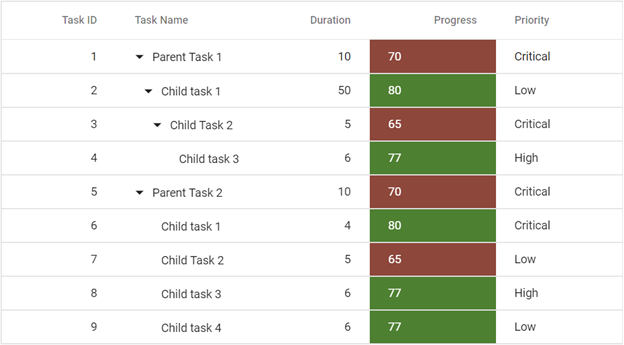
This package contains the Blazor TreeGrid component for Blazor applications. The Blazor TreeGrid is a feature-rich component used to visualize self-referential hierarchical (tree-like structure) data effectively in a tabular format. Its rich feature set includes data binding, editing, sorting, filtering, paging, aggregating rows, and exporting to Excel, CSV, and PDF formats.
Using this package with an AI coding agent
Before generating Syncfusion code, ask your AI coding agent to run the Syncfusion setup using the following prompt:
Set up this project for Syncfusion before generating code. Fetch and follow the official instructions at https://ai.syncfusion.com, then report the detected platform, installed skill pack, MCP status, and any required licensing action.The setup detects your project's platform and loads the appropriate Syncfusion skill pack. No Syncfusion account or MCP key is required to install or read Syncfusion agent skills.
Platform reference: https://ai.syncfusion.com/blazor/llms.txt
Key features
- Data binding: Bind to local data, remote services, and hierarchical data sources
- Sorting, Filtering & Paging: Sort, filter, and page through hierarchical records
- Editing: Built-in CRUD with dialog, inline, and batch edit modes
- Aggregates: Display summary values with footer aggregates
- Export: Export to Excel, CSV, and PDF formats
- Templates: Customize column, row, and header content
- Frozen columns & rows: Keep columns and rows visible while scrolling
- Row drag and drop: Reorder rows and rebuild hierarchy interactively
- Accessibility & RTL: Built-in accessibility and RTL support
- Responsive design: Responsive layout with mobile touch optimization
System requirements
- .NET 8.0 or later (Blazor Server App, Blazor Web App, Blazor WebAssembly App, Blazor Hybrid App)
- See full requirements: system requirements
Installation
Install the TreeGrid package and the themes package, which provides the stylesheets referenced below:
dotnet add package Syncfusion.Blazor.TreeGrid
dotnet add package Syncfusion.Blazor.Themes
Add stylesheet and script references
For Blazor Web App / Blazor Server App, add these to Components/App.razor or App.razor. For Blazor WebAssembly App, add these to wwwroot/index.html:
<link href="_content/Syncfusion.Blazor.Themes/fluent2.css" rel="stylesheet" />
<script src="_content/Syncfusion.Blazor.Core/scripts/syncfusion-blazor.min.js" type="text/javascript"></script>
Quick start
- Register the Syncfusion Blazor service in
Program.cs:
using Syncfusion.Blazor;

builder.Services.AddSyncfusionBlazor();
- Add the TreeGrid component to your razor page:
@using Syncfusion.Blazor.TreeGrid

<SfTreeGrid DataSource="@TreeData" IdMapping="TaskId" ParentIdMapping="ParentId" TreeColumnIndex="1">
    <TreeGridColumns>
        <TreeGridColumn Field="TaskId" HeaderText="Task ID" Width="80" TextAlign="Syncfusion.Blazor.Grids.TextAlign.Right"></TreeGridColumn>
        <TreeGridColumn Field="TaskName" HeaderText="Task Name" Width="160"></TreeGridColumn>
        <TreeGridColumn Field="StartDate" HeaderText="Start Date" Format="d" Type="Syncfusion.Blazor.Grids.ColumnType.DateOnly" Width="152" TextAlign="Syncfusion.Blazor.Grids.TextAlign.Right"></TreeGridColumn>
        <TreeGridColumn Field="StartTime" HeaderText="Start Time" Type="Syncfusion.Blazor.Grids.ColumnType.TimeOnly" Width="100" TextAlign="Syncfusion.Blazor.Grids.TextAlign.Right"></TreeGridColumn>
    </TreeGridColumns>
</SfTreeGrid>

@code {

   public class BusinessObject
    {
        public int TaskId { get; set; }
        public string TaskName { get; set; }
        public DateOnly? StartDate { get; set; }
        public TimeOnly? StartTime { get; set; }
        public int Duration { get; set; }
        public int Progress { get; set; }
        public string Priority { get; set; }
        public int? ParentId { get; set; }
    }

    public List<BusinessObject> TreeData = new List<BusinessObject>();

    protected override void OnInitialized()
    {
        TreeData.Add(new BusinessObject() { TaskId = 1, TaskName = "Parent Task 1", StartDate = new DateOnly(2021, 03, 02), StartTime = new TimeOnly(10, 00, 00), Duration = 10, Progress = 70, ParentId = null, Priority = "High" });
        TreeData.Add(new BusinessObject() { TaskId = 2, TaskName = "Child task 1", StartDate = new DateOnly(2021, 03, 04), StartTime = new TimeOnly(11, 30, 00), Duration = 4, Progress = 80, ParentId = 1, Priority = "Normal" });
        TreeData.Add(new BusinessObject() { TaskId = 3, TaskName = "Child Task 2", StartDate = new DateOnly(2021, 03, 06), StartTime = new TimeOnly(12, 00, 00), Duration = 5, Progress = 65, ParentId = 1, Priority = "Critical" });
        TreeData.Add(new BusinessObject() { TaskId = 4, TaskName = "Parent Task 2", StartDate = new DateOnly(2021, 03, 08), StartTime = new TimeOnly(13, 30, 00), Duration = 6, Progress = 77, ParentId = null, Priority = "Low" });
        TreeData.Add(new BusinessObject() { TaskId = 5, TaskName = "Child Task 5", StartDate = new DateOnly(2021, 07, 10), StartTime = new TimeOnly(14, 00, 00), Duration = 9, Progress = 25, ParentId = 4, Priority = "Normal" });
        TreeData.Add(new BusinessObject() { TaskId = 6, TaskName = "Child Task 6", StartDate = new DateOnly(2021, 10, 12), StartTime = new TimeOnly(16, 00, 00), Duration = 9, Progress = 7, ParentId = 4, Priority = "Normal" });
    }
}
Documentation
- Getting Started with Blazor Web App
- Getting Started with Blazor WebAssembly App
- API reference
- Blazor TreeGrid component features overview
- Blazor TreeGrid component demos
- Blazor TreeGrid component video tutorials
Support and feedback
- For queries, reach our Syncfusion support team or post them through the community forums.
- Request new features through the Syncfusion feedback portal.
Other popular Blazor components
Explore other popular Syncfusion Blazor components curated from UI components, standalone SDKs, and document solution suites.
| UI components | Standalone UI SDK's | Document processing |
|---|---|---|
| Blazor DataGrid | Blazor Gantt Chart | Blazor DOCX Editor |
| Blazor Pivot Table | Blazor Diagram | Blazor Document |
| Blazor Map | Blazor Scheduler | Blazor PDF Viewer |
| Blazor File Manager | Blazor RichTextEditor | Blazor Spreadsheet Editor |
License
This is a commercial product and requires a paid license for possession or use. Syncfusion licensed software, including this component, is subject to the terms and conditions of the Syncfusion EULA. You can purchase a license here or start a free 30-day trial here.
About Syncfusion
Founded in 2001 and headquartered in Research Triangle Park, N.C., Syncfusion has more than 29,000 customers and more than 1 million users, including large financial institutions, Fortune 500 companies, and global IT consultancies.
Today, we provide 1800+ components and frameworks for web, mobile, and desktop development across multiple platforms:
Web: Blazor | ASP.NET Core | ASP.NET MVC | JavaScript | Angular | React | Vue
Desktop: WinForms | WPF | WinUI
Learn more at www.syncfusion.com.
sales@syncfusion.com | Toll Free: 1-888-9-DOTNET
| Product | Versions Compatible and additional computed target framework versions. |
|---|---|
| .NET | net8.0 is compatible. net8.0-android was computed. net8.0-browser was computed. net8.0-ios was computed. net8.0-maccatalyst was computed. net8.0-macos was computed. net8.0-tvos was computed. net8.0-windows was computed. net9.0 is compatible. net9.0-android was computed. net9.0-browser was computed. net9.0-ios was computed. net9.0-maccatalyst was computed. net9.0-macos was computed. net9.0-tvos was computed. net9.0-windows was computed. net10.0 is compatible. net10.0-android was computed. net10.0-browser was computed. net10.0-ios was computed. net10.0-maccatalyst was computed. net10.0-macos was computed. net10.0-tvos was computed. net10.0-windows was computed. |
-
net10.0
- Syncfusion.Blazor.Buttons (>= 35.1.41)
- Syncfusion.Blazor.Calendars (>= 35.1.41)
- Syncfusion.Blazor.Core (>= 35.1.41)
- Syncfusion.Blazor.Data (>= 35.1.41)
- Syncfusion.Blazor.DropDowns (>= 35.1.41)
- Syncfusion.Blazor.Grid (>= 35.1.41)
- Syncfusion.Blazor.Inputs (>= 35.1.41)
- Syncfusion.Blazor.Navigations (>= 35.1.41)
- Syncfusion.Blazor.Popups (>= 35.1.41)
- Syncfusion.Telemetry (>= 35.1.41)
- System.Linq.Dynamic.Core (>= 1.7.2)
-
net8.0
- Syncfusion.Blazor.Buttons (>= 35.1.41)
- Syncfusion.Blazor.Calendars (>= 35.1.41)
- Syncfusion.Blazor.Core (>= 35.1.41)
- Syncfusion.Blazor.Data (>= 35.1.41)
- Syncfusion.Blazor.DropDowns (>= 35.1.41)
- Syncfusion.Blazor.Grid (>= 35.1.41)
- Syncfusion.Blazor.Inputs (>= 35.1.41)
- Syncfusion.Blazor.Navigations (>= 35.1.41)
- Syncfusion.Blazor.Popups (>= 35.1.41)
- Syncfusion.Telemetry (>= 35.1.41)
- System.Linq.Dynamic.Core (>= 1.7.2)
-
net9.0
- Syncfusion.Blazor.Buttons (>= 35.1.41)
- Syncfusion.Blazor.Calendars (>= 35.1.41)
- Syncfusion.Blazor.Core (>= 35.1.41)
- Syncfusion.Blazor.Data (>= 35.1.41)
- Syncfusion.Blazor.DropDowns (>= 35.1.41)
- Syncfusion.Blazor.Grid (>= 35.1.41)
- Syncfusion.Blazor.Inputs (>= 35.1.41)
- Syncfusion.Blazor.Navigations (>= 35.1.41)
- Syncfusion.Blazor.Popups (>= 35.1.41)
- Syncfusion.Telemetry (>= 35.1.41)
- System.Linq.Dynamic.Core (>= 1.7.2)
NuGet packages (10)
Showing the top 5 NuGet packages that depend on Syncfusion.Blazor.TreeGrid:
| Package | Downloads |
|---|---|
|
Syncfusion.Blazor.Gantt
This package contains the Syncfusion® Blazor Gantt component. |
|
|
Cayaqui.MPS.Components
Design system and EVM/EPC reusable components (KPI strip, gauges CPI/SPI/PF, S-curves, Gantt, WBS tree grid, R9C, risk heatmap, change orders, purchase orders, engineering deliverables, lookahead grid) for .NET 10 Blazor WebApp (Interactive Server) on top of Syncfusion.Blazor. Proprietary — requires a commercial agreement with Cayaqui. |
|
|
Ruth.JYC.Net8.ManageRazor
Package Description |
|
|
Cayaqui.Components
Design system and EVM/EPC reusable components (KPI strip, gauges CPI/SPI/PF, S-curves, Gantt, WBS tree grid, R9C, risk heatmap, change orders, purchase orders, engineering deliverables, lookahead grid) for .NET 10 Blazor WebApp (Interactive Server) on top of Syncfusion.Blazor. Proprietary — requires a commercial agreement with Cayaqui. |
|
|
Ruth.JYC.Net7.RazorClassLib
Package Description |
GitHub repositories
This package is not used by any popular GitHub repositories.
| Version | Downloads | Last Updated |
|---|---|---|
| 35.1.41 | 94 | 10/20/2026 |
| 35.1.40 | 1,830 | 10/13/2026 |
| 35.1.39 | 1,228 | 10/6/2026 |
| 35.1.37 | 2,457 | 9/29/2026 |
| 34.2.9 | 1,962 | 9/21/2026 |
| 34.2.8 | 3,602 | 9/14/2026 |
| 34.2.7 | 2,059 | 9/8/2026 |
| 34.2.6 | 1,404 | 8/31/2026 |
| 34.2.5 | 1,651 | 8/25/2026 |
| 34.2.4 | 3,975 | 8/17/2026 |
| 34.2.3 | 2,141 | 8/11/2026 |
| 34.2.2 | 13,285 | 8/5/2026 |
| 34.1.33 | 3,218 | 7/27/2026 |
| 34.1.32 | 4,532 | 7/21/2026 |
| 34.1.31 | 7,549 | 7/14/2026 |
| 34.1.30 | 1,365 | 7/9/2026 |
| 34.1.29 | 4,381 | 7/6/2026 |
| 33.2.15 | 3,464 | 6/23/2026 |
| 33.2.13 | 3,749 | 6/16/2026 |
| 33.2.12 | 5,228 | 6/9/2026 |