Syncfusion.Blazor.InPlaceEditor
33.1.44
Prefix Reserved
dotnet add package Syncfusion.Blazor.InPlaceEditor --version 33.1.44
NuGet\Install-Package Syncfusion.Blazor.InPlaceEditor -Version 33.1.44
<PackageReference Include="Syncfusion.Blazor.InPlaceEditor" Version="33.1.44" />
<PackageVersion Include="Syncfusion.Blazor.InPlaceEditor" Version="33.1.44" />
<PackageReference Include="Syncfusion.Blazor.InPlaceEditor" />
paket add Syncfusion.Blazor.InPlaceEditor --version 33.1.44
#r "nuget: Syncfusion.Blazor.InPlaceEditor, 33.1.44"
#:package Syncfusion.Blazor.InPlaceEditor@33.1.44
#addin nuget:?package=Syncfusion.Blazor.InPlaceEditor&version=33.1.44
#tool nuget:?package=Syncfusion.Blazor.InPlaceEditor&version=33.1.44
Syncfusion® Blazor In-place Editor Component
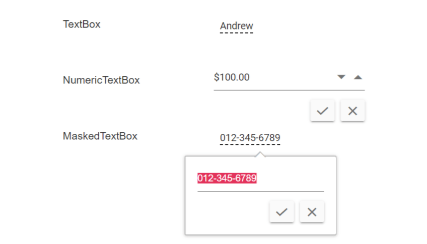
The Blazor In-place Editor Component enables inline or popup editing of values directly within the page context. It supports multiple input types and integrates seamlessly with Blazor Server and Blazor WebAssembly applications.
Key Features
- Multiple Input Types: Built-in support for TextBox, Dropdown List, DatePicker, Rich Text Editor etc..
- Dual Edit Modes: Inline editing or popup mode
- Customizable UI: Flexible styling and template support
- Event Handling: Comprehensive event APIs for integration workflows
- Two-way Binding: Seamless Blazor component integration
- Keyboard Support: Full keyboard navigation and accessibility
System Requirements
- .NET 8.0 or later (Blazor Web App, Blazor Server, Blazor WebAssembly and Blazor Hybrid)
- See full requirements: System Requirements.
Installation
.NET CLI
dotnet add package Syncfusion.Blazor.InPlaceEditor
NuGet Package Manager
Install-Package Syncfusion.Blazor.InPlaceEditor
Add Stylesheet and Script References
- For Blazor Server App / Blazor Web App, add these to
Components/App.razororApp.razor. - For Blazor WebAssembly App: add these to
wwwroot/index.html.
<link href="_content/Syncfusion.Blazor.Themes/bootstrap5.css" rel="stylesheet" />
<script src="_content/Syncfusion.Blazor.Core/scripts/syncfusion-blazor.min.js" type="text/javascript"></script>
Quick Start
- Register the Syncfusion® Blazor services in
Program.cs:
using Syncfusion.Blazor;

builder.Services.AddSyncfusionBlazor();
- Add the In-place Editor component in a Razor page:
@using Syncfusion.Blazor.InPlaceEditor

<SfInPlaceEditor @bind-Value="@EditorValue" Mode="RenderMode.Inline" />

@code {
    public string EditorValue { get; set; } = "Click to edit";
}
Documentation
- Getting Started with Blazor Web App
- Getting Started with Blazor WebAssembly App
- API Reference
- Live Demos
- Feature Overview
Support
License
This is a commercial product and requires a paid license for possession or use. Syncfusion® licensed software is subject to the terms and conditions of the Syncfusion® EULA.
About Syncfusion®
Syncfusion® provides 1600+ UI components and frameworks for web, mobile, and desktop development across multiple platforms:
Web: Blazor | ASP.NET Core | ASP.NET MVC | JavaScript | Angular | React | Vue
Desktop: WinForms | WPF | WinUI
Learn more at www.syncfusion.com.
sales@syncfusion.com | Toll Free: 1-888-9-DOTNET
| Product | Versions Compatible and additional computed target framework versions. |
|---|---|
| .NET | net8.0 is compatible. net8.0-android was computed. net8.0-browser was computed. net8.0-ios was computed. net8.0-maccatalyst was computed. net8.0-macos was computed. net8.0-tvos was computed. net8.0-windows was computed. net9.0 is compatible. net9.0-android was computed. net9.0-browser was computed. net9.0-ios was computed. net9.0-maccatalyst was computed. net9.0-macos was computed. net9.0-tvos was computed. net9.0-windows was computed. net10.0 is compatible. net10.0-android was computed. net10.0-browser was computed. net10.0-ios was computed. net10.0-maccatalyst was computed. net10.0-macos was computed. net10.0-tvos was computed. net10.0-windows was computed. |
-
net10.0
- Syncfusion.Blazor.Buttons (>= 33.1.44)
- Syncfusion.Blazor.Calendars (>= 33.1.44)
- Syncfusion.Blazor.Core (>= 33.1.44)
- Syncfusion.Blazor.DropDowns (>= 33.1.44)
- Syncfusion.Blazor.Inputs (>= 33.1.44)
- Syncfusion.Blazor.Popups (>= 33.1.44)
- Syncfusion.Blazor.RichTextEditor (>= 33.1.44)
- Syncfusion.Blazor.Spinner (>= 33.1.44)
-
net8.0
- Syncfusion.Blazor.Buttons (>= 33.1.44)
- Syncfusion.Blazor.Calendars (>= 33.1.44)
- Syncfusion.Blazor.Core (>= 33.1.44)
- Syncfusion.Blazor.DropDowns (>= 33.1.44)
- Syncfusion.Blazor.Inputs (>= 33.1.44)
- Syncfusion.Blazor.Popups (>= 33.1.44)
- Syncfusion.Blazor.RichTextEditor (>= 33.1.44)
- Syncfusion.Blazor.Spinner (>= 33.1.44)
-
net9.0
- Syncfusion.Blazor.Buttons (>= 33.1.44)
- Syncfusion.Blazor.Calendars (>= 33.1.44)
- Syncfusion.Blazor.Core (>= 33.1.44)
- Syncfusion.Blazor.DropDowns (>= 33.1.44)
- Syncfusion.Blazor.Inputs (>= 33.1.44)
- Syncfusion.Blazor.Popups (>= 33.1.44)
- Syncfusion.Blazor.RichTextEditor (>= 33.1.44)
- Syncfusion.Blazor.Spinner (>= 33.1.44)
NuGet packages (3)
Showing the top 3 NuGet packages that depend on Syncfusion.Blazor.InPlaceEditor:
| Package | Downloads |
|---|---|
|
Syncfusion.Blazor.PdfViewer
This package provides the functionality to utilize the features of Syncfusion Blazor PDF Viewer component and more. |
|
|
Syncfusion.Blazor.SfPdfViewer
This package provides the functionality to utilize the features of Syncfusion® Blazor PDF Viewer component and more. |
|
|
Jakar.Extensions.Blazor.Syncfusion
Extensions to aid in development. |
GitHub repositories
This package is not used by any popular GitHub repositories.
| Version | Downloads | Last Updated |
|---|---|---|
| 33.1.44 | 1,121 | 3/16/2026 |
| 32.2.9 | 1,746 | 3/9/2026 |
| 32.2.8 | 2,051 | 3/2/2026 |
| 32.2.7 | 2,199 | 2/23/2026 |
| 32.2.5 | 2,737 | 2/16/2026 |
| 32.2.4 | 1,892 | 2/10/2026 |
| 32.2.3 | 3,726 | 2/5/2026 |
| 32.1.25 | 2,760 | 1/26/2026 |
| 32.1.24 | 3,367 | 1/19/2026 |
| 32.1.23 | 7,770 | 1/13/2026 |
| 32.1.22 | 3,770 | 1/5/2026 |
| 32.1.21 | 1,558 | 12/29/2025 |
| 32.1.20 | 1,664 | 12/23/2025 |
| 32.1.19 | 7,569 | 12/16/2025 |
| 31.2.18 | 3,011 | 12/8/2025 |
| 31.2.16 | 1,853 | 12/1/2025 |
| 31.2.15 | 4,210 | 11/25/2025 |
| 31.2.12 | 3,790 | 11/18/2025 |
| 31.2.10 | 1,488 | 11/12/2025 |
| 31.2.5 | 4,503 | 11/3/2025 |