Syncfusion.Blazor.RichTextEditor
35.1.40
Prefix Reserved
dotnet add package Syncfusion.Blazor.RichTextEditor --version 35.1.40
NuGet\Install-Package Syncfusion.Blazor.RichTextEditor -Version 35.1.40
<PackageReference Include="Syncfusion.Blazor.RichTextEditor" Version="35.1.40" />
<PackageVersion Include="Syncfusion.Blazor.RichTextEditor" Version="35.1.40" />
<PackageReference Include="Syncfusion.Blazor.RichTextEditor" />
paket add Syncfusion.Blazor.RichTextEditor --version 35.1.40
#r "nuget: Syncfusion.Blazor.RichTextEditor, 35.1.40"
#:package Syncfusion.Blazor.RichTextEditor@35.1.40
#addin nuget:?package=Syncfusion.Blazor.RichTextEditor&version=35.1.40
#tool nuget:?package=Syncfusion.Blazor.RichTextEditor&version=35.1.40
Syncfusion Blazor Rich Text Editor
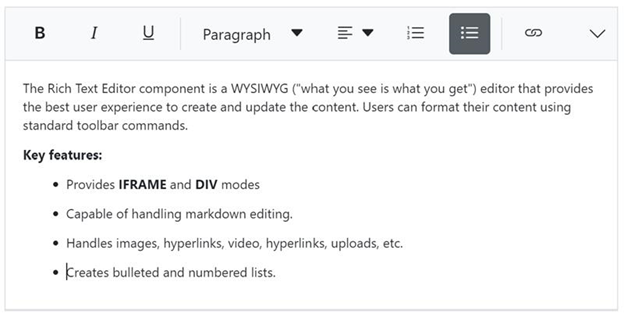
Feature-rich WYSIWYG HTML and Markdown editor for creating and formatting rich content in Blazor applications.
Using this package with an AI coding agent
Before generating Syncfusion code, ask your AI coding agent to run the Syncfusion setup using the following prompt:
Set up this project for Syncfusion before generating code. Fetch and follow the official instructions at https://ai.syncfusion.com, then report the detected platform, installed skill pack, MCP status, and any required licensing action.The setup detects your project's platform and loads the appropriate Syncfusion skill pack. No Syncfusion account or MCP key is required to install or read Syncfusion agent skills.
Platform reference: https://ai.syncfusion.com/blazor/llms.txt
Overview
The Blazor Rich Text Editor is a powerful WYSIWYG editor for creating blogs, forum posts, notes, comments, messaging applications, and support tickets. It provides comprehensive formatting tools, supports both HTML and Markdown modes, and returns valid markup for seamless content integration.
Key features
- Dual editing modes - HTML and Markdown (MD) editing with mode switching
- Rich formatting tools - Text formatting, fonts, colors, alignment, and styles
- Insert capabilities - Images, links, tables, lists, code blocks, and media
- Toolbar customization - Configurable toolbar with custom tools and commands
- Table support - Create and edit tables with cell merging and formatting
- Image management - Upload, resize, and position images with drag-and-drop
- Link insertion - Insert hyperlinks and email links with validation
- Paste cleanup - Smart paste from Word and other sources with formatting cleanup
- Undo/Redo - Full undo and redo support with history management
- Full-screen mode - Distraction-free editing experience
- Character and word count - Track content length in real-time
- Import/Export - Import Word documents and export content
- Responsive design - Touch-friendly interface for mobile devices
- Inline and iframe modes - Flexible rendering options
- Custom formatting - Apply custom CSS classes and inline styles
- Accessibility - WCAG 2.2 compliant with keyboard shortcuts and screen reader support
- RTL support - Right-to-left language compatibility
- Themes - Multiple built-in themes and custom styling
System Requirements
- .NET 8.0 or later (Blazor Server, Blazor Web App, Blazor WebAssembly, Blazor Hybrid)
- See full requirements: System Requirements
Installation
Install the Rich Text Editor package and the themes package, which provides the stylesheets referenced below:
dotnet add package Syncfusion.Blazor.RichTextEditor
dotnet add package Syncfusion.Blazor.Themes
Add stylesheet and script references
- For Blazor Server App / Blazor Web App, add these to
Components/App.razororApp.razorfile. - For Blazor WebAssembly App, add these to
wwwroot/index.htmlfile.
<link href="_content/Syncfusion.Blazor.Themes/fluent2.css" rel="stylesheet" />
<script src="_content/Syncfusion.Blazor.RichTextEditor/scripts/sf-richtexteditor.min.js" type="text/javascript"></script>
Quick start
- Register the Syncfusion Blazor services in the
Program.csfile.
using Syncfusion.Blazor;

builder.Services.AddSyncfusionBlazor();
- Add Blazor Rich Text Editor Component to your Razor page.
@using Syncfusion.Blazor.RichTextEditor

<SfRichTextEditor></SfRichTextEditor>
- Custom Toolbar Configuration
Configure toolbar with specific tools:
@using Syncfusion.Blazor.RichTextEditor

<SfRichTextEditor @bind-Value="@content">
    <RichTextEditorToolbarSettings Items="@tools" />
</SfRichTextEditor>

@code {
    private string content = "<p>Start typing...</p>";

    private List<ToolbarItemModel> tools = new List<ToolbarItemModel>()
    {
        new ToolbarItemModel() { Command = ToolbarCommand.Bold },
        new ToolbarItemModel() { Command = ToolbarCommand.Italic },
        new ToolbarItemModel() { Command = ToolbarCommand.Underline },
        new ToolbarItemModel() { Command = ToolbarCommand.Separator },
        new ToolbarItemModel() { Command = ToolbarCommand.Formats },
        new ToolbarItemModel() { Command = ToolbarCommand.Alignments },
        new ToolbarItemModel() { Command = ToolbarCommand.OrderedList },
        new ToolbarItemModel() { Command = ToolbarCommand.UnorderedList },
        new ToolbarItemModel() { Command = ToolbarCommand.Separator },
        new ToolbarItemModel() { Command = ToolbarCommand.CreateLink },
        new ToolbarItemModel() { Command = ToolbarCommand.Image },
        new ToolbarItemModel() { Command = ToolbarCommand.Separator },
        new ToolbarItemModel() { Command = ToolbarCommand.Undo },
        new ToolbarItemModel() { Command = ToolbarCommand.Redo }
    };
}
- Markdown Mode
Enable Markdown editing:
@using Syncfusion.Blazor.RichTextEditor

<SfRichTextEditor EditorMode="EditorMode.Markdown" @bind-Value="@markdownContent">
    <RichTextEditorToolbarSettings Items="@markdownTools" />
</SfRichTextEditor>

@code {
    private string markdownContent = "# Hello Markdown\n\nThis is **bold** and this is *italic*.";

    private List<ToolbarItemModel> markdownTools = new List<ToolbarItemModel>()
    {
        new ToolbarItemModel() { Command = ToolbarCommand.Bold },
        new ToolbarItemModel() { Command = ToolbarCommand.Italic },
        new ToolbarItemModel() { Command = ToolbarCommand.StrikeThrough },
        new ToolbarItemModel() { Command = ToolbarCommand.Separator },
        new ToolbarItemModel() { Command = ToolbarCommand.Formats },
        new ToolbarItemModel() { Command = ToolbarCommand.OrderedList },
        new ToolbarItemModel() { Command = ToolbarCommand.UnorderedList },
        new ToolbarItemModel() { Command = ToolbarCommand.Separator },
        new ToolbarItemModel() { Command = ToolbarCommand.CreateLink },
        new ToolbarItemModel() { Command = ToolbarCommand.Image }
    };
}
Documentation
- Getting Started with Blazor Web App
- Getting Started with Blazor WebAssembly App
- Feature Overview
- API Reference
- Live Demos
- Video Tutorials
Support
- Contact Support - Submit a support ticket
- Community Forums - Community Forums
- Feature Requests - Feedback Portal
Other Popular Blazor Components
Explore other popular Syncfusion Blazor components curated from UI components, standalone SDKs, and document solution suites.
| UI components | Standalone UI SDK's | Document Processing |
|---|---|---|
| Blazor Charts<br/> Blazor File Manager<br/> Blazor DataGrid<br/> | Blazor Gantt Chart<br/> Blazor Diagram<br/> Blazor Scheduler<br/> Blazor Kanban | Blazor DOCX Editor<br/> Blazor PDF Viewer<br/> Blazor Spreadsheet Editor |
License
This is a commercial product and requires a paid license for use.
About Syncfusion
Syncfusion is a provider of enterprise software components and frameworks. We offer 1600+ components and frameworks for web (Blazor, ASP.NET Core, ASP.NET MVC, ASP.NET WebForms, JavaScript, Angular, React, Vue, and Flutter), mobile (Flutter and JavaScript), and desktop development (WinForms, WPF, WinUI, .NET MAUI, and Flutter).
sales@syncfusion.com | www.syncfusion.com | 1-888-9-DOTNET
| Product | Versions Compatible and additional computed target framework versions. |
|---|---|
| .NET | net8.0 is compatible. net8.0-android was computed. net8.0-browser was computed. net8.0-ios was computed. net8.0-maccatalyst was computed. net8.0-macos was computed. net8.0-tvos was computed. net8.0-windows was computed. net9.0 is compatible. net9.0-android was computed. net9.0-browser was computed. net9.0-ios was computed. net9.0-maccatalyst was computed. net9.0-macos was computed. net9.0-tvos was computed. net9.0-windows was computed. net10.0 is compatible. net10.0-android was computed. net10.0-browser was computed. net10.0-ios was computed. net10.0-maccatalyst was computed. net10.0-macos was computed. net10.0-tvos was computed. net10.0-windows was computed. |
-
net10.0
- Syncfusion.Blazor.Buttons (>= 35.1.40)
- Syncfusion.Blazor.Core (>= 35.1.40)
- Syncfusion.Blazor.Inputs (>= 35.1.40)
- Syncfusion.Blazor.Navigations (>= 35.1.40)
- Syncfusion.Blazor.Popups (>= 35.1.40)
- Syncfusion.Blazor.SplitButtons (>= 35.1.40)
- Syncfusion.Telemetry (>= 35.1.40)
-
net8.0
- Syncfusion.Blazor.Buttons (>= 35.1.40)
- Syncfusion.Blazor.Core (>= 35.1.40)
- Syncfusion.Blazor.Inputs (>= 35.1.40)
- Syncfusion.Blazor.Navigations (>= 35.1.40)
- Syncfusion.Blazor.Popups (>= 35.1.40)
- Syncfusion.Blazor.SplitButtons (>= 35.1.40)
- Syncfusion.Telemetry (>= 35.1.40)
-
net9.0
- Syncfusion.Blazor.Buttons (>= 35.1.40)
- Syncfusion.Blazor.Core (>= 35.1.40)
- Syncfusion.Blazor.Inputs (>= 35.1.40)
- Syncfusion.Blazor.Navigations (>= 35.1.40)
- Syncfusion.Blazor.Popups (>= 35.1.40)
- Syncfusion.Blazor.SplitButtons (>= 35.1.40)
- Syncfusion.Telemetry (>= 35.1.40)
NuGet packages (9)
Showing the top 5 NuGet packages that depend on Syncfusion.Blazor.RichTextEditor:
| Package | Downloads |
|---|---|
|
Syncfusion.Blazor.InPlaceEditor
Provides a Syncfusion® Blazor In-Place Editor component for inline and popup editing scenarios. Supports multiple input types including TextBox, Dropdown, DatePicker, and Rich Text Editor. Optimized for seamless integration in both Blazor Server and Blazor WebAssembly applications. |
|
|
Syncfusion.Blazor.Gantt
This package contains the Syncfusion® Blazor Gantt component. |
|
|
CyberFrameword10_V2
CyberFrameword10_V2 |
|
|
Syncfusion.Blazor.SmartRichTextEditor
This package provides the functionality to utilize the features of Syncfusion® Blazor SmartRichTextEditor component, an enhanced Rich Text Editor with integrated AI assistance for content generation, editing, and analysis using Syncfusion AI AssistView. |
|
|
Recrovit.RecroGridFramework.Client.Blazor.SyncfusionUI
RecroGrid Framework Blazor UI. |
GitHub repositories (1)
Showing the top 1 popular GitHub repositories that depend on Syncfusion.Blazor.RichTextEditor:
| Repository | Stars |
|---|---|
|
bhrugen/TangyBlazor
|
| Version | Downloads | Last Updated |
|---|---|---|
| 35.1.40 | 1,741 | 10/13/2026 |
| 35.1.39 | 1,857 | 10/6/2026 |
| 35.1.37 | 4,093 | 9/29/2026 |
| 34.2.9 | 6,516 | 9/21/2026 |
| 34.2.8 | 6,126 | 9/14/2026 |
| 34.2.7 | 5,572 | 9/8/2026 |
| 34.2.6 | 4,879 | 8/31/2026 |
| 34.2.5 | 4,613 | 8/25/2026 |
| 34.2.4 | 12,218 | 8/17/2026 |
| 34.2.3 | 7,133 | 8/11/2026 |
| 34.2.2 | 17,377 | 8/5/2026 |
| 34.1.33 | 10,995 | 7/27/2026 |
| 34.1.32 | 11,167 | 7/21/2026 |
| 34.1.31 | 11,577 | 7/14/2026 |
| 34.1.30 | 2,889 | 7/9/2026 |
| 34.1.29 | 12,892 | 7/6/2026 |
| 33.2.15 | 19,744 | 6/23/2026 |
| 33.2.13 | 7,402 | 6/16/2026 |
| 33.2.12 | 14,431 | 6/9/2026 |
| 33.2.10 | 4,697 | 6/2/2026 |