Syncfusion.Blazor.FileManager
33.1.44
Prefix Reserved
dotnet add package Syncfusion.Blazor.FileManager --version 33.1.44
NuGet\Install-Package Syncfusion.Blazor.FileManager -Version 33.1.44
<PackageReference Include="Syncfusion.Blazor.FileManager" Version="33.1.44" />
<PackageVersion Include="Syncfusion.Blazor.FileManager" Version="33.1.44" />
<PackageReference Include="Syncfusion.Blazor.FileManager" />
paket add Syncfusion.Blazor.FileManager --version 33.1.44
#r "nuget: Syncfusion.Blazor.FileManager, 33.1.44"
#:package Syncfusion.Blazor.FileManager@33.1.44
#addin nuget:?package=Syncfusion.Blazor.FileManager&version=33.1.44
#tool nuget:?package=Syncfusion.Blazor.FileManager&version=33.1.44
Syncfusion® Blazor File Manager
Powerful file system explorer component for Blazor applications. Manage files and folders with drag-drop, multi-selection, upload, download, and intuitive context menus all built-in.
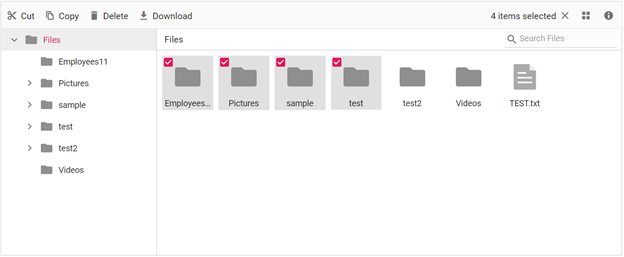
Key Features
- File Operations: Create, rename, delete, copy, move, and download files and folders
- Drag and Drop: Drag files/folders to reorder or move between locations
- Multi-Selection: Select multiple files at once with checkbox or Ctrl+Click
- File Upload: Built-in upload functionality with progress tracking
- Context Menu: Right-click menus for quick file operations
- Search: Search files and folders with real-time filtering
- Breadcrumb Navigation: Easy navigation with breadcrumb trail
- Sorting and Filtering: Sort by name, date, size; filter by file type
- Responsive Design: Works seamlessly on desktop and mobile devices
System Requirements
- .NET 8.0 or later (Blazor Server, Blazor Web App, Blazor WebAssembly, Blazor Hybrid)
- See full requirements: System Requirements
Installation
.NET CLI
dotnet add package Syncfusion.Blazor.FileManager
NuGet Package Manager
Install-Package Syncfusion.Blazor.FileManager
Add Stylesheet and Script References
For Blazor Web App / Blazor Server, add these to Components/App.razor or App.razor. For Blazor WebAssembly, add these to wwwroot/index.html:
<link href="_content/Syncfusion.Blazor.Themes/bootstrap5.css" rel="stylesheet" />
<script src="_content/Syncfusion.Blazor.Core/scripts/syncfusion-blazor.min.js" type="text/javascript"></script>
Quick Start
- Register the Syncfusion® Blazor service in
Program.cs:
using Syncfusion.Blazor;

builder.Services.AddSyncfusionBlazor();
- Add the File Manager component to your Razor page:
@using Syncfusion.Blazor.FileManager

<SfFileManager TValue="FileManagerDirectoryContent">
    <FileManagerAjaxSettings Url="https://ej2services.syncfusion.com/production/web-services/api/FileManager/FileOperations"
                             DownloadUrl="https://ej2services.syncfusion.com/production/web-services/api/FileManager/Download"
                             UploadUrl="https://ej2services.syncfusion.com/production/web-services/api/FileManager/Upload"
                             GetImageUrl="https://ej2services.syncfusion.com/production/web-services/api/FileManager/GetImage">
    </FileManagerAjaxSettings>
</SfFileManager>
Documentation
- Getting Started with Blazor Web App
- Getting Started with WebAssembly
- API Reference
- Live Demos
- Feature Overview
Support
License
This is a commercial product and requires a paid license for possession or use. Review the Syncfusion® EULA.
About Syncfusion®
Syncfusion® provides 1600+ UI components and frameworks for web, mobile, and desktop development across multiple platforms:
Web: Blazor | ASP.NET Core | ASP.NET MVC | JavaScript | Angular | React | Vue
Desktop: WinForms | WPF | WinUI
Learn more at www.syncfusion.com.
sales@syncfusion.com | Toll Free: 1-888-9-DOTNET
| Product | Versions Compatible and additional computed target framework versions. |
|---|---|
| .NET | net8.0 is compatible. net8.0-android was computed. net8.0-browser was computed. net8.0-ios was computed. net8.0-maccatalyst was computed. net8.0-macos was computed. net8.0-tvos was computed. net8.0-windows was computed. net9.0 is compatible. net9.0-android was computed. net9.0-browser was computed. net9.0-ios was computed. net9.0-maccatalyst was computed. net9.0-macos was computed. net9.0-tvos was computed. net9.0-windows was computed. net10.0 is compatible. net10.0-android was computed. net10.0-browser was computed. net10.0-ios was computed. net10.0-maccatalyst was computed. net10.0-macos was computed. net10.0-tvos was computed. net10.0-windows was computed. |
-
net10.0
- Syncfusion.Blazor.Buttons (>= 33.1.44)
- Syncfusion.Blazor.Core (>= 33.1.44)
- Syncfusion.Blazor.Data (>= 33.1.44)
- Syncfusion.Blazor.Grid (>= 33.1.44)
- Syncfusion.Blazor.Inputs (>= 33.1.44)
- Syncfusion.Blazor.Layouts (>= 33.1.44)
- Syncfusion.Blazor.Lists (>= 33.1.44)
- Syncfusion.Blazor.Navigations (>= 33.1.44)
- Syncfusion.Blazor.Popups (>= 33.1.44)
- Syncfusion.Blazor.Spinner (>= 33.1.44)
- Syncfusion.Blazor.SplitButtons (>= 33.1.44)
-
net8.0
- Syncfusion.Blazor.Buttons (>= 33.1.44)
- Syncfusion.Blazor.Core (>= 33.1.44)
- Syncfusion.Blazor.Data (>= 33.1.44)
- Syncfusion.Blazor.Grid (>= 33.1.44)
- Syncfusion.Blazor.Inputs (>= 33.1.44)
- Syncfusion.Blazor.Layouts (>= 33.1.44)
- Syncfusion.Blazor.Lists (>= 33.1.44)
- Syncfusion.Blazor.Navigations (>= 33.1.44)
- Syncfusion.Blazor.Popups (>= 33.1.44)
- Syncfusion.Blazor.Spinner (>= 33.1.44)
- Syncfusion.Blazor.SplitButtons (>= 33.1.44)
-
net9.0
- Syncfusion.Blazor.Buttons (>= 33.1.44)
- Syncfusion.Blazor.Core (>= 33.1.44)
- Syncfusion.Blazor.Data (>= 33.1.44)
- Syncfusion.Blazor.Grid (>= 33.1.44)
- Syncfusion.Blazor.Inputs (>= 33.1.44)
- Syncfusion.Blazor.Layouts (>= 33.1.44)
- Syncfusion.Blazor.Lists (>= 33.1.44)
- Syncfusion.Blazor.Navigations (>= 33.1.44)
- Syncfusion.Blazor.Popups (>= 33.1.44)
- Syncfusion.Blazor.Spinner (>= 33.1.44)
- Syncfusion.Blazor.SplitButtons (>= 33.1.44)
NuGet packages (3)
Showing the top 3 NuGet packages that depend on Syncfusion.Blazor.FileManager:
| Package | Downloads |
|---|---|
|
CyberFrameword10_V2
CyberFrameword10_V2 |
|
|
Jakar.Extensions.Blazor.Syncfusion
Extensions to aid in development. |
|
|
AtomicXPageBuilder
A powerful page builder plugin for Umbraco 16 with AI-powered content creation, file management, and visual editing capabilities. |
GitHub repositories
This package is not used by any popular GitHub repositories.
| Version | Downloads | Last Updated |
|---|---|---|
| 33.1.44 | 90 | 3/16/2026 |
| 32.2.9 | 394 | 3/9/2026 |
| 32.2.8 | 665 | 3/2/2026 |
| 32.2.7 | 426 | 2/23/2026 |
| 32.2.5 | 1,344 | 2/16/2026 |
| 32.2.4 | 388 | 2/10/2026 |
| 32.2.3 | 723 | 2/5/2026 |
| 32.1.25 | 1,106 | 1/26/2026 |
| 32.1.24 | 668 | 1/19/2026 |
| 32.1.23 | 747 | 1/13/2026 |
| 32.1.22 | 1,056 | 1/5/2026 |
| 32.1.21 | 908 | 12/29/2025 |
| 32.1.20 | 458 | 12/23/2025 |
| 32.1.19 | 1,188 | 12/16/2025 |
| 31.2.18 | 2,123 | 12/8/2025 |
| 31.2.16 | 1,320 | 12/1/2025 |
| 31.2.15 | 796 | 11/25/2025 |
| 31.2.12 | 2,680 | 11/18/2025 |
| 31.2.10 | 1,038 | 11/12/2025 |
| 31.2.5 | 1,172 | 11/3/2025 |