Majorsoft.Blazor.Components.Maps
1.6.1
dotnet add package Majorsoft.Blazor.Components.Maps --version 1.6.1
NuGet\Install-Package Majorsoft.Blazor.Components.Maps -Version 1.6.1
<PackageReference Include="Majorsoft.Blazor.Components.Maps" Version="1.6.1" />
<PackageVersion Include="Majorsoft.Blazor.Components.Maps" Version="1.6.1" />
<PackageReference Include="Majorsoft.Blazor.Components.Maps" />
paket add Majorsoft.Blazor.Components.Maps --version 1.6.1
#r "nuget: Majorsoft.Blazor.Components.Maps, 1.6.1"
#:package Majorsoft.Blazor.Components.Maps@1.6.1
#addin nuget:?package=Majorsoft.Blazor.Components.Maps&version=1.6.1
#tool nuget:?package=Majorsoft.Blazor.Components.Maps&version=1.6.1
Blazor Components Maps control



About
Blazor components that renders Google/Bing maps wrapped into Blazor components allowing to control and mange maps with .Net code. All components work with WebAssembly and Server hosted models. For code examples see usage.
You can try it out by using the demo app.
⚠️ To use any of the Map components you must proved a Token or API Key. It is available in the service provider (Google, Microsoft, etc.) developer sites.
NOTE: None of the Majorsoft Maps component tracking or exposing you Token or API Key! Injecting and protecting this Token or API Key in your Blazor application is YOUR responsibility!
Components and Services
Google:
GoogleStaticMap: component is wrapping Google Static Maps services into Blazor components.GoogleMap: component is wrapping Google JavaScript Maps services into Blazor components.IGoogleMapService: Injectable service to handle Google JavaScript Maps functionalities. Available on the instance ofGoogleMapobject ref as well.
Bing:
BindMap: Planned in release v1.6.0
Maps using IGeolocationService (see "Dependences") to center current position.
It can be omitted and injected separately to your components as well to get or track device location.
To see how it works please check Geo JS documentation and demo.
GoogleStaticMap component (See: demo app)
⚠️ To use Google Maps Platform, you must have a billing account. The billing account is used to track costs associated with your projects.
The Maps Static API returns an image (either GIF, PNG or JPEG) in response to an HTTP request via a URL. For each request, you can specify the location of the map, the size of the image, the zoom level, the type of map, and the placement of optional markers at locations on the map. You can additionally label your markers using alphanumeric characters.
A Maps Static API image is embedded within an <img> tag's src attribute, or its equivalent in other programming languages.
You can learn about Google Static Maps features and usage here.
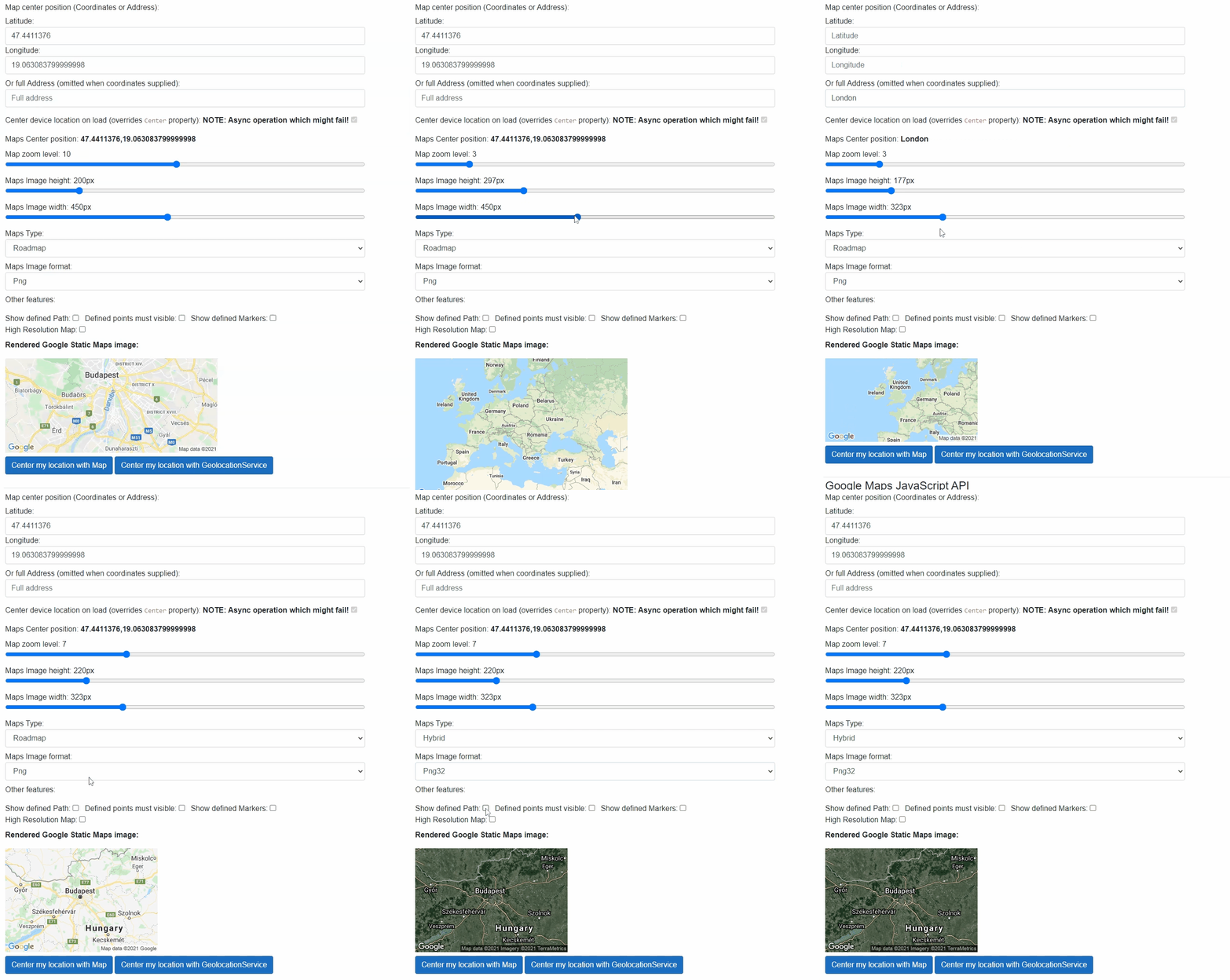
Properties
ZoomLevel:int { get; set; }(default: 12) <br /> Defines the zoom level of the map, which determines the magnification level of the map.Width:int { get; set; }(default: 400) <br /> Maps image Width in px.Height:int { get; set; }(default: 300) <br /> Maps image Height in px.HighResolution:bool { get; set; }(default: false) <br /> Affects the number of pixels that are returned. scale=2 returns twice as many pixels as scale=1 while retaining the same coverage area and level of detail (i.e. the contents of the map don't change). This is useful when developing for high-resolution displays.MapType:GoogleMapTypes { get; set; }(default: Roadmap) <br /> Defines the type of map to construct. There are several possible maptype values, including roadmap, satellite, hybrid, and terrain.ImageFormat:GoogleStaticMapImageFormats { get; set; }(default: Gif) <br /> Defines the format of the resulting image. By default, the Maps Static API creates PNG images. There are several possible formats including GIF, JPEG and PNG types.Language:string { get; set; }<br /> Defines the language to use for display of labels on map tiles. Note that this parameter is only supported for some country tiles.Region:string { get; set; }<br /> Defines the appropriate borders to display, based on geo-political sensitivities.Center:GeolocationData? { get; set; }Required (default: NULL) <br /> Maps center position set by the given Coordinates or Address. Also can be set the device location by settingCenterCurrentLocationOnLoadtotrue.CenterCurrentLocationOnLoad:bool { get; set; }(default: false) <br /> If settruethen Maps try to detect device location by usingIGeolocationServiceand center on the Map once when Map was first loaded. Note: it will override <see cref="Center"/> location, but detecting geolocation is anasyncoperation. It means map might be centered after some time the page rendered or location might fail!ApiKey:string { get; set; }- Required <br /> Required allows you to monitor your application's API usage in the Google Cloud Console.Signature:string { get; set; }<br /> A digital signature used to verify that any site generating requests using your API key is authorized to do so. Requests without a digital signature might fail.Markers:IEnumerable<GoogleStaticMapMarker>? { get; set; }(default: NULL) <br /> The markers parameter defines a set of one or more markers (map pins) at a set of locationsGoogleStaticMapMarker.Path:IEnumerable<GeolocationData>? { get; set; }(default: NULL) <br /> Defines a single path of two or more connected points to overlay on the image at specified locationsGeolocationData.VisibleLocations:IEnumerable<GeolocationData>? { get; set; }(default: NULL) <br /> Specifies one or more locations that should remain visible on the map, though no markers or other indicators will be displayedGeolocationData.Style:string { get; set; }<br /> Defines a custom style to alter the presentation of a specific feature (roads, parks, and other features) of the map.InnerElementReference:ElementReference { get; }<br /> Exposes a BlazorElementReferenceof the wrapped around HTML element. It can be used e.g. for JS interop, etc.
Arbitrary HTML attributes e.g.: tabindex="20" will be passed to the corresponding rendered root HTML wrapper element <div>.
Events
OnCurrentLocationDetected:EventCallback<GeolocationData><br /> Callback function called when location successfully detected withIGeolocationService. Device position will be supplied in the event which should be used to overrideCenterparameter value.
Functions
CenterCurrentLocationOnMapAsync():Task CenterCurrentLocationOnMapAsync()<br /> Starts an async operation to try to detect device location by usingIGeolocationService. Once operation has finished successfullyOnLocationDetectedevent will be fired.DisposeAsync():Task DisposeAsync()<br /> Component implementsIAsyncDisposableinterface Blazor framework will call it when parent removed from render tree.
GoogleMap component (See: demo app)
⚠️ To use Google Maps Platform, you must have a billing account. The billing account is used to track costs associated with your projects.
The Maps JavaScript API lets you customize maps with your own content and imagery for display on web pages and mobile devices. The Maps JavaScript API features four basic map types (roadmap, satellite, hybrid, and terrain) which you can modify using layers and styles, controls and events, and various services and libraries.
A Maps JavaScript API renders a complex customizable map within <div> tag's also allowing to receive events.
You can learn about Google JavaScript Maps features and usage here
Properties
InnerElementReference:ElementReference { get; }<br /> Exposes a BlazorElementReferenceof the wrapped around HTML element. It can be used e.g. for JS interop, etc.MapId:string { get; }<br /> Map HTML container Id. It can be used when multiple Maps added to one page.GoogleMapService:string { get; }<br /> ExposesIGeolocationServicewhich is handling JsInterop. This instance can be used for access more GoogleMap features.Width:int { get; set; }(default: 400) <br /> Maps image Width in px.Height:int { get; set; }(default: 300) <br /> Maps image Height in px.BackgroundColor:string? { get; set; }(default: NULL) <br /> Color used for the background of the Map div. This color will be visible when tiles have not yet loaded as the user pans. This option can only be set when the map is initialized.ControlSize:int { get; set; }(default: 0) <br /> Size in pixels of the controls appearing on the map. This value must be supplied directly when creating the Map.CustomControls:IEnumerable<GoogleMapCustomControl>? { get; set; }(default: NULL) <br /> Custom controls to add to the Map that will execute callbacks for events. This option can only be set when the map is initialized. UseOnInitializedmethod to set it up.Markers:ObservableRangeCollection<GoogleMapMarker>? { get; set; }(default: NULL) <br /> MarkerOptions object used to define the properties that can be set on a Marker. ObservableCollection can be initialized only once! Add or remove items to the collection the change marker properties (Marker properties value changes not detected).Zoom:byte { get; set; }(default: 12) <br /> Defines the zoom level of the map, which determines the magnification level of the map.ZoomControl:bool { get; set; }(default: true) <br /> The enabled/disabled state of the Zoom control.ZoomControlOptionsPosition:GoogleMapControlPositions { get; set; }(default: GoogleMapControlPositions.BOTTOM_RIGHT) <br /> The display options for the Zoom control.MaxZoom:byte? { get; set; }(default: NULL) <br /> The maximum zoom level which will be displayed on the map. If omitted, or set to null, the maximum zoom from the current map type is used instead.MinZoom:byte? { get; set; }(default: NULL) <br /> The minimum zoom level which will be displayed on the map. If omitted, or set to null, the minimum zoom from the current map type is used instead.Center:GeolocationData? { get; set; }Required (default: NULL) <br /> Maps center position set by the given Coordinates or Address. Also can be set the device location by settingCenterCurrentLocationOnLoadtotrue.CenterCurrentLocationOnLoad:bool { get; set; }(default: false) <br /> If settruethen Maps try to detect device location by usingIGeolocationServiceand center on the Map once when Map was first loaded. Note: it will override <see cref="Center"/> location, but detecting geolocation is anasyncoperation. It means map might be centered after some time the page rendered or location might fail!ApiKey:string { get; set; }- Required <br /> Required allows you to monitor your application's API usage in the Google Cloud Console.AnimateCenterChange:bool { get; set; }(default: true) <br /> Apply animation on Maps center change.MapType:GoogleMapTypes { get; set; }(default: GoogleMapTypes.Roadmap) <br /> Defines the type of map to construct. There are several possible maptype values, including roadmap, satellite, hybrid, and terrain.MapTypeControlOptions:GoogleMapTypeControlOptions { get; set; }<br /> Defines the type of map to construct. There are several possible maptype values, including roadmap, satellite, hybrid, and terrain.Heading:int { get; set; }(default: 0) <br /> The heading for aerial imagery in degrees measured clockwise from cardinal direction North. Headings are snapped to the nearest available angle for which imagery is available.Tilt:byte { get; set; }(default: 0) <br /> Controls the automatic switching behavior for the angle of incidence of the map. The only allowed values are 0 and 45. 45° imagery is not available (this is the default behavior). 45° imagery is only available for satellite and hybrid map types, within some locations, and at some zoom levels.ClickableIcons:bool { get; set; }(default: true) <br /> When false, map icons are not clickable. A map icon represents a point of interest, also known as a POI. By default map icons are clickable.DisableDefaultUI:bool { get; set; }(default: false) <br /> Enables/disables all default UI buttons. May be overridden individually. Does not disable the keyboard controls, which are separately controlled.DisableDoubleClickZoom:bool { get; set; }(default: false) <br /> Enables/disables zoom and center on double click. Enabled by default.DraggableCursor:string? { get; set; }(default: NULL) <br /> The name or url of the cursor to display when mousing over a draggable map. This property uses the css cursor attribute to change the icon.DraggingCursor:string? { get; set; }(default: NULL) <br /> The name or url of the cursor to display when the map is being dragged. This property uses the css cursor attribute to change the icon.FullscreenControl:bool { get; set; }(default: true) <br /> The enabled/disabled state of the Fullscreen control.FullscreenControlPositon:GoogleMapControlPositions { get; set; }(default: GoogleMapControlPositions.TOP_RIGHT) <br /> The display options for the Fullscreen control.GestureHandling:GoogleMapGestureHandlingTypes { get; set; }(default: GoogleMapGestureHandlingTypes.Auto) <br /> This setting controls how the API handles gestures on the map.KeyboardShortcuts:bool { get; set; }(default: true) <br /> If false, prevents the map from being controlled by the keyboard. Keyboard shortcuts are enabled by default.MapTypeControl:bool { get; set; }(default: true) <br /> The initial enabled/disabled state of the Map type control.RotateControl:bool { get; set; }(default: true) <br /> The enabled/disabled state of the Rotate control.RotateControlOptionsPosition:GoogleMapControlPositions { get; set; }(default: GoogleMapControlPositions.TOP_RIGHT) <br /> The display options for the Rotate control.ScaleControl:bool { get; set; }(default: true) <br /> The initial enabled/disabled state of the Scale control.StreetViewControl:bool { get; set; }(default: true) <br /> The initial enabled/disabled state of the Street View Pegman control. This control is part of the default UI, and should be set to false when displaying a map type on which the Street View road overlay should not appear (e.g. a non-Earth map type).StreetViewControlOptionsPosition:GoogleMapControlPositions { get; set; }(default: GoogleMapControlPositions.RIGHT_CENTER) <br /> The initial display options for the Street View Pegman control.Styles:GoogleMapTypeCustomStyle[]? { get; set; }(default: NULL) <br /> Styles to apply to each of the default map types. Note that for satellite/hybrid and terrain modes, these styles will only apply to labels and geometry.
Arbitrary HTML attributes e.g.: tabindex="20" will be passed to the corresponding rendered root HTML wrapper element <div>.
Events
OnCurrentLocationDetected:EventCallback<GeolocationData><br /> Callback function called when location successfully detected withIGeolocationService. Device position will be supplied in the event which should be used to overrideCenterparameter value.OnMapInitialized:EventCallback<string><br /> Callback function for Google Map initialized event.OnMapClicked:EventCallback<GeolocationCoordinate><br /> Callback function for Google Map clicked event.OnMapDoubleClicked:EventCallback<GeolocationCoordinate><br /> Callback function for Google Map double clicked event.OnMapContextMenu:EventCallback<GeolocationCoordinate><br /> Callback function for Google Map content menu event.OnMapMouseUp:EventCallback<GeolocationCoordinate><br /> Callback function for Google Map mouse up event.OnMapMouseDown:EventCallback<GeolocationCoordinate><br /> Callback function for Google Map mouse down event.OnMouseMove:EventCallback<GeolocationCoordinate><br /> Callback function for Google Map mouse move event.OnMapMouseOver:EventCallback<br /> Callback function for Google Map mouse enter event.OnMapMouseOut:EventCallback<GeolocationCoordinate><br /> Callback function for Google Map mouse leaving event.OnMapCenterChanged:EventCallback<GeolocationData><br /> Callback function for Google Map Center point changed event. Can be used for Two-way binding: @bind-Center="{variable}" @bind-Center:event="OnMapCenterChanged".OnMapZoomLevelChanged:EventCallback<byte><br /> Callback function for Google Map zoom level changed event. Can be used for Two-way binding: @bind-ZoomLevel="{variable}" @bind-ZoomLevel:event="OnMapZoomLevelChanged".OnMapTypeChanged:EventCallback<GoogleMapTypes><br /> Callback function for Google Map type changed event. Can be used for Two-way binding: @bind-MapType="{variable}" @bind-MapType:event="OnMapTypeChanged".OnMapHeadingChanged:EventCallback<int><br /> Callback function for Google Map heading changed event. Can be used for Two-way binding: @bind-Heading="{variable}" @bind-ZoomLevel:event="OnMapHeadingChanged".OnMapTiltChanged:EventCallback<byte><br /> Callback function for Google Map tilt position changed event. Can be used for Two-way binding: @bind-Tilt="{variable}" @bind-ZoomLevel:event="OnMapTiltChanged".OnMapBoundsChanged:EventCallback<br /> Callback function for Google Map boundaries changed event.OnMapProjectionChanged:EventCallback<br /> Callback function for Google Map projection changed event.OnMapDraggableChanged:EventCallback<br /> Callback function for Google Map draggable changed event.OnMapStreetviewChanged:EventCallback<br /> Callback function for Google Map street-view changed event.OnMapDrag:EventCallback<GeolocationCoordinate><br /> Callback function for Google Map dragging event.OnMapInitialized:EventCallback<GeolocationCoordinate><br /> Callback function for Google Map drag ended event.OnMapInitialized:EventCallback<GeolocationCoordinate><br /> Callback function for Google Map drag started event.OnMapResized:EventCallback<Rect><br /> Callback function for Google Map resized event.OnMapTilesLoaded:EventCallback<br /> Callback function for Google Map tiles loaded event.OnMapIdle:EventCallback<br /> Callback function for Google Map idle event.
Functions
CenterCurrentLocationOnMapAsync():Task CenterCurrentLocationOnMapAsync()<br /> Starts an async operation to try to detect device location by usingIGeolocationService. Once operation has finished successfullyOnLocationDetectedevent will be fired.DisposeAsync():Task DisposeAsync()<br /> Component implementsIAsyncDisposableinterface Blazor framework will call it when parent removed from render tree.
Configuration
Installation
Majorsoft.Blazor.Components.Maps is available on NuGet.
dotnet add package Majorsoft.Blazor.Components.Maps
Use the --version option to specify a preview version to install.
Usage
Add using statement to your Blazor <component/page>.razor file. Or globally reference it into _Imports.razor file.
@using Majorsoft.Blazor.Components.Maps

@*Only if you want to use Google Maps*@
@using Majorsoft.Blazor.Components.Maps.Google

@*Only if you want to use Bing Maps*@
@using Majorsoft.Blazor.Components.Maps.Bing

@*Other Maps dependencies*@
@using Majorsoft.Blazor.Components.Common.JsInterop.Geo
@using Majorsoft.Blazor.Components.Core.Extensions
Dependences
Majorsoft.Blazor.Components.Maps package depends on other Majorsoft Nuget packages:
- Majorsoft.Blazor.Components.Common.JsInterop which handles JS Interop for Geolocation services.
GoogleStaticMap usage
Following code example shows how to use GoogleStaticMap component.
You can learn about Google Static Maps features and usage here.
This example shows the simplest Google map usage. Static Map is a non interactive only Image generated by Google services.
Simplest usage example of Static Map requires only the Center, ZoomLevel and mandatory ApiKey properties to have values:
<GoogleStaticMap ApiKey="@_googleMapsApiKey"
	Center="@(new GeolocationData("London"))"
	ZoomLevel="8" />

@code {
	private string _googleMapsApiKey = "";
}
More complex example shows almost all available features in use:
<GoogleStaticMap @ref="_googleStaticMap"
	ApiKey="@_googleMapsApiKey"
	@bind-Center="_staticMapCenter" @bind-Center:event="OnCurrentLocationDetected"
	CenterCurrentLocationOnLoad="@_staticMapCenterCurrentLocation"
	ZoomLevel="@_staticMapZoomLevel"
	Width="@_staticMapWidth"
	Height="@_staticMapHeight"
	HighResolution="@_staticMapHighResolution"
	MapType="@_staticMapType"
	ImageFormat="@_staticMapImageFormat"
	Path="@(_staticMapShowPath ? _staticMapPaths : null)"
	VisibleLocations="@(_staticMapShowVisiblePoints ? _staticMapVisiblePoints : null)"
	Markers="@(_staticMapShowMarkers ? _staticMapMarkers : null)" />

@code {
	private string _googleMapsApiKey = "";
	//Static Maps
	private GoogleStaticMap _googleStaticMap;
	private GeolocationData _staticMapCenter = new GeolocationData(7.439586759063666, 9.10229996558434);
	private byte _staticMapZoomLevel = 10;
	private int _staticMapWidth = 450;
	private int _staticMapHeight = 200;
	private bool _staticMapCenterCurrentLocation = true; //Overrides Center. Async operation which micht fail with Location services
	private GoogleMapTypes _staticMapType = GoogleMapTypes.Roadmap;
	private GoogleStaticMapImageFormats _staticMapImageFormat = GoogleStaticMapImageFormats.Png;
	private bool _staticMapHighResolution = false;

	private bool _staticMapShowPath = false;
	private IEnumerable<GeolocationData> _staticMapPaths = new List<GeolocationData>()
{
		{ new GeolocationData("Budapest")},
		{ new GeolocationData("London")}
	};
	private bool _staticMapShowVisiblePoints = false;
	private IEnumerable<GeolocationData> _staticMapVisiblePoints = new List<GeolocationData>()
{
			{ new GeolocationData("Budapest" )},
			{ new GeolocationData("London")}
	};
	private bool _staticMapShowMarkers = false;
	private IEnumerable<GoogleStaticMapMarker> _staticMapMarkers = new List<GoogleStaticMapMarker>()
{
		{ new GoogleStaticMapMarker() },
		{ new GoogleStaticMapMarker()
			{
				CustomIcon = new GoogleMapMarkerCustomIcon()
				{ Anchor = GoogleMapMarkerCustomIconAnchors.Left, IconUrl = "https://www.google.com/favicon.ico" }
			}
		},
		{ new GoogleStaticMapMarker()
			{
				Style = new GoogleMapMarkerStyle()
				{ Color = "green", Label = 'A' }
			}
		},
		{ new GoogleStaticMapMarker()
			{
				Style = new GoogleMapMarkerStyle()
				{ Color = "0x11AABB", Label = '2', Size = GoogleMapMarkerSizes.Mid }
			}
		},
	};

	//Geolocation current position detection
	private async Task CenterMyLocationWithStaticMap()
	{
		await _googleStaticMap.CenterCurrentLocationOnMapAsync();
	}
	private async Task CenterMyLocationWithInjectedService()
	{
		await _geolocationService.GetCurrentPositionAsync(async (pos) =>
		{
			if (pos.IsSuccess)
			{
				_staticMapCenter = new GeolocationData(pos.Coordinates.Latitude, pos.Coordinates.Longitude);
				StateHasChanged();
			}
		},
		false, TimeSpan.FromSeconds(10));
	}
}
GoogleMap usage
Following code example shows how to use GoogleMap component.
You can learn about Google JavaScript Maps features and usage here
This example shows a more complex Google map usage. JavaScript Map API provides the well known Google Map experience. This API has many features and since it is interactive user interactions will change original parameters (e.g. Center, Zoom property values). Which means for some Map properties two-way bindings must be applied. Otherwise map status e.g. center point will be resetting to the original value. Please check properties documentation for suggested two-way bindings.
Simplest usage example of JavaScript Map requires only the Center, Zoom and mandatory ApiKey properties to have values (two-way binding used with built in @bind-<PropertyName>:event="<EventName>" attribute):
<GoogleMap
	@bind-Center="_jsMapCenter" @bind-Center:event="OnMapCenterChanged"
	@bind-Zoom="_jsMapZoomLevel" @bind-Zoom:event="OnMapZoomLevelChanged"
	OnMapInitialized="@(() => {})" @*Listening for Map initialized event allows Blazor to rerender component with mandatory property values*@
	ApiKey="@_googleMapsApiKey" />

@code {
	private string _googleMapsApiKey = "";
	private GeolocationData _jsMapCenter = new GeolocationData("Times Square New York");
	private byte _jsMapZoomLevel = 10;
}
NOTE: JavaScript Map component does not set property values until the control initialized!
So it is recommended to listen for OnMapInitialized event even doing nothing in it. Because it will trigger Blazor to re-set all properties again so Maps will show desired settings.
See usage above with empty event handler.
More complex example shows almost all available features in use (two-way binding used with custom event handlers):
<GoogleMap @ref="_googleMap"
	Height="@_jsMapHeight"
	Width="@_jsMapWidth"
	BackgroundColor="@_jsMapBackgroundColor"
	ControlSize="@_jsMapControlSize"
	Center="@_jsMapCenter"
	AnimateCenterChange="@_jsMapAnimateCenterChange"
	Zoom="@_jsMapZoomLevel"
	ZoomControl="@_jsZoomControl"
	ZoomControlOptionsPosition="GoogleMapControlPositions.RIGHT_BOTTOM"
	MaxZoom="null"
	MinZoom="null"
	MapType="@_jsMapType"
	Heading="@_jsHeading"
	Tilt="@_jsTilt"
	RotateControl="@_jsRotateControl"
	RotateControlOptionsPosition="GoogleMapControlPositions.RIGHT_TOP"
	ScaleControl="@_jsScaleControl"
	StreetViewControl="@_jsStreetViewControl"
	StreetViewControlOptionsPosition="GoogleMapControlPositions.TOP_CENTER"
	ClickableIcons="@_jsClickableIcons"
	DisableDefaultUI="@_jsDisableDefaultUI"
	DisableDoubleClickZoom="@_jsDisableDoubleClickZoom"
	DraggableCursor="crosshair"
	DraggingCursor="move"
	FullscreenControl="@_jsFullscreenControl"
	FullscreenControlPositon="@_jsFullscreenControlPositon"
	GestureHandling="@_jsGestureHandling"
	KeyboardShortcuts="@_jsKeyboardShortcuts"
	MapTypeControl="@_jsMapTypeControl"
	MapTypeControlOptions="@_jsMapTypeControlOptions"
	CenterCurrentLocationOnLoad="@_jsMapCenterCurrentLocation"
	CustomControls="@_jsCustomControls"
	Markers="@_jsMarkers"
	OnCurrentLocationDetected="@JavaScripMapLocationDetected"
	OnMapInitialized="@OnMapInitialized"
	OnMapClicked="@OnMapClicked"
	OnMapDoubleClicked="@OnMapDoubleClicked"
	OnMapContextMenu="@OnMapContextMenu"
	OnMapMouseUp="@OnMapMouseUp"
	OnMapMouseDown="@OnMapMouseDown"
	OnMouseMove="@OnMouseMove"
	OnMapMouseOver="@OnMapMouseOver"
	OnMapMouseOut="@OnMapMouseOut"
	OnMapCenterChanged="@OnMapCenterChanged"
	OnMapZoomLevelChanged="@OnMapZoomLevelChanged"
	OnMapTypeChanged="@OnMapTypeChanged"
	OnMapHeadingChanged="@OnMapHeadingChanged"
	OnMapTiltChanged="@OnMapTiltChanged"
	OnMapBoundsChanged="@OnMapBoundsChanged"
	OnMapProjectionChanged="@OnMapProjectionChanged"
	OnMapDraggableChanged="@OnMapDraggableChanged"
	OnMapStreetviewChanged="@OnMapStreetviewChanged"
	OnMapDrag="@OnMapDrag"
	OnMapDragEnd="@OnMapDragEnd"
	OnMapDragStart="@OnMapDragStart"
	OnMapResized="@OnMapResized"
	OnMapTilesLoaded="@OnMapTilesLoaded"
	OnMapIdle="@OnMapIdle"
	ApiKey="@_googleMapsApiKey" />

@code {
	private string _googleMapsApiKey = "";

	//Javascript Maps
	private GoogleMap _googleMap;
	private GeolocationData _jsMapCenter = new GeolocationData("Times Square New York");
	private string _jsMapBackgroundColor = "lightblue";
	private int _jsMapControlSize = 38;
	private byte _jsMapZoomLevel = 10;
	private int _jsMapWidth = 450;
	private int _jsMapHeight = 250;
	private bool _jsMapCenterCurrentLocation = true; //Overrides Center. Async operation which might fail with Location services
	private GoogleMapTypes _jsMapType = GoogleMapTypes.Roadmap;
	private byte _jsTilt = 0;
	private int _jsHeading = 0;
	private bool _jsMapAnimateCenterChange = true;
	private bool _jsClickableIcons = true;
	private bool _jsDisableDefaultUI = false;
	private bool _jsDisableDoubleClickZoom = false;
	private bool _jsFullscreenControl = true;
	private GoogleMapControlPositions _jsFullscreenControlPositon = GoogleMapControlPositions.TOP_RIGHT;
	private GoogleMapGestureHandlingTypes _jsGestureHandling = GoogleMapGestureHandlingTypes.Auto;
	private bool _jsKeyboardShortcuts = true;
	private bool _jsMapTypeControl = true;
	private GoogleMapTypeControlOptions _jsMapTypeControlOptions = new GoogleMapTypeControlOptions()
	{
		MapTypeControlStyle = GoogleMapTypeControlStyles.DROPDOWN_MENU,
	};
	private bool _jsRotateControl = true;
	private bool _jsScaleControl = true;
	private bool _jsStreetViewControl = true;
	private bool _jsZoomControl = true;

	private List<GoogleMapCustomControl> _jsCustomControls = new List<GoogleMapCustomControl>();
	private ObservableRangeCollection<GoogleMapMarker> _jsMarkers = new ObservableRangeCollection<GoogleMapMarker>();
	private ObservableRangeCollection<GoogleMapMarker> _jsMarkersTmp = new ObservableRangeCollection<GoogleMapMarker>();
}
| Product | Versions Compatible and additional computed target framework versions. |
|---|---|
| .NET | net5.0 is compatible. net5.0-windows was computed. net6.0 was computed. net6.0-android was computed. net6.0-ios was computed. net6.0-maccatalyst was computed. net6.0-macos was computed. net6.0-tvos was computed. net6.0-windows was computed. net7.0 was computed. net7.0-android was computed. net7.0-ios was computed. net7.0-maccatalyst was computed. net7.0-macos was computed. net7.0-tvos was computed. net7.0-windows was computed. net8.0 was computed. net8.0-android was computed. net8.0-browser was computed. net8.0-ios was computed. net8.0-maccatalyst was computed. net8.0-macos was computed. net8.0-tvos was computed. net8.0-windows was computed. net9.0 was computed. net9.0-android was computed. net9.0-browser was computed. net9.0-ios was computed. net9.0-maccatalyst was computed. net9.0-macos was computed. net9.0-tvos was computed. net9.0-windows was computed. net10.0 was computed. net10.0-android was computed. net10.0-browser was computed. net10.0-ios was computed. net10.0-maccatalyst was computed. net10.0-macos was computed. net10.0-tvos was computed. net10.0-windows was computed. |
-
net5.0
- Majorsoft.Blazor.Components.Common.JsInterop (>= 1.6.1)
- Microsoft.AspNetCore.Components.Web (>= 5.0.3)
NuGet packages
This package is not used by any NuGet packages.
GitHub repositories
This package is not used by any popular GitHub repositories.
See Releases here: https://github.com/majorimi/blazor-components/releases