IVSoftware.Portable.WatchdogTimer
2.0.0-rc
Prefix Reserved
dotnet add package IVSoftware.Portable.WatchdogTimer --version 2.0.0-rc
NuGet\Install-Package IVSoftware.Portable.WatchdogTimer -Version 2.0.0-rc
<PackageReference Include="IVSoftware.Portable.WatchdogTimer" Version="2.0.0-rc" />
<PackageVersion Include="IVSoftware.Portable.WatchdogTimer" Version="2.0.0-rc" />
<PackageReference Include="IVSoftware.Portable.WatchdogTimer" />
paket add IVSoftware.Portable.WatchdogTimer --version 2.0.0-rc
#r "nuget: IVSoftware.Portable.WatchdogTimer, 2.0.0-rc"
#:package IVSoftware.Portable.WatchdogTimer@2.0.0-rc
#addin nuget:?package=IVSoftware.Portable.WatchdogTimer&version=2.0.0-rc&prerelease
#tool nuget:?package=IVSoftware.Portable.WatchdogTimer&version=2.0.0-rc&prerelease
Watchdog Timer [GitHub]
WatchdogTimer is a restartable debounce timer for UI and event-driven workflows. It triggers exactly once after the configured Interval has elapsed since the most recent call to StartOrRestart. Calling Cancel suppresses completion for the current cycle and is treated as a normal control path both internally and for consumers; no TaskCanceledException is produced.
A common use case is waiting for activity to settle before running expensive work.
Examples:
- Keystrokes and text changes produced by an IME
- Mouse movement, including repeated entry and exit of a control boundary
- Continuous list or viewport scrolling
- File system change bursts
- Hardware polling
New Features in Release 2.0.0
- Subclassing is streamlined through protected virtual lifecycle methods:
OnEpochInitialized()OnRanToCompletion()OnCanceled()
WatchdogTimeris awaitable. Developers may find this especially useful for testing their apps.Optional advanced asynchronous epoch finalization via override:
protected override Task OnEpochFinalizingAsync( EpochFinalizingAsyncEventArgs e)
Level 1 — Simple Debounce (90% Use Case)
This loop is a simulation of a user typing "g-r-e-e-n" into an entry box. The goal is to have one event when they're done.
StringBuilder inputText = new();
Stopwatch stopwatch = new(); // Measure epoch for test.

// Fasttrack Ctor option with handler lambdas added inline.
var wdt = new WatchdogTimer(
    defaultInitialAction: () =>
    {
        inputText.Clear();
        stopwatch.Restart();
    },
    defaultCompleteAction: () =>
    {
        // Expecting ~
        // 1.5574444S: Settled Text: green
        Debug.WriteLine($"{stopwatch.Elapsed.TotalSeconds}S: Settled Text: {inputText}");
    })
{
    Interval = TimeSpan.FromSeconds(0.5)
};

// Simulate keystrokes that would normally occur on the UI thread.
_ = Task.Run(async () =>
{
    foreach (var c in new[] { 'g', 'r', 'e', 'e', 'n'})
    {
        await Task.Delay(TimeSpan.FromSeconds(0.25));
        wdt.StartOrRestart();
        inputText.Append(c);
    }
});
This is working code, but if this were an actual unit test there would need to be an awaited delay - otherwise the test returns before having enough time to run. One possibility is to 'guess' and await a 2 second delay. What would be better is to "only wait for what you need" by having each epoch be awaitable. WatchdogTimer supports awaiting each epoch, eliminating the need for arbitrary delays.
An "epoch" is defined as the interval that begins when an idle WDT receives a start instruction (via the StartOrRestart method) and ends when the most-recent restart expires.
What makes this different?
Many debounce implementations cancel active Task.Delay calls, producing TaskCanceledException.
WatchdogTimer does not cancel in-flight delays.
Instead:
- All delays are allowed to complete naturally.
- Only the most recent restart is allowed to commit.
- Earlier expirations are ignored.
This avoids:
CancellationToken- Canceled tasks
- Exception-driven control flow
- Defensive try/catch around await
Cancellation Without Exceptions
Calling Cancel() suppresses the current epoch without throwing.
You may subscribe to:
wdt.Cancelled += ...
wdt.RanToCompletion += ...
No noise. No swallowed exceptions.
Await Support (Optional but Powerful)
Beginning with v2.0.0, WatchdogTimer is awaitable.
wdt.StartOrRestart();
await wdt;
Awaiting provides a deterministic synchronization point. This is especially useful in tests.
Example — Deterministic UI Settlement in a Unit Test
This example simulates a user typing five characters at realistic intervals. When no new character arrives within the configured interval, a single completion event is raised.
[TestMethod]
public async Task Test_SimpleDebounce()
{
    TaskCompletionSource tcsSimStarted = new(); // Will ensure that the test enters the simulation.
    StringBuilder inputText = new();
    Stopwatch stopwatch = new(); // Measure epoch for test.
    var wdt = new WatchdogTimer(
        defaultInitialAction: () =>
        {
            tcsSimStarted.TrySetResult();
            stopwatch.Restart();
        },
        defaultCompleteAction: () =>
        {
            Debug.WriteLine($"@{stopwatch.Elapsed.TotalSeconds} Settled Text: {inputText}");
        })
    {
        Interval = TimeSpan.FromSeconds(0.5)
    };
    // Simulate keystrokes that would normally occur on the UI thread.
    // - Do not await here. This is just a burst of keystrokes in the wild.
    _ = Task.Run(async () =>
    {
        inputText.Clear();
        foreach (var c in new[] { 'g', 'r', 'e', 'e', 'n' })
        {
            await Task.Delay(TimeSpan.FromSeconds(0.25));
            inputText.Append(c);
            wdt.StartOrRestart();
        }
    });

    // Without awaiting, this test would return immediately
    // (the fire-and-forget input simulation may not execute at all).
    await tcsSimStarted.Task;
    await wdt; // Await deterministic epoch settlement.
}
Eliminates the need for:
Task.Delay- Polling
- Timing guesses
Level 2 — Structured Async Coordination (Advanced)
If you stop reading here, you already have a solid debounce timer.
Everything below this point is about coordinated async participation inside an epoch.
The Concept of an Epoch
An epoch begins when an idle WatchdogTimer receives StartOrRestart.
It ends when the most recent restart completes its Interval.
Start
-> [Restart, Restart...]
-> Dwell Interval
-> Raise synchronous `RanToCompletion` event
-> Execute asynchronous finalization (if any)
-> Complete awaitable boundary
Example — Awaitable Epoch Boundary
Scenario: A text entry control triggers an asynchronous query after input settles.
- The user enters text.
- The settled value determines the SQL query.
- The query executes asynchronously.
- Await resumes only after the query completes.
Inheritance Model
This snippet shows a scenario where TextEntryModel is a WatchdogTimer.
class TextEntryModel : WatchdogTimer
{
    protected override async Task OnEpochFinalizingAsync(
        EpochFinalizingAsyncEventArgs e)
    {
        if (!e.Cancel)
        {
            // Async work here participates in settlement
        }

        await base.OnEpochFinalizingAsync(e);
    }
}
Use this when settlement behavior is intrinsic to the type. Here, the type is a timer and therefore owns the settlement boundary.
Composition Model
This snippet shows a scenario where TextEntryModel has a WatchdogTimer.
class TextEntryModel : TextBox
{
    private readonly WatchdogTimer _wdt = new();

    public TextEntryModel()
    {
        _wdt.EpochFinalizing += (sender, e) =>
        {
            e.QueueEpochTask(async () =>
            {
                await SomeAsyncWork();
            });
        };
    }
}
The mental model is simple:
- The synchronous
EpochFinalizingevent can be made to behave "just like" a subclass that overridesOnEpochFinalizing. - To extend the awaited epoch and perform work inside that timeline, queue the async workload inside the handler.
Important rules:
- The handler remains synchronous.
- You do not
awaitinside the handler. - You register async work using
QueueEpochTask. - Execution is FIFO and sequential.
- Awaiting the timer resumes only after all queued tasks complete.
Overridable Composition Model
This snippet layers override semantics over composition, allowing simplified subclassing of the control.
class TextEntryModel : TextBox
{
    private readonly WatchdogTimer _wdt = new();

    public TextEntryModel()
    {
        _wdt.EpochFinalizing += (sender, e) =>
            e.QueueEpochTask(() => OnEpochFinalizingAsync(e));
    }

    // Represents an ordered async workload participating in settlement.
    protected virtual async Task OnEpochFinalizingAsync(
        EpochFinalizingAsyncEventArgs e)
    {
        await SomeAsyncWork(); // "Calls are taken in the order that they are received."
    }
}
If no asynchronous work is required, the override may return a completed task:
protected virtual Task OnEpochFinalizingAsync(EpochFinalizingAsyncEventArgs e) => Task.CompletedTask
The mental model:
Bridges the eventing model, making it transparent to control subclasses.
From the Archive: Examples That Came with the Original Library
Display an alert after user moves the mouse
Suppose we want to handle mouse move events but only trigger a single consolidated response when the mouse has stopped moving for a short period. Using a WatchdogTimer, we can ensure that an alert is displayed only after the user has stopped moving the mouse for a defined interval.
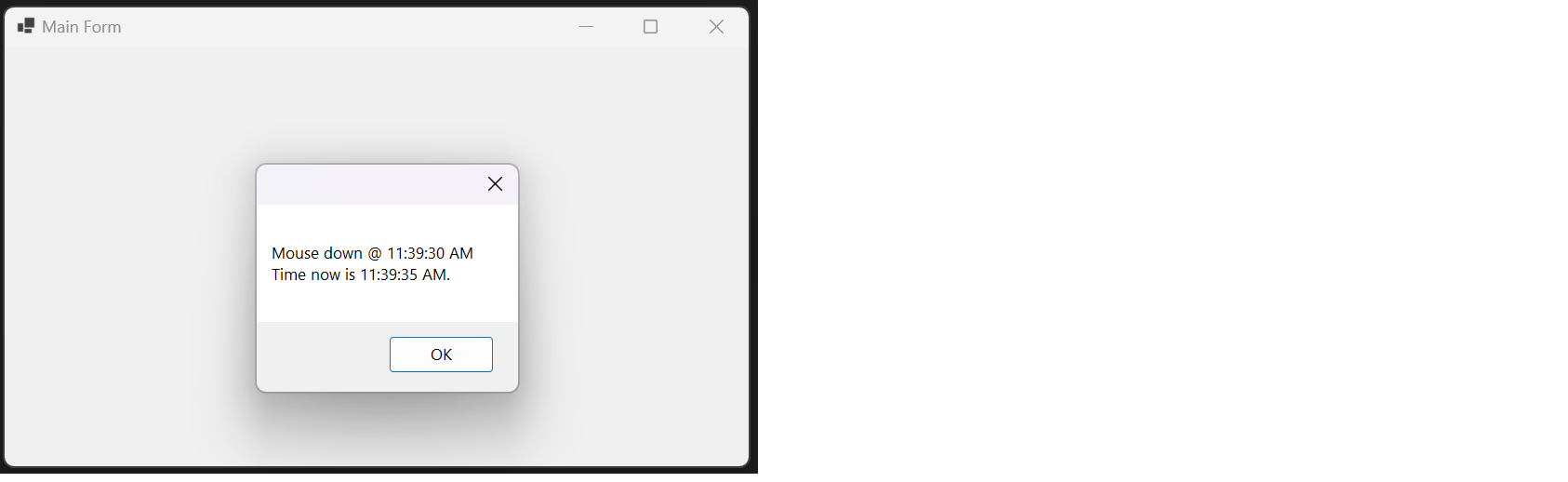
public partial class MainForm : Form
{
    public MainForm() => InitializeComponent();

    WatchdogTimer _wdtMouseMove = new WatchdogTimer
    {
        Interval = TimeSpan.FromSeconds(0.5)
    };

    DateTime _mouseStartTimeStamp = DateTime.MinValue;
    protected override void OnMouseMove(MouseEventArgs e)
    {
        if(!_wdtMouseMove.Running)
        {
            _mouseStartTimeStamp = DateTime.Now;
        }
        _wdtMouseMove.StartOrRestart(() =>
        {
            BeginInvoke(() =>
                MessageBox.Show(
                    $"Mouse down @ {
                        _mouseStartTimeStamp.ToString(@"hh\:mm\:ss tt")
                    }\nTime now is {
                        DateTime.Now.ToString(@"hh\:mm\:ss tt")
                    }."));
        });
        base.OnMouseMove(e);
    }
}
Explanation:
The OnMouseMove method resets the timer each time the mouse moves, and starts the timer on the first move. If the mouse stops moving for 0.5 seconds (as defined by Interval), the StartOrRestart method executes, displaying a message with the timestamps of the event.
Debouncing
For impatient users who tap multiple times, a WatchdogTimer can ensure the action occurs only once, requiring a cooldown period before allowing the same action again.
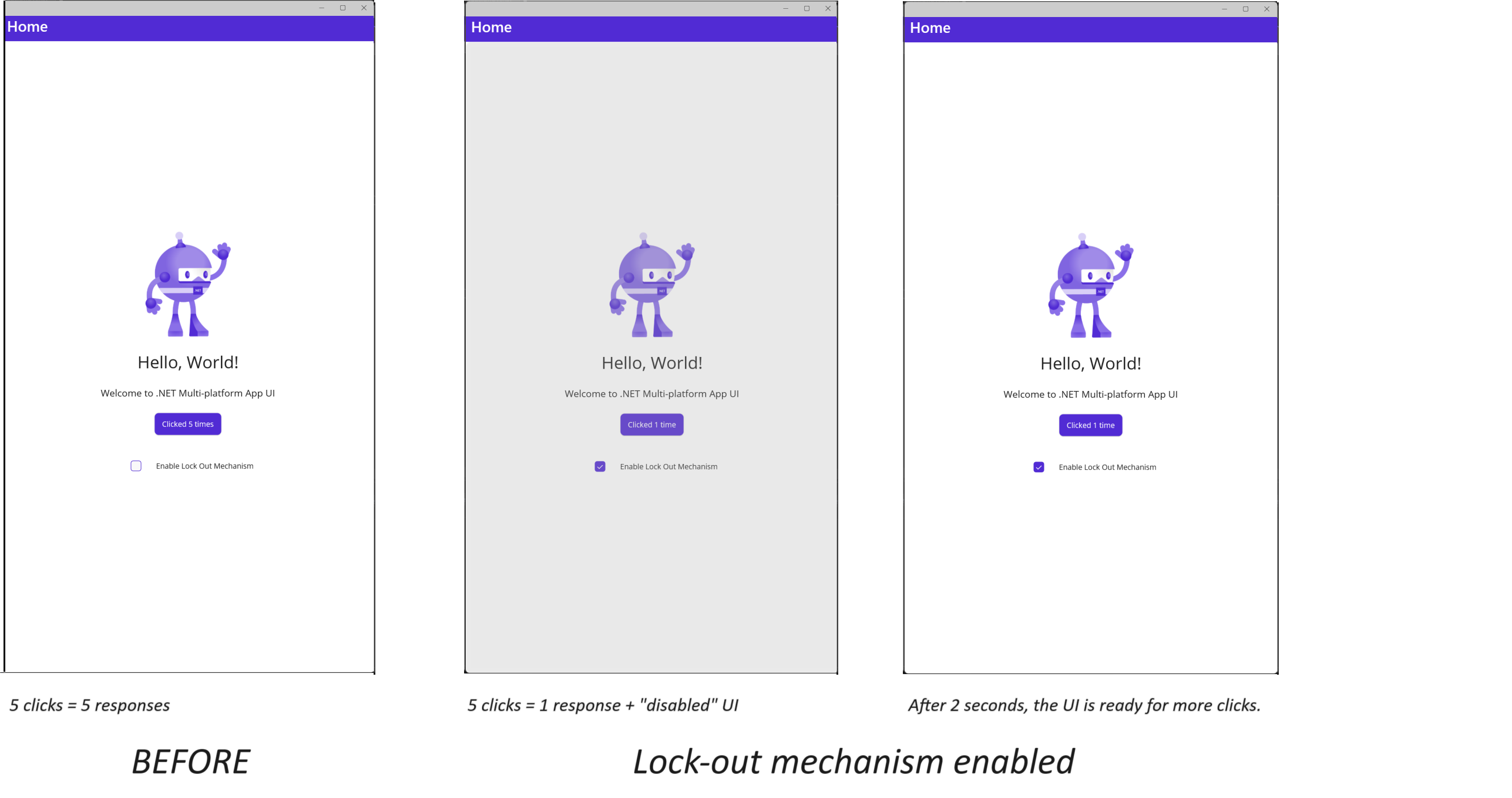
public partial class MainPage : ContentPage
{
    int count = 0;

    public MainPage()
    {
        BindingContext = this;
        InitializeComponent();
    }
    private void OnCounterClicked(object sender, EventArgs e)
    {
        if (checkboxIsLockOutMechanismEnabled.IsChecked)
        {
            ExtendLockout();
        }
        count++;
        if (count == 1)
            CounterBtn.Text = $"Clicked {count} time";
        else
            CounterBtn.Text = $"Clicked {count} times";

        SemanticScreenReader.Announce(CounterBtn.Text);
    }
    WatchdogTimer _wdtOverlay = new WatchdogTimer { Interval = TimeSpan.FromSeconds(2) };

    private void ExtendLockout()
    {
        _wdtOverlay.StartOrRestart(
            initialAction: () => IsLockedOut = true,
            completeAction: () => IsLockedOut = false);
    }

    public bool IsLockedOut
    {
        get => _isLockedOut;
        set
        {
            if (!Equals(_isLockedOut, value))
            {
                _isLockedOut = value;
                OnPropertyChanged();
            }
        }
    }
    bool _isLockedOut = false;

    private void OnOverlayTapped(object sender, TappedEventArgs e)
    {
        ExtendLockout();
    }
}
Constructor
/// <summary>
/// Initializes a new instance of the <see cref="WatchdogTimer"/> class with optional default actions for the initial and completion phases.
/// </summary>
/// <param name="defaultInitialAction">An optional default action to be executed when the timer starts, if no other initial action is provided in the call to the `StartOrRestart` method.</param>
/// <param name="defaultCompleteAction">An optional default action to be executed upon successful completion of the timer, if no other completion action is provided in the call to the `StartOrRestart` method.</param>
/// <remarks>
/// The preferred usage is to choose one of the following approaches:
/// - Always use default actions, or
/// - Always use actions passed in as arguments to the method.
/// However, in situations where both defaults and method arguments are provided, an orderly scheme is in place for resolving conflicts: actions passed as arguments to the method will always take precedence over default actions, even if defaults are set.
/// This ensures the timer behaves predictably and consistently in scenarios where both default and explicit actions are provided.
/// </remarks>
public WatchdogTimer(Action defaultInitialAction = null, Action defaultCompleteAction = null);
Methods
/// <summary>
/// Restarts the watchdog timer using default completion actions.
/// </summary>
/// <remarks>
/// Clients may subscribe to the <see cref="RanToCompletion"/> event to receive notifications upon completion.
/// On completion, an event is fired with an empty <see cref="EventArgs"/> object.
/// This overload does not specify an initial action, but if <see cref="DefaultInitialAction"/> is set, it will be executed.
/// This overload does not specify a completion action, but if <see cref="DefaultCompleteAction"/> is set, it will be executed.
/// </remarks>
public void StartOrRestart();

/// <summary>
/// Restarts the watchdog timer using default completion actions and specified event arguments.
/// </summary>
/// <remarks>
/// Clients may subscribe to the <see cref="RanToCompletion"/> event to receive notifications upon completion.
/// On completion, an event is fired with the provided <see cref="EventArgs"/> object.
/// This overload does not specify an initial action, but if <see cref="DefaultInitialAction"/> is set, it will be executed.
/// This overload does not specify a completion action, but if <see cref="DefaultCompleteAction"/> is set, it will be executed.
/// </remarks>
/// <param name="e">An optional <see cref="EventArgs"/> object to pass to the completion event.
/// If null, an empty <see cref="EventArgs"/> will be used.</param>
public void StartOrRestart(EventArgs e);

/// <summary>
/// Restarts the watchdog timer using a specified completion action.
/// </summary>
/// <remarks>
/// Clients may subscribe to the <see cref="RanToCompletion"/> event to receive notifications upon completion.
/// On completion, an event is fired with an empty <see cref="EventArgs"/> object.
/// This overload does not specify an initial action, but if <see cref="DefaultInitialAction"/> is set, it will be executed.
/// The provided completion action will be executed upon successful completion of the timer, overriding the <see cref="DefaultCompleteAction"/>.
/// </remarks>
/// <param name="action">The action to execute upon successful completion of the timer.
/// This parameter cannot be null and will override the <see cref="DefaultCompleteAction"/> if it is set.</param>
/// <exception cref="ArgumentNullException">Thrown when the <paramref name="action"/> parameter is null.</exception>
public void StartOrRestart(Action action);

/// <summary>
/// Restarts the watchdog timer using a specified completion action and event arguments.
/// </summary>
/// <remarks>
/// Clients may subscribe to the <see cref="RanToCompletion"/> event to receive notifications upon completion.
/// On completion, an event is fired with the provided <see cref="EventArgs"/> object.
/// This overload does not specify an initial action, but if <see cref="DefaultInitialAction"/> is set, it will be executed.
/// The provided completion action will be executed upon successful completion of the timer, overriding the <see cref="DefaultCompleteAction"/>.
/// </remarks>
/// <param name="action">The action to execute upon successful completion of the timer.
/// This parameter cannot be null and will override the <see cref="DefaultCompleteAction"/> if it is set.</param>
/// <param name="e">An optional <see cref="EventArgs"/> object to pass to the completion event.
/// If null, an empty <see cref="EventArgs"/> will be used.</param>
/// <exception cref="ArgumentNullException">Thrown when the <paramref name="action"/> parameter is null.</exception>
public void StartOrRestart(Action action, EventArgs e);

/// <summary>
/// Restarts the watchdog timer using specified initial and completion actions.
/// </summary>
/// <remarks>
/// Clients may subscribe to the <see cref="RanToCompletion"/> event to receive notifications upon completion.
/// On completion, an event is fired with an empty <see cref="EventArgs"/> object.
/// This overload allows clients to specify both an initial action and a completion action,
/// and both actions will override <see cref="DefaultInitialAction"/> and <see cref="DefaultCompleteAction"/> if they are set.
/// </remarks>
/// <param name="initialAction">The action to execute when starting the timer.
/// This parameter cannot be null and will override the <see cref="DefaultInitialAction"/> if it is set.</param>
/// <param name="completeAction">The action to execute upon successful completion of the timer.
/// This parameter cannot be null and will override the <see cref="DefaultCompleteAction"/> if it is set.</param>
/// <exception cref="ArgumentNullException">Thrown when either <paramref name="initialAction"/> or <paramref name="completeAction"/> is null.</exception>
public void StartOrRestart(Action initialAction, Action completeAction);

/// <summary>
/// Cancels the current timer, preventing any pending completion actions and events.
/// </summary>
/// <remarks>
/// Calling this method stops the timer and prevents any pending completion actions from running.
/// You can subscribe to the <see cref="Cancelled"/> event to be notified when the timer is cancelled.
/// </remarks>
public void Cancel();
Properties
/// <summary>
/// Gets or sets the time interval for the watchdog timer. This interval defines the delay period before the completion action is triggered.
/// </summary>
/// <value>The interval duration for the timer. Defaults to 1 second if not explicitly set.</value>
public TimeSpan Interval { get; set; }

/// <summary>
/// Gets a value indicating whether the timer is currently running. This property is bindable.
/// </summary>
/// <value><c>true</c> if the timer is running; otherwise, <c>false</c>.</value>
/// <remarks>
/// The running state is managed internally by the <see cref="WatchdogTimer"/> class and cannot be set externally.
/// This property supports data binding and triggers the <see cref="PropertyChanged"/> event when the running state changes.
/// </remarks>
public bool Running { get; }

/// <summary>
/// Gets the default action to be executed when the timer starts, if no other initial action is provided.
/// This property is read-only and can only be set through the constructor.
/// </summary>
/// <value>The default initial action.</value>
public Action DefaultInitialAction { get; }

/// <summary>
/// Gets the default action to be executed upon successful completion of the timer, if no other completion action is provided.
/// This property is read-only and can only be set through the constructor.
/// </summary>
/// <value>The default completion action.</value>
public Action DefaultCompleteAction { get; }
Events
/// <summary>
/// Raised when the timer successfully completes its countdown and the completion action is invoked.
/// </summary>
public event EventHandler RanToCompletion;

/// <summary>
/// Raised when the timer is cancelled before completing its countdown.
/// </summary>
public event EventHandler Cancelled;

/// <summary>
/// Raised when a property value changes, supporting data binding for the <see cref="Running"/> property.
/// </summary>
/// <remarks>
/// This event is triggered whenever the <see cref="Running"/> property changes.
/// It is part of the <see cref="INotifyPropertyChanged"/> interface to support data binding in UI frameworks.
/// </remarks>
public event PropertyChangedEventHandler PropertyChanged;
Main Features and Enhancements:
- Support for Default Actions at Instantiation:
- You can now set default actions for
InitialActionandCompletedActionat the time of instantiation. These defaults will be automatically used in theStartOrRestartmethod when no specific actions are provided. - This enhances the flexibility of the timer, allowing reusable behavior without requiring actions to be passed in every time.
- Consider using a singleton pattern to initialize using non-static properties of the instance.
- You can now set default actions for
/// <summary>
/// Instantiate using singleton pattern.
/// </summary>
public WatchdogTimer WatchdogTimer
{
    get
    {
        if (_watchdogTimer is null)
        {
            _watchdogTimer = new WatchdogTimer(
                defaultInitialAction: () =>
                {
                    Console.WriteLine("Timer Started");
                },
                defaultCompleteAction: () =>
                {
                    Console.WriteLine("Timer Completed");
                }
            );
        }
        return _watchdogTimer;
    }
}
WatchdogTimer _watchdogTimer = default;
StackOverflow
| Product | Versions Compatible and additional computed target framework versions. |
|---|---|
| .NET | net5.0 was computed. net5.0-windows was computed. net6.0 was computed. net6.0-android was computed. net6.0-ios was computed. net6.0-maccatalyst was computed. net6.0-macos was computed. net6.0-tvos was computed. net6.0-windows was computed. net7.0 was computed. net7.0-android was computed. net7.0-ios was computed. net7.0-maccatalyst was computed. net7.0-macos was computed. net7.0-tvos was computed. net7.0-windows was computed. net8.0 was computed. net8.0-android was computed. net8.0-browser was computed. net8.0-ios was computed. net8.0-maccatalyst was computed. net8.0-macos was computed. net8.0-tvos was computed. net8.0-windows was computed. net9.0 was computed. net9.0-android was computed. net9.0-browser was computed. net9.0-ios was computed. net9.0-maccatalyst was computed. net9.0-macos was computed. net9.0-tvos was computed. net9.0-windows was computed. net10.0 was computed. net10.0-android was computed. net10.0-browser was computed. net10.0-ios was computed. net10.0-maccatalyst was computed. net10.0-macos was computed. net10.0-tvos was computed. net10.0-windows was computed. |
| .NET Core | netcoreapp2.0 was computed. netcoreapp2.1 was computed. netcoreapp2.2 was computed. netcoreapp3.0 was computed. netcoreapp3.1 was computed. |
| .NET Standard | netstandard2.0 is compatible. netstandard2.1 was computed. |
| .NET Framework | net461 was computed. net462 was computed. net463 was computed. net47 was computed. net471 was computed. net472 was computed. net48 was computed. net481 was computed. |
| MonoAndroid | monoandroid was computed. |
| MonoMac | monomac was computed. |
| MonoTouch | monotouch was computed. |
| Tizen | tizen40 was computed. tizen60 was computed. |
| Xamarin.iOS | xamarinios was computed. |
| Xamarin.Mac | xamarinmac was computed. |
| Xamarin.TVOS | xamarintvos was computed. |
| Xamarin.WatchOS | xamarinwatchos was computed. |
-
.NETStandard 2.0
- IVSoftware.Portable.Common (>= 1.0.0-rc1)
- IVSoftware.Portable.Disposable (>= 2.0.0)
NuGet packages (2)
Showing the top 2 NuGet packages that depend on IVSoftware.Portable.WatchdogTimer:
| Package | Downloads |
|---|---|
|
IVSoftware.Portable.Xml.Linq.XBoundObject
A lightweight extension for System.Xml.Linq that adds runtime object binding, hierarchical modeling, and flexible path resolution via enriched XAttribute support. Includes enum-based metadata, tree construction from flat paths, and event-driven behaviors — ideal for dynamic UIs, workflows, and cross-platform .NET apps. (Ever wish XAttribute had a Tag property? Now it does.) |
|
|
IVSoftware.Portable.SQLiteMarkdown
Lightweight, cross-platform expression-to-SQL parser with intuitive syntax. Supports query-then-filter workflows where external data can come from any source, with in-memory filtering powered by SQLite. Features atomic quoted phrases and tag-based terms. |
GitHub repositories
This package is not used by any popular GitHub repositories.
| Version | Downloads | Last Updated |
|---|---|---|
| 2.0.0-rc | 90 | 3/15/2026 |
| 1.3.0 | 669 | 7/11/2025 |
| 1.3.0-prerelease | 408 | 10/20/2024 |
| 1.2.1 | 394 | 11/7/2023 |
Stable release 1.3.0
Key Features:
- Built-in debounce-style watchdog timer with no exceptions or Task cancellations required.
- `Running` state exposed and observable via INotifyPropertyChanged.
- Optional event handlers: `RanToCompletion`, `Cancelled`.
New in this release:
- Supports default initial and completion actions via constructor or overloads.
- Unit test coverage added to validate debounce timing, cancel behavior, awaitable usage, and clean final state.
- Property change events are tested and confirmed during start/stop transitions.
Beta release 2.0.0
WatchdogTimer remains the same lightweight, reliable debounce-style timer.
Major Enhancements:
- WatchdogTimer is now awaitable (especially useful for deterministic testing scenarios — only wait for what you need).
- Before completing the awaitable boundary, an overridable `OnEpochFinalizingAsync` method allows asynchronous work triggered by timer settlement to complete before continuation resumes.
Epoch lifecycle:
Start()
-> [Restart(), Restart()...]
-> Dwell Interval
-> Raise synchronous `RanToCompletion` event
-> Execute asynchronous finalization (if any)
-> Complete awaitable boundary
Improved Semantics:
- An "epoch" begins when an idle WDT receives `StartOrRestart` and ends when the most-recent restart expires.
- `WatchdogTimer.GetAwaiter()` signals completion only after the sealed async finalization queue drains.
Minor changes:
- Improved support for subclassing: new virtual methods wrap existing events and 'Running' property setter is now protected.
- Initialization now raises a dedicated event.