EasyCore.EventBus.RedisStreams
8.0.2
dotnet add package EasyCore.EventBus.RedisStreams --version 8.0.2
NuGet\Install-Package EasyCore.EventBus.RedisStreams -Version 8.0.2
<PackageReference Include="EasyCore.EventBus.RedisStreams" Version="8.0.2" />
<PackageVersion Include="EasyCore.EventBus.RedisStreams" Version="8.0.2" />
<PackageReference Include="EasyCore.EventBus.RedisStreams" />
paket add EasyCore.EventBus.RedisStreams --version 8.0.2
#r "nuget: EasyCore.EventBus.RedisStreams, 8.0.2"
#:package EasyCore.EventBus.RedisStreams@8.0.2
#addin nuget:?package=EasyCore.EventBus.RedisStreams&version=8.0.2
#tool nuget:?package=EasyCore.EventBus.RedisStreams&version=8.0.2
🚌 EasyCore.EventBus
EasyCore.EventBus is a lightweight event bus for .NET 8. It unifies local (in-process) and distributed (cross-process) publish/subscribe, with pluggable adapters for RabbitMQ / Kafka / Pulsar / Redis Streams—so you can adopt event-driven architecture (EDA) with one consistent API.
<p align="center"> <img src="https://cdn.jsdelivr.net/gh/RockyWang0521/EasyCore.EventBus@master/png/EasyCoreLogo.png" alt="EasyCore Logo" width="120" /> </p>





Repository: github.com/RockyWang0521/EasyCore.EventBus
🌍 Language
- Chinese: README.md
- English (this document)
📚 Table of Contents
🧭 Part I — Overview & Architecture
🚀 Part II — Getting Started
🏭 Part III — Config · Demo · Production
- 9. 🔁 Retry & Failure Callback
- 10. 🔌 Transport Configuration
- 11. 🧪 Demo Projects
- 12. ✅ Production Checklist
- 13. ❓ FAQ
- 14. 📄 License
- 🤝 Contributing
1. 🎯 Positioning
EasyCore.EventBus solves “one API for in-process decoupling and cross-service messaging” in .NET:
| Pain point | EasyCore.EventBus approach |
|---|---|
| Separate local vs distributed APIs | Shared IEvent + PublishAsync; only handler interfaces differ |
| Deep MQ lock-in | Core abstractions + EventBus.* adapters, reference as needed |
| Manual handler registration | EventTypeScanner auto-discovers and registers handlers |
| Hard-to-retry consumer failures | RetryCount / RetryInterval / FailureCallback + header overrides |
| Want raw MQ clients | Infra packages like EasyCore.RabbitMQ work standalone |
1.1 Design Principles
| Principle | Meaning |
|---|---|
| Low friction | One call: services.EasyCoreEventBus(...) |
| Local-first | Without action, only ILocalEventBus is registered |
| Pluggable transports | Separate adapters for RabbitMQ / Kafka / Pulsar / Redis Streams |
| Failure-aware | Exhausted retries invoke FailureCallback and log |
| Auto scan | Implement ILocalEventHandler<T> / IDistributedEventHandler<T> → DI |
1.2 Repository Layout
EasyCore.EventBus/
├── src/
│   ├── EasyCore.EventBus/                 # Core: local/distributed abstractions, Dispatcher, HostedService
│   ├── EasyCore.EventBus.RabbitMQ/        # EventBus → RabbitMQ adapter
│   ├── EasyCore.EventBus.Kafka/           # EventBus → Kafka adapter
│   ├── EasyCore.EventBus.Pulsar/          # EventBus → Pulsar adapter
│   ├── EasyCore.EventBus.RedisStreams/    # EventBus → Redis Streams adapter
│   ├── EasyCore.RabbitMQ/                 # RabbitMQ infra (usable alone)
│   ├── EasyCore.Kafka/
│   ├── EasyCore.Pulsar/
│   └── EasyCore.RedisStreams/
├── demo/
│   ├── Infra/                             # Standalone infra client demos (no EventBus)
│   ├── RabbitMq/                          # EventBus Publish + Subscribe
│   ├── Kafka/
│   ├── Pulsar/
│   ├── Redis/
│   └── Winform/                           # Local / distributed WinForms samples
├── tests/EasyCore.EventBus.Tests/
├── docs/svg/                              # Architecture / sequence diagrams
└── png/EasyCoreLogo.png
2. 🏗 Architecture
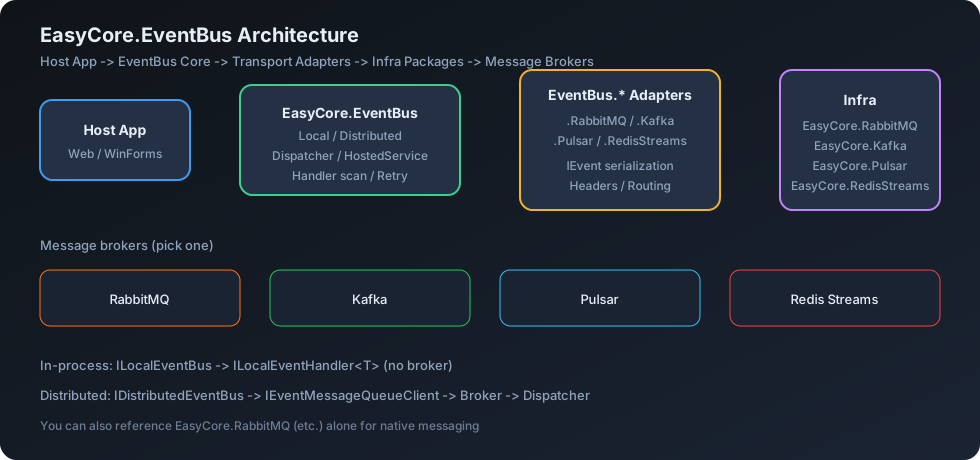
2.1 Component Diagram
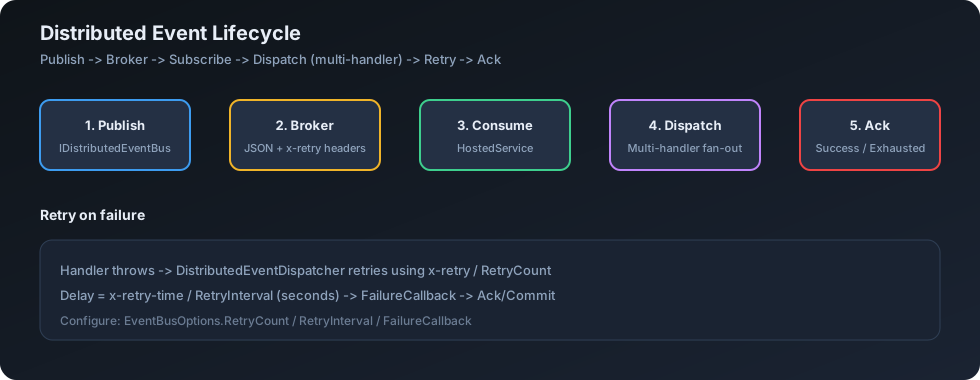
2.2 Message Lifecycle
2.3 Data Flow
Publisher
   │
   ├─ ILocalEventBus.PublishAsync ──────────► ILocalEventHandler<T>[]
   │
   └─ IDistributedEventBus.PublishAsync ────► IEventMessageQueueClient (MQ)
                                                      │
                                                      ▼
                                            EventBusHostedService
                                                      │
                                                      ▼
                                         DistributedEventDispatcher
                                                      │
                                                      ▼
                                      IDistributedEventHandler<T>[]
                                         (retry / FailureCallback)
Three layers:
| Layer | Packages | Role |
|---|---|---|
| Core | EasyCore.EventBus |
Abstractions, scan, dispatch, HostedService |
| Adapters | EasyCore.EventBus.* |
Wire EventBus to a concrete broker |
| Infrastructure | EasyCore.* |
Raw MQ clients, usable without EventBus |
3. 📦 NuGet Packages
| Package | Role | Required |
|---|---|---|
EasyCore.EventBus |
Core: local/distributed abstractions, Dispatcher, auto-scan | ✅ |
EasyCore.EventBus.RabbitMQ |
RabbitMQ adapter | Optional |
EasyCore.EventBus.Kafka |
Kafka adapter | Optional |
EasyCore.EventBus.Pulsar |
Pulsar adapter | Optional |
EasyCore.EventBus.RedisStreams |
Redis Streams adapter | Optional |
EasyCore.RabbitMQ |
RabbitMQ infrastructure client | Optional (pulled by adapter) |
EasyCore.Kafka |
Kafka infrastructure client | Optional |
EasyCore.Pulsar |
Pulsar infrastructure client | Optional |
EasyCore.RedisStreams |
Redis Streams infrastructure client | Optional |
Reference an
EasyCore.EventBus.*adapter for EventBus messaging. For bare client APIs, referenceEasyCore.RabbitMQ(etc.) alone.
4. 📊 Transport Comparison
| Capability | Local | RabbitMQ | Kafka | Pulsar | Redis Streams |
|---|---|---|---|---|---|
| Package | Core only | .RabbitMQ |
.Kafka |
.Pulsar |
.RedisStreams |
| Cross-process | ❌ | ✅ | ✅ | ✅ | ✅ |
| Typical use | Module decoupling | Enterprise / AMQP | High-throughput streams | Cloud-native messaging | Lightweight queues |
| Config entry | — | options.RabbitMQ(...) |
options.Kafka(...) |
options.Pulsar(...) |
options.RedisStreams(...) |
4.1 Decision Tree
Need cross-process / cross-service?
├── No  → services.EasyCoreEventBus() + ILocalEventBus only
└── Yes → pick your broker
        ├── RabbitMQ        → EasyCore.EventBus.RabbitMQ
        ├── Apache Kafka    → EasyCore.EventBus.Kafka
        ├── Apache Pulsar   → EasyCore.EventBus.Pulsar
        └── Redis Streams   → EasyCore.EventBus.RedisStreams
5. ⚙ Requirements
| Item | Requirement |
|---|---|
| .NET | 8.0+ |
| Host | ASP.NET Core / Generic Host / WinForms + Hosting |
| Broker | Required for distributed scenarios |
| DI | Microsoft.Extensions.DependencyInjection |
6. 📥 Installation
# Core (required for local EventBus)
dotnet add package EasyCore.EventBus

# Pick one (or more) as needed
dotnet add package EasyCore.EventBus.RabbitMQ
dotnet add package EasyCore.EventBus.Kafka
dotnet add package EasyCore.EventBus.Pulsar
dotnet add package EasyCore.EventBus.RedisStreams
7. ⚡ Quick Start (3 minutes)
7️⃣.1️⃣ Local EventBus (in-process)
Define an event (IEvent):
using EasyCore.EventBus.Event;

public class OrderCreatedEvent : IEvent
{
    public string OrderId { get; set; } = "";
}
Define a handler (ILocalEventHandler<T> — auto-registered):
using EasyCore.EventBus.Event;

public class OrderCreatedLocalHandler : ILocalEventHandler<OrderCreatedEvent>
{
    public Task HandleAsync(OrderCreatedEvent eventMessage)
    {
        Console.WriteLine($"Local: {eventMessage.OrderId}");
        return Task.CompletedTask;
    }
}
Register and publish:
using EasyCore.EventBus;
using EasyCore.EventBus.Local;

// Local only: omit the options action
services.EasyCoreEventBus();

public class OrderService(ILocalEventBus localEventBus)
{
    public Task CreateAsync(string orderId) =>
        localEventBus.PublishAsync(new OrderCreatedEvent { OrderId = orderId });
}
7️⃣.2️⃣ Distributed EventBus (RabbitMQ Web)
Subscriber Program.cs:
using EasyCore.EventBus;
using EasyCore.EventBus.RabbitMQ;

var builder = WebApplication.CreateBuilder(args);

builder.Services.AddControllers();
builder.Services.EasyCoreEventBus(options =>
{
    options.RabbitMQ(opt =>
    {
        opt.HostName = "localhost";
        opt.UserName = "guest";
        opt.Password = "guest";
        opt.Port = 5672;
    });

    options.RetryCount = 3;
    options.RetryInterval = 3;
    options.FailureCallback = (eventName, payload) =>
    {
        // After retries are exhausted (log / alert / persist)
        Console.WriteLine($"Failed: {eventName}, payload={payload}");
    };
});

var app = builder.Build();
app.MapControllers();
app.Run();
Shorthand: options.RabbitMQ("localhost");
Event + distributed handler:
using EasyCore.EventBus.Event;

public class WebEventMessage : IEvent
{
    public string? Message { get; set; }
}

public class MyEventHandler : IDistributedEventHandler<WebEventMessage>
{
    private readonly ILogger<MyEventHandler> _logger;

    public MyEventHandler(ILogger<MyEventHandler> logger) => _logger = logger;

    public Task HandleAsync(WebEventMessage eventMessage)
    {
        _logger.LogInformation("Received: {Message}", eventMessage.Message);
        return Task.CompletedTask;
    }
}
Publisher:
using EasyCore.EventBus.Distributed;

[ApiController]
[Route("api/[controller]")]
public class PublishController(IDistributedEventBus distributedEventBus) : ControllerBase
{
    [HttpPost]
    public async Task Publish()
    {
        await distributedEventBus.PublishAsync(new WebEventMessage
        {
            Message = "Hello, world!"
        });
    }
}
When a transport extension is configured, the framework registers
IDistributedEventBusandEventBusHostedService, which connects and subscribes on host start.
8. 🧩 Events & Handlers
| Concept | Type | Notes |
|---|---|---|
| Event marker | IEvent |
Required on all event messages |
| Local bus | ILocalEventBus |
In-process PublishAsync |
| Local handler | ILocalEventHandler<T> |
T : IEvent, same process |
| Distributed bus | IDistributedEventBus |
PublishAsync / Publish to MQ |
| Distributed handler | IDistributedEventHandler<T> |
Cross-process consumption |
| Dispatcher | DistributedEventDispatcher |
Deserialize, multi-handler, retry |
Multiple handlers per event type are supported. Local handlers run sequentially; distributed handlers are orchestrated by DistributedEventDispatcher.
9. 🔁 Retry & Failure Callback
9.1 EventBusOptions
| Property | Default | Description |
|---|---|---|
RetryCount |
3 |
Additional attempts after the first try |
RetryInterval |
3 |
Delay between retries (seconds) |
FailureCallback |
null |
Invoked when retries are exhausted (or deserialize fails): (eventTypeName, payloadJson?) |
Total attempts ≈ max(1, RetryCount + 1).
9.2 Header overrides
| Header | Constant | Meaning |
|---|---|---|
x-retry |
EventMessageHeaders.Retry |
Override max retry count for this message |
x-retry-time |
EventMessageHeaders.RetryInterval |
Override retry interval (seconds) |
Parsed by DistributedEventDispatcher.ParseRetryHeaders(...); missing/invalid values fall back to EventBusOptions.
10. 🔌 Transport Configuration
10.1 RabbitMQ
options.RabbitMQ("localhost");
// or
options.RabbitMQ(opt =>
{
    opt.HostName = "localhost";
    opt.UserName = "guest";
    opt.Password = "guest";
    opt.Port = 5672;
    opt.ExchangeName = "EasyCore.EventBus";
    opt.QueueName = "EasyCore.Queue";
    opt.ExchangeType = "topic";
    opt.VirtualHost = "/";
});
10.2 Kafka
options.Kafka("localhost:9092");
// or
options.Kafka(opt =>
{
    opt.BootstrapServers = "localhost:9092";
    opt.TopicName = "EasyCore.Topic";
    opt.GroupId = "EasyCore.GroupId";
});
10.3 Pulsar
options.Pulsar("pulsar://localhost:6650");
// or
options.Pulsar(opt =>
{
    opt.ServiceUrl = "pulsar://localhost:6650";
});
10.4 Redis Streams
options.RedisStreams(new List<string> { "localhost:6379" });
// or
options.RedisStreams(opt =>
{
    opt.EndPoints = new List<string> { "localhost:6379" };
    opt.Password = null;
    opt.ConsumerGroup = "RedisGroup";
});
11. 🧪 Demo Projects
| Path | Description | Example command |
|---|---|---|
demo/RabbitMq |
EventBus: Web.RabbitMQ subscribe + Web.RabbitMQ.Publish |
dotnet run --project demo/RabbitMq/Web.RabbitMQ |
demo/Kafka |
EventBus: Kafka publish / subscribe pair | dotnet run --project demo/Kafka/Web.Kafka |
demo/Pulsar |
EventBus: Pulsar publish / subscribe pair | dotnet run --project demo/Pulsar/Web.Pulsar |
demo/Redis |
EventBus: Redis Streams publish / subscribe | dotnet run --project demo/Redis/Web.Redis |
demo/Winform |
Local / distributed WinForms + Web | Open the matching .csproj |
demo/Infra |
Infra-only: IRabbitMQClient / IKafkaClient / IPulsarClient / IRedisStreamsClient |
dotnet run --project demo/Infra/Web.Infra.RabbitMQ |
See demo/README.md for the full guide.
Tips:
- EventBus: start Subscribe + Publish, then
POST /api/Publish(also/one,/batch). - Infra: one process; Swagger →
POST /api/messages; a HostedService subscribes and logs.
12. ✅ Production Checklist
- Store credentials in a config/secret store—never hardcode
- Tune
RetryCount/RetryIntervaland implementFailureCallback(alert or dead-letter store) - Keep publisher and subscriber on the same event types and serialization contract
- Confirm competing-consumer / consumer-group semantics for multi-instance hosts
- Monitor broker backlog, disconnects, and handler exception logs
- Validate connectivity with the matching
demo/*against your target environment - Skip transport extensions for local-only apps (avoids unnecessary HostedService)
13. ❓ FAQ
Q: Is the entry point AddAppEventBus?
A: No. Use services.EasyCoreEventBus(options => { ... }).
Q: Do I need a RabbitMQ package for local events only?
A: No. Reference EasyCore.EventBus and call services.EasyCoreEventBus().
Q: Must I register handlers with AddTransient?
A: Usually not. Implement ILocalEventHandler<T> / IDistributedEventHandler<T>; EventTypeScanner registers them during setup.
Q: When does distributed consumption start?
A: After a transport extension is configured, EventBusHostedService runs ConnectAsync + SubscribeAsync on host start.
Q: How many attempts does RetryCount = 3 mean?
A: About 4 (1 first try + 3 extra). Header x-retry can override this.
Q: Can I configure multiple transports?
A: Multiple IEventOptionsExtension registrations are supported by the options model; in production prefer one primary transport per host to keep topology clear.
Q: Adapter vs infra packages?
A: EasyCore.EventBus.* targets the event-bus scenario; EasyCore.RabbitMQ (etc.) are lower-level clients usable outside EventBus.
14. 📄 License
MIT OR Apache-2.0 — see LICENSE and each package’s PackageLicenseExpression.
You may use this software under either the MIT or the Apache-2.0 license.
🤝 Contributing
- Fork and create a feature branch
- Add tests under
tests/EasyCore.EventBus.Tests - Run
dotnet testanddotnet build EasyCore.EventBus.sln - Open a Pull Request
Issues and PRs are welcome 🚀
| Product | Versions Compatible and additional computed target framework versions. |
|---|---|
| .NET | net8.0 is compatible. net8.0-android was computed. net8.0-browser was computed. net8.0-ios was computed. net8.0-maccatalyst was computed. net8.0-macos was computed. net8.0-tvos was computed. net8.0-windows was computed. net9.0 was computed. net9.0-android was computed. net9.0-browser was computed. net9.0-ios was computed. net9.0-maccatalyst was computed. net9.0-macos was computed. net9.0-tvos was computed. net9.0-windows was computed. net10.0 was computed. net10.0-android was computed. net10.0-browser was computed. net10.0-ios was computed. net10.0-maccatalyst was computed. net10.0-macos was computed. net10.0-tvos was computed. net10.0-windows was computed. |
-
net8.0
- EasyCore.EventBus (>= 8.0.2)
- EasyCore.RedisStreams (>= 8.0.0)
NuGet packages
This package is not used by any NuGet packages.
GitHub repositories
This package is not used by any popular GitHub repositories.