DotNetCore.CAP
8.4.0
See the version list below for details.
dotnet add package DotNetCore.CAP --version 8.4.0
NuGet\Install-Package DotNetCore.CAP -Version 8.4.0
<PackageReference Include="DotNetCore.CAP" Version="8.4.0" />
<PackageVersion Include="DotNetCore.CAP" Version="8.4.0" />
<PackageReference Include="DotNetCore.CAP" />
paket add DotNetCore.CAP --version 8.4.0
#r "nuget: DotNetCore.CAP, 8.4.0"
#:package DotNetCore.CAP@8.4.0
#addin nuget:?package=DotNetCore.CAP&version=8.4.0
#tool nuget:?package=DotNetCore.CAP&version=8.4.0
<p align="center"> <img height="140" src="https://raw.githubusercontent.com/dotnetcore/CAP/master/docs/content/img/logo.svg"> </p>
CAP 中文





CAP is a library based on .Net standard, which is a solution to deal with distributed transactions, has the function of EventBus, it is lightweight, easy to use, and efficient.
In the process of building an SOA or MicroService system, we usually need to use the event to integrate each service. In the process, simple use of message queue does not guarantee reliability. CAP adopts local message table program integrated with the current database to solve exceptions that may occur in the process of the distributed system calling each other. It can ensure that the event messages are not lost in any case.
You can also use CAP as an EventBus. CAP provides a simpler way to implement event publishing and subscriptions. You do not need to inherit or implement any interface during subscription and sending process.
Architecture overview
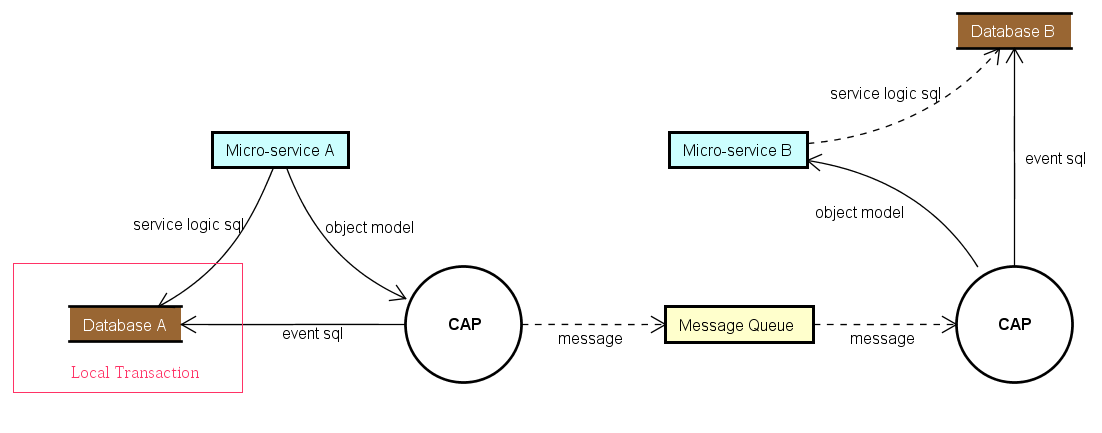
CAP implements the Outbox Pattern described in the eShop ebook.
Getting Started
NuGet
CAP can be installed in your project with the following command.
PM> Install-Package DotNetCore.CAP
CAP supports most popular message queue as transport, following packages are available to install:
PM> Install-Package DotNetCore.CAP.Kafka
PM> Install-Package DotNetCore.CAP.RabbitMQ
PM> Install-Package DotNetCore.CAP.AzureServiceBus
PM> Install-Package DotNetCore.CAP.AmazonSQS
PM> Install-Package DotNetCore.CAP.NATS
PM> Install-Package DotNetCore.CAP.RedisStreams
PM> Install-Package DotNetCore.CAP.Pulsar
CAP supports most popular database as event storage, following packages are available to install:
// select a database provider you are using, event log table will integrate into.

PM> Install-Package DotNetCore.CAP.SqlServer
PM> Install-Package DotNetCore.CAP.MySql
PM> Install-Package DotNetCore.CAP.PostgreSql
PM> Install-Package DotNetCore.CAP.MongoDB     //need MongoDB 4.0+ cluster
Configuration
First, you need to configure CAP in your Startup.cs:
public void ConfigureServices(IServiceCollection services)
{
    //......

    services.AddDbContext<AppDbContext>(); //Options, If you are using EF as the ORM
    services.AddSingleton<IMongoClient>(new MongoClient("")); //Options, If you are using MongoDB

    services.AddCap(x =>
    {
        // If you are using EF, you need to add the configuration:
        x.UseEntityFramework<AppDbContext>(); //Options, Notice: You don't need to config x.UseSqlServer(""") again! CAP can autodiscovery.

        // If you are using ADO.NET, choose to add configuration you needed:
        x.UseSqlServer("Your ConnectionStrings");
        x.UseMySql("Your ConnectionStrings");
        x.UsePostgreSql("Your ConnectionStrings");

        // If you are using MongoDB, you need to add the configuration:
        x.UseMongoDB("Your ConnectionStrings");  //MongoDB 4.0+ cluster

        // CAP support RabbitMQ,Kafka,AzureService as the MQ, choose to add configuration you needed:
        x.UseRabbitMQ("HostName");
        x.UseKafka("ConnectionString");
        x.UseAzureServiceBus("ConnectionString");
        x.UseAmazonSQS();
    });
}
Publish
Inject ICapPublisher in your Controller, then use the ICapPublisher to send messages.
The version 7.0+ supports publish delay messages.
public class PublishController : Controller
{
    private readonly ICapPublisher _capBus;

    public PublishController(ICapPublisher capPublisher)
    {
        _capBus = capPublisher;
    }

    [Route("~/adonet/transaction")]
    public IActionResult AdonetWithTransaction()
    {
        using (var connection = new MySqlConnection(ConnectionString))
        {
            using (var transaction = connection.BeginTransaction(_capBus, autoCommit: true))
            {
                //your business logic code

                _capBus.Publish("xxx.services.show.time", DateTime.Now);

                // Publish delay message
                _capBus.PublishDelayAsync(TimeSpan.FromSeconds(delaySeconds), "xxx.services.show.time", DateTime.Now);
            }
        }

        return Ok();
    }

    [Route("~/ef/transaction")]
    public IActionResult EntityFrameworkWithTransaction([FromServices]AppDbContext dbContext)
    {
        using (var trans = dbContext.Database.BeginTransaction(_capBus, autoCommit: true))
        {
            //your business logic code

            _capBus.Publish("xxx.services.show.time", DateTime.Now);
        }

        return Ok();
    }
}
Subscribe
In Controller Action
Add the Attribute [CapSubscribe()] on Action to subscribe to messages:
public class PublishController : Controller
{
    [CapSubscribe("xxx.services.show.time")]
    public void CheckReceivedMessage(DateTime datetime)
    {
        Console.WriteLine(datetime);
    }
}
In Business Logic Service
If your subscription method is not in the Controller, then your subscribe class needs to implement ICapSubscribe interface:
namespace BusinessCode.Service
{
    public interface ISubscriberService
    {
        void CheckReceivedMessage(DateTime datetime);
    }

    public class SubscriberService: ISubscriberService, ICapSubscribe
    {
        [CapSubscribe("xxx.services.show.time")]
        public void CheckReceivedMessage(DateTime datetime)
        {
        }
    }
}
Then register your class that implements ISubscriberService in Startup.cs
public void ConfigureServices(IServiceCollection services)
{
    services.AddTransient<ISubscriberService,SubscriberService>();

    services.AddCap(x=>
    {
        //...
    });
}
Async subscription
You are able to implement async subscription. Subscription's method should return Task and receive CancellationToken as parameter.
public class AsyncSubscriber : ICapSubscribe
{
    [CapSubscribe("name")]
    public async Task ProcessAsync(Message message, CancellationToken cancellationToken)
    {
        await SomeOperationAsync(message, cancellationToken);
    }
}
Use partials for topic subscriptions
To group topic subscriptions on class level you're able to define a subscription on a method as a partial. Subscriptions on the message queue will then be a combination of the topic defined on the class and the topic defined on the method. In the following example the Create(..) function will be invoked when receiving a message on customers.create
[CapSubscribe("customers")]
public class CustomersSubscriberService : ICapSubscribe
{
    [CapSubscribe("create", isPartial: true)]
    public void Create(Customer customer)
    {
    }
}
Subscribe Group
The concept of a subscription group is similar to that of a consumer group in Kafka. it is the same as the broadcast mode in the message queue, which is used to process the same message between multiple different microservice instances.
When CAP startups, it will use the current assembly name as the default group name, if multiple same group subscribers subscribe to the same topic name, there is only one subscriber that can receive the message. Conversely, if subscribers are in different groups, they will all receive messages.
In the same application, you can specify Group property to keep subscriptions in different subscribe groups:
[CapSubscribe("xxx.services.show.time", Group = "group1" )]
public void ShowTime1(DateTime datetime)
{
}

[CapSubscribe("xxx.services.show.time", Group = "group2")]
public void ShowTime2(DateTime datetime)
{
}
ShowTime1 and ShowTime2 will be called at the same time.
BTW, You can specify the default group name in the configuration:
services.AddCap(x =>
{
    x.DefaultGroup = "default-group-name";
});
Dashboard
CAP also provides dashboard pages, you can easily view messages that were sent and received. In addition, you can also view the message status in real time in the dashboard. Use the following command to install the Dashboard in your project.
PM> Install-Package DotNetCore.CAP.Dashboard
In the distributed environment, the dashboard built-in integrates Consul as a node discovery, while the realization of the gateway agent function, you can also easily view the node or other node data, It's like you are visiting local resources.
If your service is deployed in Kubernetes, please use our Kubernetes discovery package.
PM> Install-Package DotNetCore.CAP.Dashboard.K8s
The dashboard default address is: http://localhost:xxx/cap , you can configure relative path /cap with x.UseDashboard(opt =>{ opt.MatchPath="/mycap"; }).
Contribute
One of the easiest ways to contribute is to participate in discussions and discuss issues. You can also contribute by submitting pull requests with code changes.
License
| Product | Versions Compatible and additional computed target framework versions. |
|---|---|
| .NET | net8.0 is compatible. net8.0-android was computed. net8.0-browser was computed. net8.0-ios was computed. net8.0-maccatalyst was computed. net8.0-macos was computed. net8.0-tvos was computed. net8.0-windows was computed. net9.0 is compatible. net9.0-android was computed. net9.0-browser was computed. net9.0-ios was computed. net9.0-maccatalyst was computed. net9.0-macos was computed. net9.0-tvos was computed. net9.0-windows was computed. net10.0 was computed. net10.0-android was computed. net10.0-browser was computed. net10.0-ios was computed. net10.0-maccatalyst was computed. net10.0-macos was computed. net10.0-tvos was computed. net10.0-windows was computed. |
-
net8.0
- Microsoft.Extensions.Hosting.Abstractions (>= 9.0.7)
- Microsoft.Extensions.Logging.Abstractions (>= 9.0.7)
- Microsoft.Extensions.Options (>= 9.0.7)
-
net9.0
- Microsoft.Extensions.Hosting.Abstractions (>= 9.0.7)
- Microsoft.Extensions.Logging.Abstractions (>= 9.0.7)
- Microsoft.Extensions.Options (>= 9.0.7)
NuGet packages (253)
Showing the top 5 NuGet packages that depend on DotNetCore.CAP:
| Package | Downloads |
|---|---|
|
DotNetCore.CAP.RabbitMQ
Distributed transaction solution in micro-service base on eventually consistency, also an eventbus with Outbox pattern. |
|
|
DotNetCore.CAP.Dashboard
Distributed transaction solution in micro-service base on eventually consistency, also an eventbus with Outbox pattern. |
|
|
DotNetCore.CAP.SqlServer
Distributed transaction solution in micro-service base on eventually consistency, also an eventbus with Outbox pattern. |
|
|
DotNetCore.CAP.InMemoryStorage
Distributed transaction solution in micro-service base on eventually consistency, also an eventbus with Outbox pattern. |
|
|
DotNetCore.CAP.PostgreSql
Distributed transaction solution in micro-service base on eventually consistency, also an eventbus with Outbox pattern. |
GitHub repositories (23)
Showing the top 20 popular GitHub repositories that depend on DotNetCore.CAP:
| Repository | Stars |
|---|---|
|
SkyAPM/SkyAPM-dotnet
The .NET/.NET Core instrument agent for Apache SkyWalking
|
|
|
AlphaYu/adnc
.NET微服务/分布式开发框架,同时也适用于单体架构系统的开发。
|
|
|
colinin/abp-next-admin
这是基于vue-vben-admin 模板适用于abp vNext的前端管理项目
|
|
|
bing-framework/Bing.NetCore
Bing是基于 .net core 3.1 的框架,旨在提升团队的开发输出能力,由常用公共操作类(工具类、帮助类)、分层架构基类,第三方组件封装,第三方业务接口封装等组成。
|
|
|
91270/Meiam.System
.NET 8 / .NET 5 WebAPI + Vue 2.0 + RBAC 企业级前后端分离权限框架
|
|
|
jerrytang67/SoMall
社交电商商城开源项目.socail+mall即取名SoMall ,abp netcore 3.1 angular vue uni-app typescript docker mssql
|
|
|
SkyChenSky/Sikiro
整合了社区主流开源框架(CAP、SkyAPM、WebAPIClient、Chloe等)的微服务项目示例
|
|
|
junkai-li/NetCoreKevin
基于NET搭建-AI知识库智能体-现代化Saas企业级前后端分离架构:前端Vue3、IDS4单点登录、多缓存、自动任务、分布式、一库多租户、日志、授权和鉴权、CAP集成事件、SignalR、领域事件、ESL、MCP协议服务、IOC模块化注入、Cors、Quartz自动任务、多短信集成、AI、AgentFramework智能体、AISemanticKernel集成、RAG检索增强、OCR识别、API多版本、单元测试、RabbitMQ、代码生成器、AI知识库、AI联网搜索
|
|
|
netcorepal/netcorepal-cloud-framework
一个基于ASP.NET Core实现的整洁领域驱动设计落地战术框架。 A tactical framework for Clean Domain-Driven Design based on ASP.NET Core.
|
|
|
axzxs2001/Asp.NetCoreExperiment
原来所有项目都移动到**OleVersion**目录下进行保留。新的案例装以.net 5.0为主,一部分对以前案例进行升级,一部分将以前的工作经验总结出来,以供大家参考!
|
|
|
dcomartin/LooselyCoupledMonolith
|
|
|
witskeeper/geektime
|
|
|
wjkhappy14/Abp.VNext.Hello
Abp.VNext.Hello
|
|
|
leooneone/aibpm.plus
AIBPM是一个开源的工作流引擎。本项目是后端服务,前端请移步aibpm.ui.plus。
|
|
|
RayWangQvQ/RayPI
一个基于.NET Core 3.1的DDD(领域驱动)的极简风WebApi开发框架。
|
|
|
iamxiaozhuang/MicroserviceDemo
Dot Net Core 微服务例子;采用Ocelot实现服务网关,IdentityServer4实现认证,CAP实现分布式数据最终一致性。 微服务内部采用领域模型驱动设计,实现了接口日志、权限控制、多租户、软删除、读写分离等特性
|
|
|
zhuyongzhengs/Rex.ShopMicroService.Sample
一个基于ABP Framework 8.x、Mysql、MongoDB、Redis、RabbitMQ、CAP、ElasticSearch、Minio、YARP的微服务电商商城平台,采用主流的互联网技术架构、全新的UI设计、可视化布局、支持集群部署;拥有活动促销、优惠卷、商品秒杀等众多完整的营销功能。
|
|
|
hzy-6/hzy-admin
前后端分离权限管理系统基架! 数据权限、按钮权限、动态菜单、动态任务调度、动态WebApi、定时标记 [Scheduled("0/5 * * * * ?")] 、代码生成
|
|
|
Kation/ComBoost
ComBoost是一个领域驱动的快速开发框架
|
|
|
luoyunchong/dotnetcore-examples
about learning DotNetCore via examples. DotNetCore 教程、技术栈示例代码,快速简单上手教程。
|
| Version | Downloads | Last Updated |
|---|---|---|
| 10.0.2-preview-285901803 | 346 | 1/23/2026 |
| 10.0.1 | 6,185 | 1/9/2026 |
| 10.0.0 | 29,627 | 11/30/2025 |
| 10.0.0-preview-280318356 | 650 | 11/19/2025 |
| 8.4.1 | 93,843 | 10/23/2025 |
| 8.4.0 | 67,399 | 9/7/2025 |
| 8.4.0-preview-271338004 | 822 | 8/13/2025 |
| 8.4.0-preview-270476069 | 865 | 7/28/2025 |
| 8.4.0-preview-270285676 | 527 | 7/26/2025 |
| 8.3.5 | 284,297 | 5/23/2025 |
| 8.3.5-preview-262164550 | 735 | 4/23/2025 |
| 8.3.4 | 101,317 | 4/22/2025 |
| 8.3.3 | 216,585 | 2/22/2025 |
| 8.3.3-preview-255432523 | 2,138 | 2/4/2025 |
| 8.3.3-preview-254219859 | 1,278 | 1/21/2025 |
| 8.3.2 | 181,968 | 12/5/2024 |
| 8.3.2-preview-248100009 | 1,713 | 11/11/2024 |
| 8.3.1 | 78,449 | 11/5/2024 |
| 8.3.1-preview-247022046 | 557 | 10/31/2024 |
| 8.3.0 | 254,322 | 10/9/2024 |
| 8.3.0-preview-243613753 | 1,455 | 9/20/2024 |
| 8.2.0 | 533,389 | 6/23/2024 |
| 8.2.0-preview-234883029 | 6,848 | 6/11/2024 |
| 8.2.0-preview-233720681 | 724 | 5/29/2024 |
| 8.1.2 | 185,515 | 5/7/2024 |
| 8.1.1 | 39,971 | 4/21/2024 |
| 8.1.1-preview-230008876 | 742 | 4/16/2024 |
| 8.1.0 | 59,998 | 3/19/2024 |
| 8.1.0-preview-226548602 | 1,092 | 3/7/2024 |
| 8.1.0-preview-225165712 | 47,763 | 2/20/2024 |
| 8.0.1 | 333,001 | 1/25/2024 |
| 8.0.0 | 266,373 | 12/14/2023 |
| 8.0.0-preview-218723843 | 2,113 | 12/7/2023 |
| 8.0.0-preview-218688659 | 1,888 | 12/7/2023 |
| 7.2.3-preview-217562936 | 4,749 | 11/24/2023 |
| 7.2.3-preview-217174309 | 1,908 | 11/19/2023 |
| 7.2.3-preview-216527974 | 5,346 | 11/12/2023 |
| 7.2.2 | 127,521 | 11/1/2023 |
| 7.2.1 | 214,806 | 9/8/2023 |
| 7.2.0 | 170,633 | 7/30/2023 |
| 7.2.0-preview-207226127 | 2,625 | 7/27/2023 |
| 7.2.0-preview-207205557 | 2,576 | 7/27/2023 |
| 7.2.0-preview-204044155 | 10,096 | 6/20/2023 |
| 7.1.4 | 91,839 | 6/17/2023 |
| 7.1.3 | 80,952 | 5/17/2023 |
| 7.1.3-preview-200912175 | 2,686 | 5/15/2023 |
| 7.1.3-preview-200730887 | 2,556 | 5/13/2023 |
| 7.1.2 | 58,325 | 4/25/2023 |
| 7.1.2-preview-198398083 | 2,615 | 4/16/2023 |
| 7.1.1 | 80,977 | 4/7/2023 |
| 7.1.1-preview-197551401 | 2,679 | 4/6/2023 |
| 7.1.1-preview-196764828 | 10,349 | 3/28/2023 |
| 7.1.1-preview-196761499 | 2,602 | 3/28/2023 |
| 7.1.0 | 305,109 | 3/5/2023 |
| 7.1.0-preview-194230942 | 3,150 | 2/27/2023 |
| 7.1.0-preview-193202380 | 2,901 | 2/15/2023 |
| 7.0.3 | 73,886 | 2/2/2023 |
| 7.0.2 | 68,444 | 1/9/2023 |
| 7.0.2-preview-189692844 | 2,751 | 1/9/2023 |
| 7.0.1 | 61,416 | 12/16/2022 |
| 7.0.0 | 366,334 | 11/27/2022 |
| 7.0.0-preview-186133345 | 2,669 | 11/25/2022 |
| 7.0.0-preview-185881699 | 2,700 | 11/22/2022 |
| 7.0.0-preview-185533510 | 2,590 | 11/18/2022 |
| 7.0.0-preview-185469232 | 2,564 | 11/18/2022 |
| 7.0.0-preview-185451687 | 2,640 | 11/17/2022 |
| 6.2.1 | 832,375 | 10/15/2022 |
| 6.2.1-preview-180716003 | 4,192 | 9/23/2022 |
| 6.2.0 | 113,752 | 9/19/2022 |
| 6.1.1 | 8,041 | 9/19/2022 |
| 6.1.1-preview-176300030 | 3,543 | 8/3/2022 |
| 6.1.1-preview-175769056 | 3,288 | 7/28/2022 |
| 6.1.0 | 664,750 | 6/10/2022 |
| 6.1.0-preview-165373954 | 3,980 | 3/30/2022 |
| 6.1.0-preview-163077268 | 5,005 | 3/3/2022 |
| 6.1.0-preview-162971117 | 3,236 | 3/2/2022 |
| 6.0.1 | 560,200 | 2/15/2022 |
| 6.0.0 | 290,952 | 1/6/2022 |
| 6.0.0-preview-153999281 | 6,037 | 11/18/2021 |
| 5.2.0 | 430,116 | 11/12/2021 |
| 5.2.0-preview-152861792 | 3,902 | 11/5/2021 |
| 5.2.0-preview-150458135 | 4,438 | 10/8/2021 |
| 5.1.4 | 215,777 | 9/29/2021 |
| 5.1.4-preview-147174683 | 15,813 | 8/31/2021 |
| 5.1.3 | 138,849 | 8/18/2021 |
| 5.1.3-preview-144669387 | 9,187 | 8/2/2021 |
| 5.1.3-preview-144222698 | 4,009 | 7/28/2021 |
| 5.1.2 | 157,404 | 7/26/2021 |
| 5.1.2-preview-143176668 | 4,247 | 7/16/2021 |
| 5.1.1 | 137,201 | 7/9/2021 |
| 5.1.1-preview-141622241 | 3,934 | 6/29/2021 |
| 5.1.1-preview-140603701 | 3,788 | 6/16/2021 |
| 5.1.0 | 95,757 | 6/7/2021 |
| 5.1.0-preview-138879827 | 3,820 | 5/27/2021 |
| 5.0.3 | 113,419 | 5/14/2021 |
| 5.0.2 | 63,124 | 4/28/2021 |
| 5.0.2-preview-136262472 | 3,684 | 4/27/2021 |
| 5.0.2-preview-136113481 | 3,713 | 4/25/2021 |
| 5.0.2-preview-135224594 | 3,715 | 4/15/2021 |
| 5.0.2-preview-134636747 | 3,560 | 4/8/2021 |
| 5.0.1 | 114,861 | 4/7/2021 |
| 5.0.1-preview-133783177 | 3,657 | 3/29/2021 |
| 5.0.0 | 32,428 | 3/23/2021 |
| 5.0.0-preview-132888327 | 3,739 | 3/19/2021 |
| 5.0.0-preview-132124922 | 4,844 | 3/10/2021 |
| 5.0.0-preview-131679580 | 4,940 | 3/5/2021 |
| 5.0.0-preview-126609691 | 10,518 | 1/5/2021 |
| 3.1.2 | 929,381 | 12/3/2020 |
| 3.1.2-preview-121943182 | 4,548 | 11/12/2020 |
| 3.1.2-preview-120665033 | 4,458 | 10/29/2020 |
| 3.1.2-preview-120490779 | 4,342 | 10/26/2020 |
| 3.1.2-preview-119453473 | 4,553 | 10/14/2020 |
| 3.1.1 | 400,247 | 9/23/2020 |
| 3.1.1-preview-115802637 | 4,362 | 9/2/2020 |
| 3.1.0 | 566,832 | 8/15/2020 |
| 3.1.0-preview-114160390 | 4,347 | 8/14/2020 |
| 3.1.0-preview-112969177 | 7,709 | 7/31/2020 |
| 3.1.0-preview-112250362 | 4,595 | 7/23/2020 |
| 3.1.0-preview-111117527 | 5,420 | 7/10/2020 |
| 3.1.0-preview-108719052 | 4,982 | 6/12/2020 |
| 3.0.4 | 214,013 | 5/27/2020 |
| 3.0.4-preview-106413158 | 4,160 | 5/16/2020 |
| 3.0.4-preview-103991021 | 5,253 | 4/18/2020 |
| 3.0.4-preview-102596937 | 8,485 | 4/2/2020 |
| 3.0.4-preview-102593320 | 4,250 | 4/2/2020 |
| 3.0.3 | 112,540 | 4/1/2020 |
| 3.0.3-preview-98619331 | 15,345 | 2/16/2020 |
| 3.0.2 | 82,422 | 2/5/2020 |
| 3.0.2-preview-97503759 | 4,367 | 2/3/2020 |
| 3.0.1 | 28,055 | 1/19/2020 |
| 3.0.1-preview-95233114 | 4,451 | 1/8/2020 |
| 3.0.1-preview-94915444 | 4,747 | 1/4/2020 |
| 3.0.0 | 94,217 | 12/30/2019 |
| 3.0.0-preview-93361469 | 5,329 | 12/17/2019 |
| 3.0.0-preview-92995853 | 4,595 | 12/13/2019 |
| 3.0.0-preview-92907246 | 4,326 | 12/12/2019 |
| 2.6.0 | 217,204 | 8/29/2019 |
| 2.6.0-preview-82454970 | 6,639 | 8/14/2019 |
| 2.6.0-preview-82001197 | 6,350 | 8/8/2019 |
| 2.6.0-preview-80821564 | 5,344 | 7/25/2019 |
| 2.6.0-preview-79432176 | 7,332 | 7/9/2019 |
| 2.5.1 | 125,979 | 6/21/2019 |
| 2.5.1-preview-75824665 | 12,750 | 5/28/2019 |
| 2.5.1-preview-73792921 | 5,330 | 5/5/2019 |
| 2.5.1-preview-73031417 | 4,915 | 4/26/2019 |
| 2.5.0 | 191,281 | 3/30/2019 |
| 2.5.0-preview-69219007 | 7,911 | 3/14/2019 |
| 2.5.0-preview-69210974 | 4,827 | 3/13/2019 |
| 2.5.0-preview-68640186 | 21,899 | 3/6/2019 |
| 2.5.0-preview-67093158 | 4,865 | 2/16/2019 |
| 2.4.2 | 51,870 | 1/8/2019 |
| 2.4.2-preview-62147279 | 5,004 | 12/21/2018 |
| 2.4.1 | 6,273 | 12/19/2018 |
| 2.4.0 | 7,145 | 12/8/2018 |
| 2.4.0-preview-58415569 | 5,173 | 11/8/2018 |
| 2.4.0-preview-58238865 | 4,904 | 11/6/2018 |
| 2.3.1 | 36,312 | 10/29/2018 |
| 2.3.1-preview-57307518 | 4,962 | 10/26/2018 |
| 2.3.1-preview-53660607 | 4,771 | 9/25/2018 |
| 2.3.1-preview-53320926 | 4,957 | 9/10/2018 |
| 2.3.0 | 39,513 | 8/30/2018 |
| 2.2.6-preview-50057154 | 5,230 | 8/3/2018 |
| 2.2.6-preview-50053657 | 5,108 | 8/3/2018 |
| 2.2.6-preview-49112414 | 4,969 | 7/23/2018 |
| 2.2.5 | 10,430 | 7/19/2018 |
| 2.2.5-preview-45566217 | 5,145 | 6/12/2018 |
| 2.2.5-preview-45139132 | 5,300 | 6/7/2018 |
| 2.2.4 | 16,464 | 6/5/2018 |
| 2.2.3-preview-43309801 | 5,416 | 5/17/2018 |
| 2.2.2 | 25,896 | 4/28/2018 |
| 2.2.2-preview-40816597 | 5,346 | 4/18/2018 |
| 2.2.1 | 8,779 | 4/18/2018 |
| 2.2.0 | 7,175 | 4/17/2018 |
| 2.2.0-preview-40294348 | 5,109 | 4/12/2018 |
| 2.2.0-preview-38490295 | 5,253 | 3/23/2018 |
| 2.2.0-preview-37969809 | 6,178 | 3/16/2018 |
| 2.2.0-preview-37943663 | 4,835 | 3/16/2018 |
| 2.1.4 | 7,064 | 3/16/2018 |
| 2.1.4-preview-34848409 | 6,886 | 2/8/2018 |
| 2.1.4-preview-34825232 | 5,128 | 2/8/2018 |
| 2.1.4-preview-33704197 | 5,186 | 1/26/2018 |
| 2.1.3 | 12,494 | 1/24/2018 |
| 2.1.3-preview-33358922 | 5,127 | 1/22/2018 |
| 2.1.3-preview-33191223 | 5,149 | 1/20/2018 |
| 2.1.3-preview-31198104 | 6,453 | 12/28/2017 |
| 2.1.2 | 7,875 | 12/18/2017 |
| 2.1.2-preview-30288174 | 5,262 | 12/17/2017 |
| 2.1.2-preview-30286136 | 5,117 | 12/17/2017 |
| 2.1.2-preview-29226626 | 5,037 | 12/5/2017 |
| 2.1.2-preview-28879945 | 4,894 | 12/1/2017 |
| 2.1.2-preview-28782089 | 4,757 | 12/1/2017 |
| 2.1.1 | 6,060 | 11/28/2017 |
| 2.1.1-preview-28628301 | 5,040 | 11/28/2017 |
| 2.1.1-preview-28414190 | 4,864 | 11/26/2017 |
| 2.1.0 | 6,358 | 11/17/2017 |
| 2.1.0-preview-26231671 | 5,489 | 10/31/2017 |
| 2.1.0-preview-25885614 | 4,788 | 10/30/2017 |
| 2.0.2 | 5,955 | 9/29/2017 |
| 2.0.1 | 6,096 | 9/16/2017 |
| 2.0.1-preview-21560113 | 4,790 | 9/7/2017 |
| 2.0.1-preview-21392243 | 4,823 | 9/5/2017 |
| 2.0.0 | 7,103 | 9/1/2017 |
| 2.0.0-preview-20091963 | 4,802 | 8/21/2017 |
| 2.0.0-preview-19793485 | 4,716 | 8/18/2017 |
| 1.2.0-preview-00019208119 | 4,768 | 8/11/2017 |
| 1.1.1-preview-00018720262 | 4,662 | 8/5/2017 |
| 1.1.0 | 6,888 | 8/4/2017 |
| 1.1.0-preview-00018359725 | 4,843 | 8/1/2017 |
| 1.1.0-preview-00018287510 | 4,730 | 8/1/2017 |
| 1.1.0-preview-00018199934 | 4,780 | 7/30/2017 |
| 1.1.0-preview-00017833331 | 4,817 | 7/27/2017 |
| 1.1.0-preview-00017748473 | 4,726 | 7/25/2017 |
| 1.0.1 | 5,650 | 7/24/2017 |
| 1.0.1-preview-00017636063 | 4,638 | 7/24/2017 |
| 1.0.1-preview-00017490435 | 4,579 | 7/22/2017 |
| 1.0.1-preview-00017285652 | 4,509 | 7/20/2017 |
| 1.0.0 | 13,996 | 7/19/2017 |
| 0.1.0-ci-00016390477 | 4,354 | 7/9/2017 |
| 0.1.0-ci-00016261636 | 4,615 | 7/8/2017 |
| 0.1.0-ci-00016020116 | 4,593 | 7/5/2017 |
| 0.1.0-ci-00016011622 | 4,732 | 7/5/2017 |
| 0.1.0-ci-00015583876 | 4,808 | 6/30/2017 |