CS2WorkshopManager 1.2.0
See the version list below for details.
dotnet add package CS2WorkshopManager --version 1.2.0
NuGet\Install-Package CS2WorkshopManager -Version 1.2.0
<PackageReference Include="CS2WorkshopManager" Version="1.2.0" />
<PackageVersion Include="CS2WorkshopManager" Version="1.2.0" />
<PackageReference Include="CS2WorkshopManager" />
paket add CS2WorkshopManager --version 1.2.0
#r "nuget: CS2WorkshopManager, 1.2.0"
#:package CS2WorkshopManager@1.2.0
#addin nuget:?package=CS2WorkshopManager&version=1.2.0
#tool nuget:?package=CS2WorkshopManager&version=1.2.0
CS2 Workshop Manager
External Counter-Strike 2 Workshop Manager.
Packs a compiled addon the same way Valve's tool does and publishes it to the Steam Workshop, then lets you manage everything you have published.
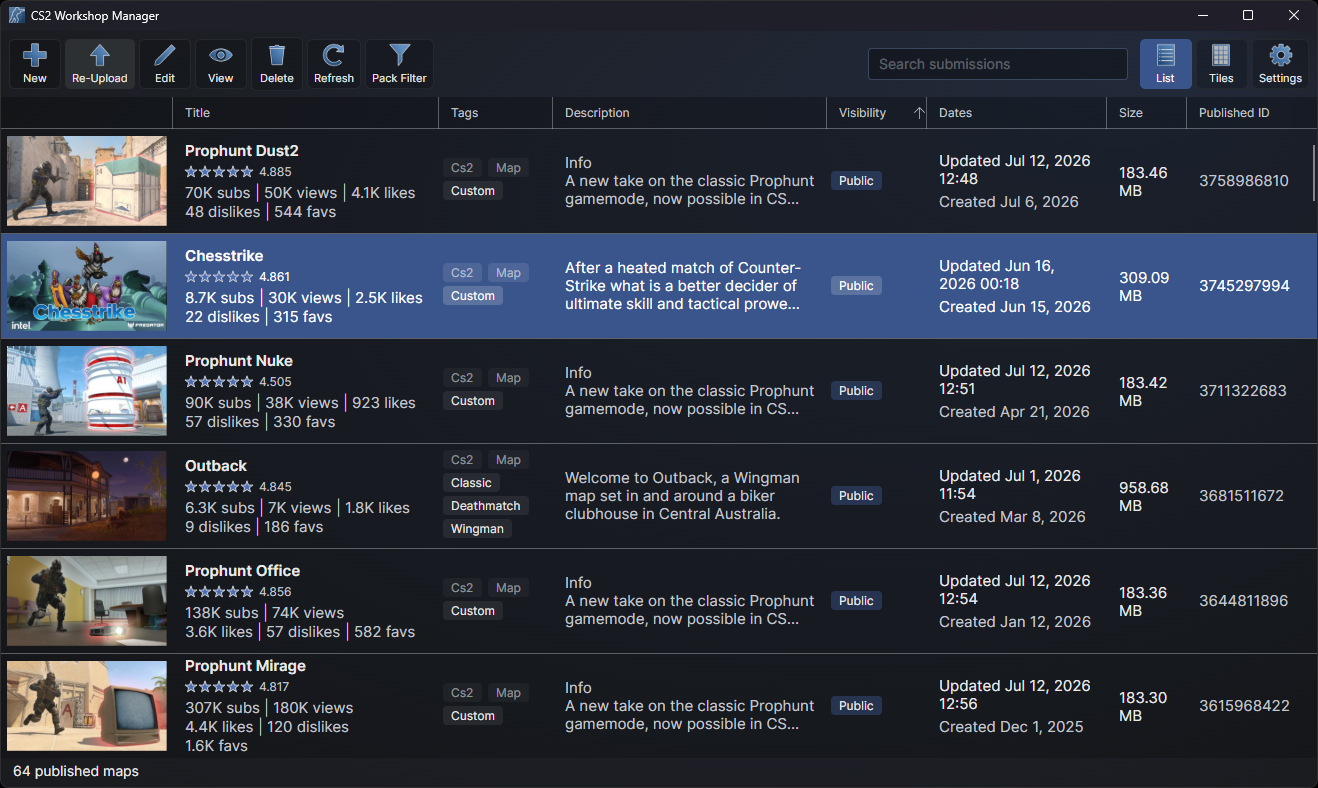
Projects:
- GUI - Cross-platform desktop app.
- CLI - Command-line tool for scripts and build pipelines.
- CS2WorkshopManager - Library that the GUI and CLI projects are built on, published as a Nuget package.
Features
Valve's Worskhop manager has quite a lot of drawbacks and shortcomings, this tool aims to fix and or improve on all of them.
- Fixed loading descriptions, it will now show the entire description instead of just the first 255 bytes.
- Added "Unlisted" visiblity option.
- Added a new description editor, with Steam BBCode preview.
- Added a new gallery editor, screenshots and YouTube videos under the thumbnail can be added and removed without leaving the app.
- Added support for more thumbnail file types as well as resolutions.
- Added support for GIF thumbnails.
- Added support for custom used defined tags.
- Added new tool "Pack Filter" allowing you to define custom file packing rules.
- Improved user interface, thumbnails are now shown, more stats like subscribers, views, likes and favourites per item, a grid view as well as a search bar.
- Linux support.
Requirements
- Counter-Strike 2 installed through Steam, with the addon compiled under
game/csgo_addons/<addon>. - Steam running and logged into the account that owns the workshop items.
- Windows or Linux. Releases are self-contained and need no .NET install.
The command line tool
Exposes the full functionality that the base library and GUI expose, useful for automating map updates which was the initial motivator for this project.
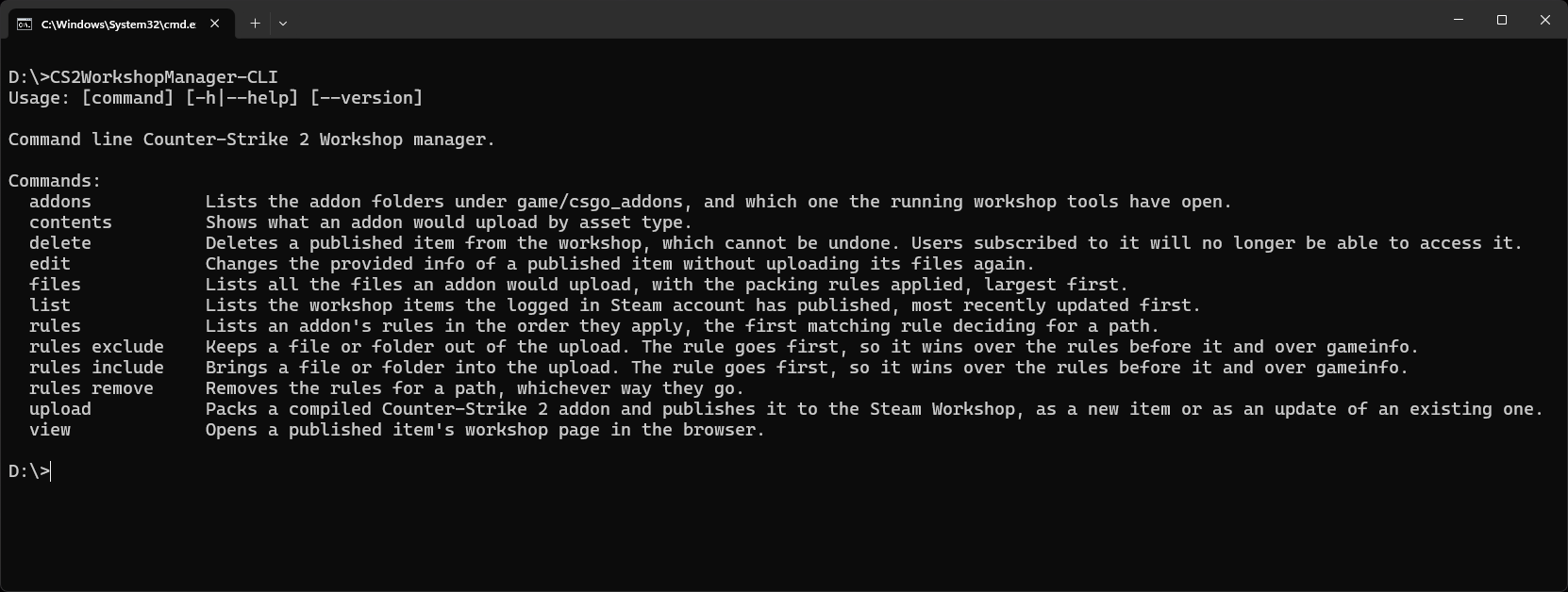
Commands
| Command | What it does |
|---|---|
upload |
Packs an addon and publishes it as a new item, or updates an existing item when --id is given. |
edit |
Changes a published item's title, description, thumbnail, visibility or game modes, and adds or removes gallery screenshots and videos. |
list |
Lists your published maps with their counts. |
view |
Opens an item's workshop page in the browser. |
previews |
Lists the gallery under an item's thumbnail, with the indices that edit --remove_previews takes. |
delete |
Deletes an item, after asking, or straight away with --yes. |
addons |
Lists the addon folders, marking the one open in the tools. |
contents |
Shows what an addon would upload by asset type. |
files |
Lists the files an addon would upload, or every file with --all. |
rules |
Lists, adds and removes an addon's packing rules, or with --global the ones that apply to every addon. |
Example
CS2WorkshopManager-CLI upload --addon prophunt --title "Prophunt Mirage" --visibility unlisted
CS2WorkshopManager-CLI upload --addon prophunt --title "Prophunt Mirage" --id 3611562098 --changenote "Added more props"
CS2WorkshopManager-CLI edit --id 3611562098 --description_file description.txt
CS2WorkshopManager-CLI list
The library
The CS2WorkshopManager package wraps all of this for your own tools. It talks to the running Steam client directly, so it needs no Steamworks SDK or steam_api library alongside it.
This library is also published as a C# Nuget package.
var manager = WorkshopManager.FromSteamInstall();

var result = await manager.PublishAsync(new AddonPublishOptions
{
    AddonName = "prophunt",
    Title = "Prophunt Mirage",
    Visibility = WorkshopVisibility.Unlisted,
    Tags = ["CS2", "Map", "Custom"],
});

Console.WriteLine(result.Url);

await foreach (var item in WorkshopManager.GetPublishedItemsAsync())
{
    Console.WriteLine($"{item.Title}: {item.Subscribers} subscribers");
}
Packing rules
The upload takes the files that gameinfo.gi lists under VpkDirectories, minus the files the workshop manager always leaves out, exactly as Valve's tool does. On top of that you can keep files out or bring files in with rules of your own, saved as publish_rules.txt in the addon's content root folder, content/csgo_addons/<addon>:
"publish_rules"
{
	"exclude"	"materials/dev/"
	"include"	"maps/backup.txt"
}
A rule matches everything whose path starts with its text, a folder ending in a slash. The first matching rule wins, and your rules are checked before gameinfo's. The Pack Filter window and the rules CLI command both write this file, and you can edit it by hand.
Rules that should apply to every addon go in the app's settings file instead, settings.txt under %AppData%\CS2WorkshopManager on Windows or ~/.config/CS2WorkshopManager on Linux, in a publish_rules block of the same shape. They are checked before the addon's own rules, so they win over them. The Settings window and rules --global write this file.
Credits
The file type icons in the Pack Filter window are from Source 2 Viewer, see THIRD_PARTY_NOTICES.txt.
This project is not affiliated with Valve. Counter-Strike and Steam are trademarks of Valve Corporation.
License
MIT, see LICENSE.
| Product | Versions Compatible and additional computed target framework versions. |
|---|---|
| .NET | net10.0 is compatible. net10.0-android was computed. net10.0-browser was computed. net10.0-ios was computed. net10.0-maccatalyst was computed. net10.0-macos was computed. net10.0-tvos was computed. net10.0-windows was computed. |
-
net10.0
- StbImageSharp (>= 2.30.16)
- StbImageWriteSharp (>= 1.16.7)
- ValvePak (>= 6.0.0.182)
- ValveResourceFormat (>= 20.0.6980)
NuGet packages
This package is not used by any NuGet packages.
GitHub repositories
This package is not used by any popular GitHub repositories.