BlazorWasmPreRendering.Build
1.0.0-preview.4.1
See the version list below for details.
dotnet add package BlazorWasmPreRendering.Build --version 1.0.0-preview.4.1
NuGet\Install-Package BlazorWasmPreRendering.Build -Version 1.0.0-preview.4.1
<PackageReference Include="BlazorWasmPreRendering.Build" Version="1.0.0-preview.4.1" />
<PackageVersion Include="BlazorWasmPreRendering.Build" Version="1.0.0-preview.4.1" />
<PackageReference Include="BlazorWasmPreRendering.Build" />
paket add BlazorWasmPreRendering.Build --version 1.0.0-preview.4.1
#r "nuget: BlazorWasmPreRendering.Build, 1.0.0-preview.4.1"
#:package BlazorWasmPreRendering.Build@1.0.0-preview.4.1
#addin nuget:?package=BlazorWasmPreRendering.Build&version=1.0.0-preview.4.1&prerelease
#tool nuget:?package=BlazorWasmPreRendering.Build&version=1.0.0-preview.4.1&prerelease
BlazorWasmPreRendering.Build 
Summary
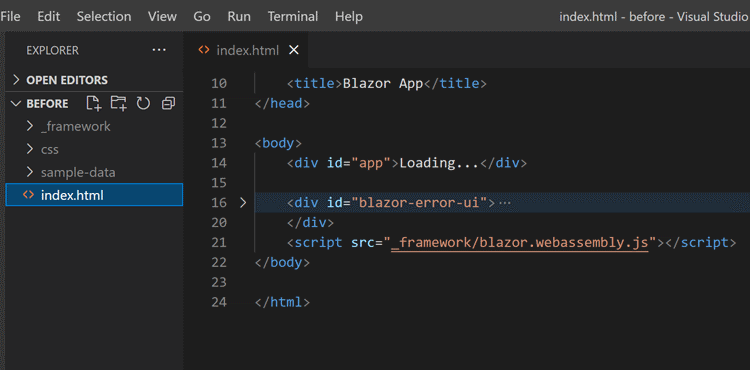
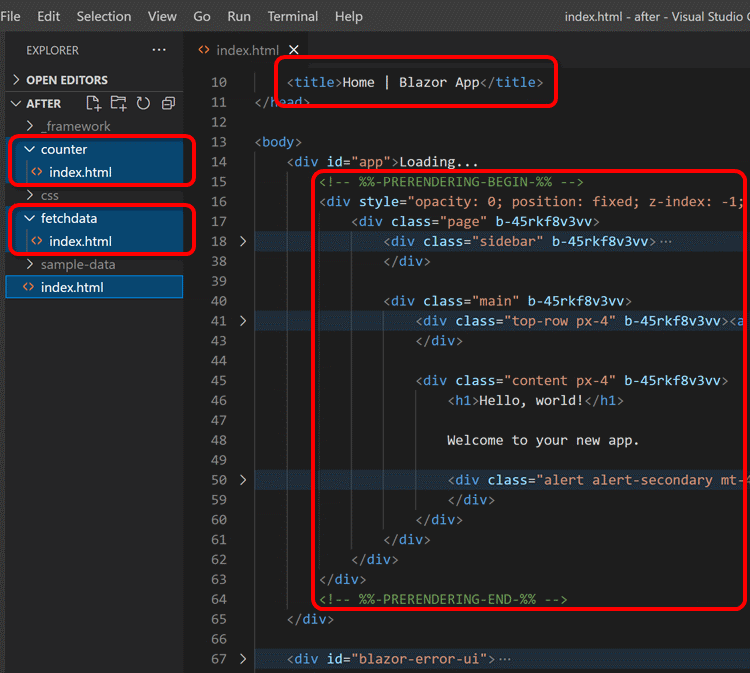
When you publish your Blazor WebAssembly app, this package pre-renders and saves the app as static HTML files in your public folder.
This will help make the contents of your Blazor WebAssembly static apps findable in internet search and be visible from the OGP client.
An output of "dotnet publish" before installing this package:
And after installing this package:
Usage
Install this package to your Blazor WebAssembly project.
dotnet add package BlazorWasmPreRendering.Build --version 1.0.0-preview.4.1
Basically, that's all.
Once installing this package is done, the output of the dotnet publish command will include pre-rendered contents.
Configurations
Services registration
If you are registering any services (except HttpClient that isn't specially configured) to the service provider at the startup of your Blazor WebAssembly app, please extract that process to the static method named static void ConfigureServices(IServiceCollection services, string baseAddress).
public class Program
{
  public static async Task Main(string[] args)
  {
    var builder = WebAssemblyHostBuilder.CreateDefault(args);
    builder.RootComponents.Add<App>("#app");

    // 👇 Extract service registration...
    services.AddScoped(sp => new HttpClient { BaseAddress = new Uri(baseAddress) });
    services.AddScoped<IFoo, MyFoo>();

    await builder.Build().RunAsync();
  }
}
public class Program
{
  public static async Task Main(string[] args)
  {
    var builder = WebAssemblyHostBuilder.CreateDefault(args);
    builder.RootComponents.Add<App>("#app");

    ConfigureServices(builder.Services, builder.HostEnvironment.BaseAddress);

    await builder.Build().RunAsync();
  }

  // 👇 ... to this named static method.
  private static void ConfigureServices(IServiceCollection services, string baseAddress)
  {
    services.AddScoped(sp => new HttpClient { BaseAddress = new Uri(baseAddress) });
    services.AddScoped<IFoo, MyFoo>();
  }
}
This package calls the ConfigureServices() static method inside of your Blazor WebAssembly app when pre-renders it if that method exists.
This is important to your Blazor WebAssembly components work fine in the pre-rendering process.
Root component type and selector
In some cases, suppose the type and selector of the root component of your Blazor WebAssembly app are not "{RootNamespace}.App" and "#app".
In that case, you have to describe that information explicitly in the project file (.csproj) of your Blazor WebAssembly app, like this.
<Project Sdk="Microsoft.NET.Sdk.BlazorWebAssembly">
  ...
  <PropertyGroup>
    <BlazorWasmPrerenderingRootComponentType>My.Custom.RootComponentClass</BlazorWasmPrerenderingRootComponentType>
    <BlazorWasmPrerenderingRootComponentSelector>.selector-for-root</BlazorWasmPrerenderingRootComponentSelector>
  </PropertyGroup>
  ...
Appendix
- If you would like to change a title or any meta elements for each page in your Blazor WebAssembly app, I recommend using the "Blazor Head Element Helper"
 NuGet package.
 - If you would like to deploy your Blazor WebAssembly app to GitHub Pages, I recommend using the "Publish SPA for GitHub Pages"
 NuGet package.
 - The "Awesome Blazor Browser" site is one of a good showcase of this package. That site is republishing every day by GitHub Actions with pre-rendering powered by this package.
Notice
This package is now experimental stage.
We can expect this package will work fine with a simple Blazor WebAssembly project.
But I'm not sure this package works fine even with a complicated real-world Blazor WebAssembly project at this time.
I welcome to fork and improve this project on your hand.
License
Learn more about Target Frameworks and .NET Standard.
This package has no dependencies.
NuGet packages
This package is not used by any NuGet packages.
GitHub repositories (6)
Showing the top 6 popular GitHub repositories that depend on BlazorWasmPreRendering.Build:
| Repository | Stars |
|---|---|
|
ant-design-blazor/ant-design-blazor
🌈A rich set of enterprise-class UI components based on Ant Design and Blazor.
|
|
|
jsakamoto/awesome-blazor-browser
A Blazor WebAssembly app for browsing the "Awesome Blazor" resources.
|
|
|
CropperBlazor/Cropper.Blazor
Cropper.js as Blazor component for cropping images
|
|
|
jsakamoto/Toolbelt.Blazor.HeadElement
Head element support (change the document title, "meta" elements such as OGP, and "link" elements) for Blazor apps.
|
|
|
jsakamoto/Toolbelt.Blazor.HotKeys2
This is a class library that provides configuration-centric keyboard shortcuts for your Blazor apps.
|
|
|
jsakamoto/Toolbelt.Blazor.HotKeys
This is a class library that provides configuration-centric keyboard shortcuts for your Blazor WebAssembly (client-side) apps.
|
| Version | Downloads | Last Updated |
|---|---|---|
| 7.0.0 | 2,991 | 11/11/2025 |
| 7.0.0-preview.1 | 6,956 | 7/7/2025 |
| 6.0.0 | 4,452 | 7/7/2025 |
| 6.0.0-preview.2 | 286 | 5/17/2025 |
| 6.0.0-preview.1 | 255 | 3/2/2025 |
| 5.0.1 | 3,339 | 3/1/2025 |
| 5.0.0 | 3,385 | 11/12/2024 |
| 5.0.0-preview.2 | 3,455 | 9/23/2024 |
| 5.0.0-preview.1 | 650 | 4/18/2024 |
| 4.0.1 | 926 | 9/23/2024 |
| 4.0.0 | 3,481 | 4/18/2024 |
| 3.1.0-preview.4 | 4,453 | 9/20/2023 |
| 3.1.0-preview.3 | 227 | 9/14/2023 |
| 3.1.0-preview.2 | 181 | 9/3/2023 |
| 3.1.0-preview.1 | 244 | 9/2/2023 |
| 3.0.0-preview.2 | 474 | 8/3/2023 |
| 3.0.0-preview.1 | 311 | 7/9/2023 |
| 2.0.0-preview.9 | 1,112 | 5/28/2023 |
| 2.0.0-preview.8 | 1,170 | 3/15/2023 |
| 2.0.0-preview.7 | 1,160 | 11/22/2022 |
| 2.0.0-preview.6 | 228 | 11/20/2022 |
| 2.0.0-preview.5 | 342 | 11/16/2022 |
| 2.0.0-preview.4 | 753 | 11/3/2022 |
| 2.0.0-preview.3.1 | 222 | 11/3/2022 |
| 2.0.0-preview.2 | 246 | 10/23/2022 |
| 2.0.0-preview.1 | 269 | 10/22/2022 |
| 1.0.0-preview.28.0 | 807 | 9/22/2022 |
| 1.0.0-preview.27.0 | 230 | 9/21/2022 |
| 1.0.0-preview.26.0 | 1,014 | 7/23/2022 |
| 1.0.0-preview.25.1 | 242 | 7/23/2022 |
| 1.0.0-preview.25.0 | 339 | 7/10/2022 |
| 1.0.0-preview.24.1 | 485 | 6/28/2022 |
| 1.0.0-preview.24.0 | 1,312 | 4/19/2022 |
| 1.0.0-preview.23.0 | 315 | 3/16/2022 |
| 1.0.0-preview.22.0 | 317 | 3/10/2022 |
| 1.0.0-preview.21.0 | 258 | 3/9/2022 |
| 1.0.0-preview.20.0 | 259 | 3/9/2022 |
| 1.0.0-preview.19.0 | 265 | 2/26/2022 |
| 1.0.0-preview.18.0 | 262 | 2/26/2022 |
| 1.0.0-preview.17.0 | 2,237 | 2/23/2022 |
| 1.0.0-preview.16.0 | 288 | 2/18/2022 |
| 1.0.0-preview.15.0 | 258 | 2/15/2022 |
| 1.0.0-preview.14.0 | 274 | 1/18/2022 |
| 1.0.0-preview.13.0 | 343 | 12/18/2021 |
| 1.0.0-preview.12.0 | 416 | 12/18/2021 |
| 1.0.0-preview.11.4 | 345 | 12/16/2021 |
| 1.0.0-preview.10.1 | 400 | 12/11/2021 |
| 1.0.0-preview.9.0 | 655 | 10/16/2021 |
| 1.0.0-preview.8.0 | 366 | 9/19/2021 |
| 1.0.0-preview.7.1 | 426 | 8/24/2021 |
| 1.0.0-preview.6 | 301 | 7/27/2021 |
| 1.0.0-preview.5 | 392 | 7/23/2021 |
| 1.0.0-preview.4.1 | 468 | 5/22/2021 |
| 1.0.0-preview.4 | 375 | 5/9/2021 |
| 1.0.0-preview.3 | 334 | 5/9/2021 |
| 1.0.0-preview.2 | 335 | 5/9/2021 |
v.1.0.0
- 1st release.