Umbraco.Community.AI.LogAnalyser
1.0.2
dotnet add package Umbraco.Community.AI.LogAnalyser --version 1.0.2
NuGet\Install-Package Umbraco.Community.AI.LogAnalyser -Version 1.0.2
<PackageReference Include="Umbraco.Community.AI.LogAnalyser" Version="1.0.2" />
<PackageVersion Include="Umbraco.Community.AI.LogAnalyser" Version="1.0.2" />
<PackageReference Include="Umbraco.Community.AI.LogAnalyser" />
paket add Umbraco.Community.AI.LogAnalyser --version 1.0.2
#r "nuget: Umbraco.Community.AI.LogAnalyser, 1.0.2"
#:package Umbraco.Community.AI.LogAnalyser@1.0.2
#addin nuget:?package=Umbraco.Community.AI.LogAnalyser&version=1.0.2
#tool nuget:?package=Umbraco.Community.AI.LogAnalyser&version=1.0.2
AI.Log Analyser


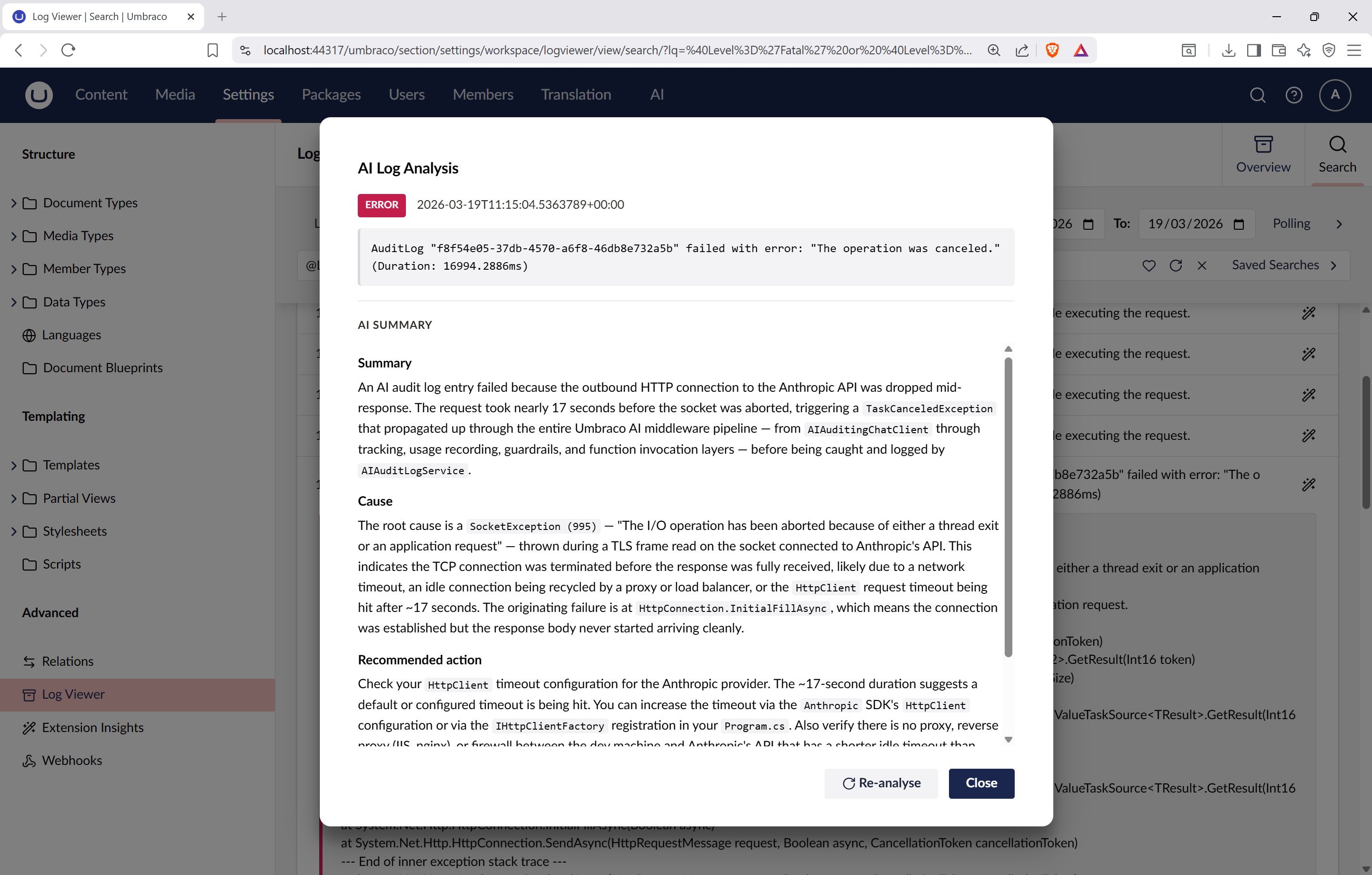
An Umbraco package that adds AI-powered log analysis to the backoffice log viewer. Each log entry gets an "Analyse with AI" button that returns a concise, actionable summary using your configured AI provider.
Supports any AI provider available through Umbraco.AI, including OpenAI, Anthropic, Google, Amazon Bedrock and Microsoft AI Foundry.
Quick Start
dotnet add package Umbraco.Community.AI.LogAnalyser
You will also need at least one Umbraco.AI provider package installed and configured (e.g. Umbraco.AI.OpenAI).
Then navigate to Settings > Log Viewer > Search in the backoffice and click the AI icon on any log entry.
Features
- One-click AI analysis of any log entry from the backoffice log viewer
- Structured response with summary, likely cause and recommended action
- Includes surrounding log entries for sequence-of-events context
- Detects error frequency to distinguish one-off vs systemic issues
- Includes system diagnostics (Umbraco version, .NET, OS, database provider, hosting model, assemblies) for environment-aware analysis
- Logs performance diagnostics (context gathering time, AI response time) to the Umbraco log
- Renders responses as formatted markdown
- Works with any AI provider configured via Umbraco.AI
- Fully configurable via
appsettings.json
Configuration
All settings are optional with sensible defaults:
{
  "AILogAnalyser": {
    "LogContext": {
      "MaxSurroundingEntries": 10,
      "SurroundingWindowMinutes": 5,
      "FrequencyMaxScan": 500,
      "FrequencyWindowMinutes": 60
    }
  }
}
| Setting | Default | Description |
|---|---|---|
MaxSurroundingEntries |
10 |
Log entries to fetch before/after the selected entry |
SurroundingWindowMinutes |
5 |
Time window for surrounding entries |
FrequencyMaxScan |
500 |
Max entries to scan for frequency counting |
FrequencyWindowMinutes |
60 |
Time window for error frequency counting |
What context is sent to the AI?
The package sends the log entry details (level, message, template, exception, properties), surrounding log entries, error frequency, and system diagnostics (Umbraco version, .NET, OS, database provider, hosting model, ModelsBuilder mode, loaded assemblies). No content data, user data, or credentials are sent.
Documentation
Full documentation and source code available on GitHub.
| Product | Versions Compatible and additional computed target framework versions. |
|---|---|
| .NET | net10.0 is compatible. net10.0-android was computed. net10.0-browser was computed. net10.0-ios was computed. net10.0-maccatalyst was computed. net10.0-macos was computed. net10.0-tvos was computed. net10.0-windows was computed. |
-
net10.0
- Umbraco.AI (>= 1.6.0)
- Umbraco.Cms.Api.Common (>= 17.2.2)
- Umbraco.Cms.Api.Management (>= 17.2.2)
- Umbraco.Cms.Web.Common (>= 17.2.2)
- Umbraco.Cms.Web.Website (>= 17.2.2)
NuGet packages
This package is not used by any NuGet packages.
GitHub repositories
This package is not used by any popular GitHub repositories.