Syncfusion.Core.WinForms
35.1.41
Prefix Reserved
dotnet add package Syncfusion.Core.WinForms --version 35.1.41
NuGet\Install-Package Syncfusion.Core.WinForms -Version 35.1.41
<PackageReference Include="Syncfusion.Core.WinForms" Version="35.1.41" />
<PackageVersion Include="Syncfusion.Core.WinForms" Version="35.1.41" />
<PackageReference Include="Syncfusion.Core.WinForms" />
paket add Syncfusion.Core.WinForms --version 35.1.41
#r "nuget: Syncfusion.Core.WinForms, 35.1.41"
#:package Syncfusion.Core.WinForms@35.1.41
#addin nuget:?package=Syncfusion.Core.WinForms&version=35.1.41
#tool nuget:?package=Syncfusion.Core.WinForms&version=35.1.41
Syncfusion® WinForms Core Components
This package contains Button, Form, ToolTip, and Scroll Frame components for WinForms application.
Using this package with an AI coding agent
Before generating Syncfusion code, ask your AI coding agent to run the Syncfusion setup using the following prompt:
Set up this project for Syncfusion before generating code. Fetch and follow the official instructions at https://ai.syncfusion.com, then report the detected platform, installed skill pack, MCP status, and any required licensing action.The setup detects your project’s platform and loads the appropriate Syncfusion skill pack. No Syncfusion account or MCP key is required to install or read Syncfusion agent skills.
Platform reference: https://ai.syncfusion.com/winforms/llms.txt
System Requirements
WinForms Button
The Syncfusion® WinForms Button is an advanced button control capable of displaying text and images with various customization. Animated images (.GIF) can be shown in the Button control for an intuitive UI experience. The component provides complete control over its appearance. Customize the text, images, borders, Rich Text Formatting (RTF), button states and more.
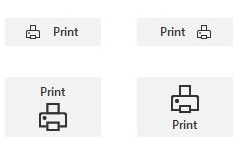
Features Overview | Docs | Online Demo | Support | Forums | Feedback
Getting Started
WinForms Form
The Syncfusion® WinForms Form is a window control that allows the complete customization of its appearance and the loading of any custom user interface in the title bar to perform the customized operations. The portion of text in the title bar can be formatted by using Rich Text Formatting (RTF). Its rich, built-in feature set includes an MDI form, title bar height customization, shadow effect, and appearance customization.
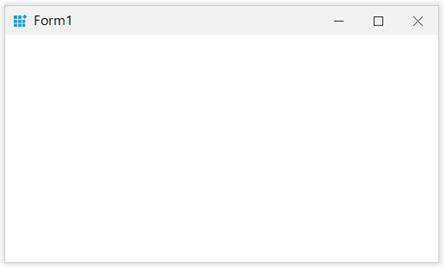
Features Overview | Docs | Online Demo | Support | Forums | Feedback
Getting Started
WinForms ToolTip
The Syncfusion® WinForms ToolTip provides support to display hints for any control. A custom, intuitive UI for tooltips can be designed by loading any UI control as content. Its rich feature set includes multiple content regions, delaying tooltips for a specified length of time, images, shadow effects, tooltips with beaks, and appearance customization.
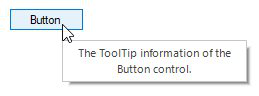
Features Overview | Docs | Online Demo | Support | Forums | Feedback
Getting Started
WinForms Scroll Frame
The Syncfusion® WinForms Scroll Frame is a component that allows users to customize the appearance of scroll bars for any control derived from the scrollable controls such MS ListView, Panel and more. It provides complete control over its appearance to customize the scroll bars, context menus and more.
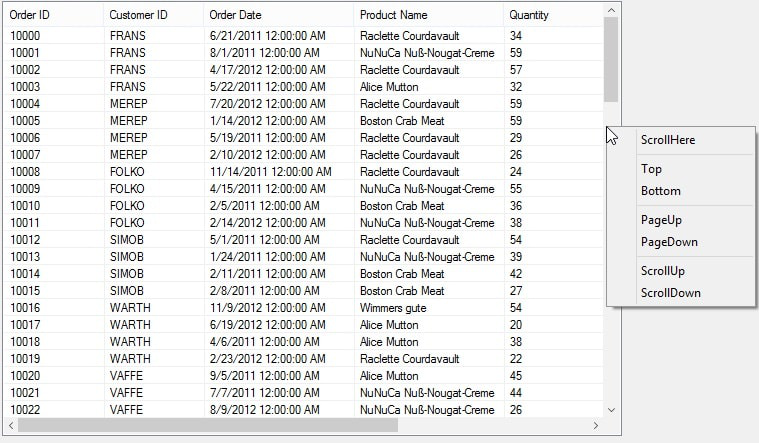
Features Overview | Docs | Online Demo | Support | Forums | Feedback
Getting Started
License
This is a commercial product and requires a paid license for possession or use. Syncfusion® licensed software, including this component, is subject to the terms and conditions of Syncfusion® EULA. You can purchase a license here or start a free 30-day trial here.
About Syncfusion®
Founded in 2001 and headquartered in Research Triangle Park, N.C., Syncfusion® has more than 29,000 customers and more than 1 million users, including large financial institutions, Fortune 500 companies, and global IT consultancies.
Today, we provide 1800+ components and frameworks for web (Blazor, Flutter, ASP.NET Core, ASP.NET MVC, ASP.NET Web Forms, JavaScript, Angular, React, Vue, and jQuery), mobile (.NET MAUI, Flutter, Xamarin, UWP, and JavaScript), and desktop development (WinForms, WPF, WinUI, .NET MAUI, Flutter, Xamarin, and UWP). We provide ready-to-deploy enterprise software for dashboards, reports, data integration, and big data processing. Many customers have saved millions in licensing fees by deploying our software.
sales@syncfusion.com | www.syncfusion.com | Toll Free: 1-888-9 DOTNET
| Product | Versions Compatible and additional computed target framework versions. |
|---|---|
| .NET | net8.0-windows7.0 is compatible. net9.0-windows was computed. net9.0-windows7.0 is compatible. net10.0-windows was computed. net10.0-windows7.0 is compatible. |
| .NET Framework | net462 is compatible. net463 was computed. net47 was computed. net471 was computed. net472 was computed. net48 was computed. net481 was computed. |
-
.NETFramework 4.0
- Syncfusion.Licensing (>= 35.1.41)
- Syncfusion.Shared.Base (>= 35.1.41)
- Syncfusion.Telemetry (>= 35.1.41)
-
.NETFramework 4.6.2
- Syncfusion.Licensing (>= 35.1.41)
- Syncfusion.Shared.Base (>= 35.1.41)
- Syncfusion.Telemetry (>= 35.1.41)
-
net10.0-windows7.0
- Microsoft.WinForms.Designer.SDK (>= 1.6.0)
- Syncfusion.Licensing (>= 35.1.41)
- Syncfusion.Shared.Base (>= 35.1.41)
- Syncfusion.Telemetry (>= 35.1.41)
-
net8.0-windows7.0
- Microsoft.WinForms.Designer.SDK (>= 1.6.0)
- Syncfusion.Licensing (>= 35.1.41)
- Syncfusion.Shared.Base (>= 35.1.41)
- Syncfusion.Telemetry (>= 35.1.41)
-
net9.0-windows7.0
- Microsoft.WinForms.Designer.SDK (>= 1.6.0)
- Syncfusion.Licensing (>= 35.1.41)
- Syncfusion.Shared.Base (>= 35.1.41)
- Syncfusion.Telemetry (>= 35.1.41)
NuGet packages (8)
Showing the top 5 NuGet packages that depend on Syncfusion.Core.WinForms:
| Package | Downloads |
|---|---|
|
Syncfusion.SfInput.WinForms
This package provides the functionality to utilize the features of Syncfusion® WinForms Calendar, Date-Time Edit, and Numeric TextBox. |
|
|
Syncfusion.SfListView.WinForms
This package provides the functionality to utilize the features of Syncfusion® WinForms Listview and Combo Box. |
|
|
Syncfusion.SfDataGrid.WinForms
This package provides the functionality to utilize the features of Syncfusion® WinForms DataGrid control and more. |
|
|
Syncfusion.Spreadsheet.Windows
This package provides the functionality to utilize the features of Syncfusion® WinForms SpreadSheet control and more. |
|
|
Syncfusion.SfSmithChart.WinForms
This package provides the functionality to utilize the features of Syncfusion® WinForms SmithChart and more. |
GitHub repositories (2)
Showing the top 2 popular GitHub repositories that depend on Syncfusion.Core.WinForms:
| Repository | Stars |
|---|---|
|
LAB02-Research/HASS.Agent
Windows-based client for Home Assistant. Provides notifications, quick actions, commands, sensors and more.
|
|
|
syncfusion/winforms-demos
This repository contains the samples for Syncfusion Windows Forms UI Controls and File Format libraries and the guide to use them.
|
| Version | Downloads | Last Updated |
|---|---|---|
| 35.1.41 | 101 | 10/19/2026 |
| 35.1.40 | 557 | 10/12/2026 |
| 35.1.39 | 424 | 10/6/2026 |
| 35.1.37 | 715 | 9/29/2026 |
| 34.2.9 | 698 | 9/21/2026 |
| 34.2.8 | 573 | 9/14/2026 |
| 34.2.7 | 500 | 9/8/2026 |
| 34.2.6 | 650 | 8/31/2026 |
| 34.2.5 | 562 | 8/25/2026 |
| 34.2.4 | 965 | 8/17/2026 |
| 34.2.3 | 588 | 8/11/2026 |
| 34.2.2 | 617 | 8/5/2026 |
| 34.1.33 | 823 | 7/27/2026 |
| 34.1.32 | 648 | 7/21/2026 |
| 34.1.31 | 703 | 7/13/2026 |
| 34.1.30 | 525 | 7/9/2026 |
| 34.1.29 | 937 | 7/6/2026 |
| 33.2.15 | 1,559 | 6/23/2026 |
| 33.2.13 | 900 | 6/16/2026 |
| 33.2.12 | 1,273 | 6/9/2026 |