Syncfusion.Blazor.Notifications
33.1.44
Prefix Reserved
dotnet add package Syncfusion.Blazor.Notifications --version 33.1.44
NuGet\Install-Package Syncfusion.Blazor.Notifications -Version 33.1.44
<PackageReference Include="Syncfusion.Blazor.Notifications" Version="33.1.44" />
<PackageVersion Include="Syncfusion.Blazor.Notifications" Version="33.1.44" />
<PackageReference Include="Syncfusion.Blazor.Notifications" />
paket add Syncfusion.Blazor.Notifications --version 33.1.44
#r "nuget: Syncfusion.Blazor.Notifications, 33.1.44"
#:package Syncfusion.Blazor.Notifications@33.1.44
#addin nuget:?package=Syncfusion.Blazor.Notifications&version=33.1.44
#tool nuget:?package=Syncfusion.Blazor.Notifications&version=33.1.44
Syncfusion® Blazor Notification Components
A comprehensive suite of Blazor notification and placeholder components for displaying messages, toasts, and loading states. Includes Toast, Message, and Skeleton components.
Supported Components
This package includes the following components:
Blazor Toast Component
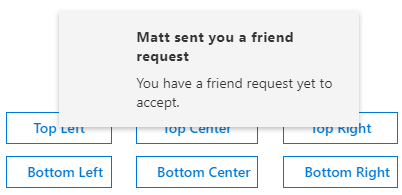
The Blazor Toast Component is a small, nonblocking notification pop-up that displays messages to users with readable content.
Key Features:
- Auto Dismissal: Messages disappear automatically after a configurable timeout period
- Positioning: Display toasts at customizable positions (top, bottom, corners)
- Animation Effects: Built-in animation effects for toast appearance and disappearance
- Multiple Toasts: Display multiple toast notifications simultaneously
- Custom Icons: Support for custom icons and visual indicators
- Templates: Rich templates for custom toast content rendering
- Keyboard Navigation: Full keyboard support for accessibility
- Action Buttons: Include action buttons within toast notifications
Documentation:
- Getting Started with Blazor Web App
- Getting Started with Blazor WebAssembly App
- Feature Overview
- Live Demos
- API Reference
Blazor Message Component
The Blazor Message Component is a graphical UI for displaying messages with visual severity levels and contextual information.
Key Features:
- Severity Levels: Display messages with different severity types (success, error, warning, info)
- Visual Icons: Built-in icons for different severity levels
- Closeable Messages: Allow users to dismiss messages
- Message Variants: Support for different visual variants and styles
- Custom Templates: Rich templates for custom message content
- Data Binding: Bind to collections for dynamic message display
- Responsive Design: Adapt to different screen sizes
- Accessibility: Full keyboard navigation and ARIA support
Documentation:
- Getting Started with Blazor Web App
- Getting Started with Blazor WebAssembly App
- Feature Overview
- Live Demos
- API Reference
Blazor Skeleton Component
The Blazor Skeleton Component is a placeholder that animates a shimmer effect to indicate content is loading.
Key Features:
- Shimmer Effect: Animated loading state with shimmer animation
- Multiple Shapes: Support for various skeleton shapes (circle, rectangle, text)
- Custom Count: Render multiple skeleton placeholders
- Responsive Layout: Adapt to different screen sizes
- Performance: Lightweight placeholder for faster page loads
- Custom Styling: Customize appearance with CSS and themes
- Template Support: Create custom skeleton layouts
- Accessibility: Semantic HTML with proper ARIA labels

Documentation:
- Getting Started with Blazor Web App
- Getting Started with Blazor WebAssembly App
- Feature Overview
- Live Demos
- API Reference
System Requirements
- .NET 8.0 or later (Blazor Web App, Blazor Server, Blazor WebAssembly and Blazor Hybrid)
- See full requirements: System Requirements.
Installation
.NET CLI
dotnet add package Syncfusion.Blazor.Notifications
NuGet Package Manager
Install-Package Syncfusion.Blazor.Notifications
Add stylesheet and script references
- For Blazor Server App / Blazor Web App, add these to
Components/App.razororApp.razor. - For Blazor WebAssembly App: add these to
wwwroot/index.html.
<link href="_content/Syncfusion.Blazor.Themes/bootstrap5.css" rel="stylesheet" />
<script src="_content/Syncfusion.Blazor.Core/scripts/syncfusion-blazor.min.js" type="text/javascript"></script>
Quick Start
Register the Syncfusion® Blazor services in Program.cs:
using Syncfusion.Blazor;

builder.Services.AddSyncfusionBlazor();
Message
<SfMessage>Please read the comments carefully</SfMessage>
<style>
    .e-message {
        width: 300px;
    }
</style>
Skeleton
<SfSkeleton Height="15px" Width="200px"></SfSkeleton><br/>
<SfSkeleton Height="15px" Width="100px"></SfSkeleton>
Toast
<div class="col-lg-12 control-section toast-default-section">
    <SfToast ID="toast_default" @ref="ToastObj" Title="Adaptive Tiles Meeting" Content="@ToastContent" Timeout="5000" Icon="e-meeting">
        <ToastPosition X="@ToastPosition"></ToastPosition>
    </SfToast>
    <div class="col-lg-12 col-sm-12 col-md-12 center">
        <div id="toastBtnDefault" style="margin: auto; text-align: center">
            <button class="e-btn" @onclick="@ShowOnClick">Show Toasts</button>
            <button class="e-btn" @onclick="@HideOnClick">Hide All</button>
        </div>
    </div>
</div>

<style>
    #toast_default .e-meeting::before {
        content: "\e705";
        font-size: 17px;
    }

    .bootstrap4 #toast_default .e-meeting::before {
        content: "\e763";
        font-size: 20px;
    }
</style>

@code {
    private SfToast ToastObj;
    private string ToastPosition = "Right";
    private string ToastContent = "Conference Room 01 / Building 135 10:00 AM-10:30 AM";

    private async Task ShowOnClick()
    {
        await ToastObj.ShowAsync();
    }

    private async Task HideOnClick()
    {
        await ToastObj.HideAsync("All");
    }
}
Support
License
This is a commercial product and requires a paid license for possession or use. Review the Syncfusion® EULA.
About Syncfusion®
Syncfusion® provides 1600+ UI components and frameworks for web, mobile, and desktop development across multiple platforms:
Web: Blazor | ASP.NET Core | ASP.NET MVC | JavaScript | Angular | React | Vue
Desktop: WinForms | WPF | WinUI
Learn more at www.syncfusion.com.
sales@syncfusion.com | Toll Free: 1-888-9-DOTNET
| Product | Versions Compatible and additional computed target framework versions. |
|---|---|
| .NET | net8.0 is compatible. net8.0-android was computed. net8.0-browser was computed. net8.0-ios was computed. net8.0-maccatalyst was computed. net8.0-macos was computed. net8.0-tvos was computed. net8.0-windows was computed. net9.0 is compatible. net9.0-android was computed. net9.0-browser was computed. net9.0-ios was computed. net9.0-maccatalyst was computed. net9.0-macos was computed. net9.0-tvos was computed. net9.0-windows was computed. net10.0 is compatible. net10.0-android was computed. net10.0-browser was computed. net10.0-ios was computed. net10.0-maccatalyst was computed. net10.0-macos was computed. net10.0-tvos was computed. net10.0-windows was computed. |
-
net10.0
- Syncfusion.Blazor.Buttons (>= 33.1.44)
- Syncfusion.Blazor.Core (>= 33.1.44)
-
net8.0
- Syncfusion.Blazor.Buttons (>= 33.1.44)
- Syncfusion.Blazor.Core (>= 33.1.44)
-
net9.0
- Syncfusion.Blazor.Buttons (>= 33.1.44)
- Syncfusion.Blazor.Core (>= 33.1.44)
NuGet packages (11)
Showing the top 5 NuGet packages that depend on Syncfusion.Blazor.Notifications:
| Package | Downloads |
|---|---|
|
Syncfusion.Blazor.DropDowns
Provides Syncfusion® Blazor dropdown and selection components including AutoComplete, ComboBox, DropDownList, ListBox, and MultiSelect controls. Supports data binding, filtering, grouping, cascading, templates, and accessibility features for building robust selection interfaces. |
|
|
Syncfusion.Blazor.PdfViewer
This package provides the functionality to utilize the features of Syncfusion Blazor PDF Viewer component and more. |
|
|
Syncfusion.Blazor.SfPdfViewer
This package provides the functionality to utilize the features of Syncfusion® Blazor PDF Viewer component and more. |
|
|
Syncfusion.Blazor.InteractiveChat
Syncfusion® Blazor Interactive Chat component for building conversational AI interfaces. Supports real-time messaging, user interactions, and integration with AI services. Designed for Blazor Server and Blazor WebAssembly applications. |
|
|
NCPC.Blazor
Set of Blazor components to user within your project |
GitHub repositories
This package is not used by any popular GitHub repositories.
| Version | Downloads | Last Updated |
|---|---|---|
| 33.1.44 | 3,650 | 3/16/2026 |
| 32.2.9 | 5,701 | 3/9/2026 |
| 32.2.8 | 7,516 | 3/2/2026 |
| 32.2.7 | 10,005 | 2/23/2026 |
| 32.2.5 | 7,468 | 2/16/2026 |
| 32.2.4 | 8,112 | 2/10/2026 |
| 32.2.3 | 10,554 | 2/5/2026 |
| 32.1.25 | 13,181 | 1/26/2026 |
| 32.1.24 | 9,452 | 1/19/2026 |
| 32.1.23 | 13,650 | 1/13/2026 |
| 32.1.22 | 8,467 | 1/5/2026 |
| 32.1.21 | 8,125 | 12/29/2025 |
| 32.1.20 | 4,348 | 12/23/2025 |
| 32.1.19 | 15,228 | 12/16/2025 |
| 31.2.18 | 14,459 | 12/8/2025 |
| 31.2.16 | 13,754 | 12/1/2025 |
| 31.2.15 | 10,746 | 11/25/2025 |
| 31.2.12 | 12,935 | 11/18/2025 |
| 31.2.10 | 5,614 | 11/12/2025 |
| 31.2.5 | 12,096 | 11/3/2025 |