Pastel 8.0.0
dotnet add package Pastel --version 8.0.0
NuGet\Install-Package Pastel -Version 8.0.0
<PackageReference Include="Pastel" Version="8.0.0" />
<PackageVersion Include="Pastel" Version="8.0.0" />
<PackageReference Include="Pastel" />
paket add Pastel --version 8.0.0
#r "nuget: Pastel, 8.0.0"
#:package Pastel@8.0.0
#addin nuget:?package=Pastel&version=8.0.0
#tool nuget:?package=Pastel&version=8.0.0
Pastel



Give your console app a nicer look by adding some color to the output it produces. This is achieved by wrapping strings of the output in ANSI escape sequences that instruct the terminal to color the string based on the interpreted code. Tested on both Windows (requires at least Windows 10, v1511 [November Update]) and Linux.
Introduction
Modern terminals have a feature that allows them to print text in different colors. To enable this, a string is wrapped with a special sequence of characters containing a directive to the terminal to color the string that follows and stop coloring when it encounters an end code. Producing these character sequences can be cumbersome, which is the reason why I decided to build this small library that turns this into a very easy task.
Because Pastel only alters the output string, there is no need to manipulate or extend the built-in System.Console class.
If your terminal doesn't support 24-bit colors, it will approximate to the nearest color instead.
How to use
The basic syntax is very simple. Use the Pastel() method on the string you want to colorize and supply a color argument.
"ENTER".Pastel(Color.FromArgb(165, 229, 250))

Console.WriteLine($"Press {"ENTER".Pastel(Color.FromArgb(165, 229, 250))} to continue");
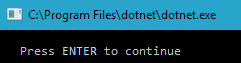
You can either use a System.Drawing.Color object, a System.ConsoleColor enum or a hexadecimal string value.
Both upper and lower case hex codes are supported and the leading number sign (#) is optional.
var spectrum = new (string color, string letter)[]
{
    ("#124542", "a"),
    ("#185C58", "b"),
    ("#1E736E", "c"),
    ("#248A84", "d"),
    ("#20B2AA", "e"),
    ("#3FBDB6", "f"),
    ("#5EC8C2", "g"),
    ("#7DD3CE", "i"),
    ("#9CDEDA", "j"),
    ("#BBE9E6", "k")
};

Console.WriteLine(string.Join("", spectrum.Select(s => s.letter.Pastel(s.color))));
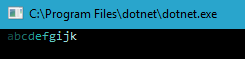

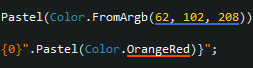
Using a Color/ConsoleColor argument pairs very well with ReSharper as the extension automatically underlines the argument list and colors it accordingly:
ConsoleColor and web colors
By default, a ConsoleColor argument emits the corresponding ANSI base color code, which lets the terminal render it using its own theme. Pass useWebColors: true to instead emit the fixed web color that the value represents:
"Colorize me".Pastel(ConsoleColor.Red);                      // Themed by the terminal
"Colorize me".Pastel(ConsoleColor.Red, useWebColors: true);  // Always #FF0000
The web colors follow the combined CSS3 list. For the two names where the web and X11 definitions disagree, the web value is used:
| Color | Pastel | X11 |
|---|---|---|
Gray |
#808080 | #BEBEBE |
Green |
#008000 | #00FF00 (the web's Lime) |
An inherited quirk worth knowing about: DarkGray (#A9A9A9) is lighter than Gray (#808080). DarkGray descends from X11 while Gray descends from the web, and the combined list keeps both. This is intentional and matches System.Drawing.Color.
Note that these are not the Windows console palette values (where Gray is #C0C0C0 and DarkGray is #808080).
Colors outside the 16 ConsoleColor names — such as Maroon or Purple — are reached through the Color or hexadecimal overloads:
"Colorize me".Pastel(Color.Maroon);   // #800000
"Colorize me".Pastel("#B03060");      // X11 Maroon
Background colors
Pastel also supports background colors. The syntax is exactly the same except that the method is called PastelBg.
Both foreground and background colors can be combined by chaining the methods:
"Colorize me".Pastel(Color.Black).PastelBg("FFD000");
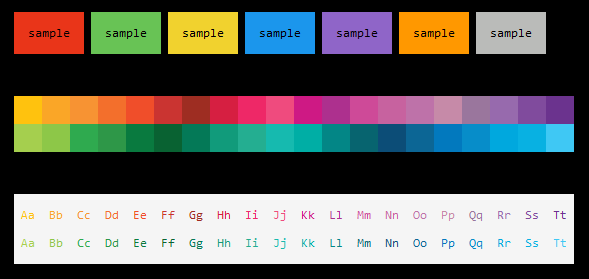
Disabling / enabling color output
If you for any reason would like to disable any future color output produced by Pastel for the duration of your app, simply call ConsoleExtensions.Disable(). To re-enable color output, call ConsoleExtensions.Enable().
CI/CD environments
Pastel will detect if your application is running under a common CI/CD environment and will disable all coloring if this is the case.
If you'd like to override this check and force colors in CI/CD environments, you can set an environment variable named PASTEL_DISABLE_ENVIRONMENT_DETECTION (value does not matter).
NO_COLOR
Pastel will also honor systems where console color output has explicitly been requested to be turned off. See more information about this initiative at https://no-color.org.
| Product | Versions Compatible and additional computed target framework versions. |
|---|---|
| .NET | net8.0 is compatible. net8.0-android was computed. net8.0-browser was computed. net8.0-ios was computed. net8.0-maccatalyst was computed. net8.0-macos was computed. net8.0-tvos was computed. net8.0-windows was computed. net9.0 is compatible. net9.0-android was computed. net9.0-browser was computed. net9.0-ios was computed. net9.0-maccatalyst was computed. net9.0-macos was computed. net9.0-tvos was computed. net9.0-windows was computed. net10.0 was computed. net10.0-android was computed. net10.0-browser was computed. net10.0-ios was computed. net10.0-maccatalyst was computed. net10.0-macos was computed. net10.0-tvos was computed. net10.0-windows was computed. |
| .NET Framework | net462 is compatible. net463 was computed. net47 was computed. net471 was computed. net472 was computed. net48 was computed. net481 was computed. |
-
.NETFramework 4.6.2
- System.Memory (>= 4.6.3)
- System.Runtime.InteropServices.RuntimeInformation (>= 4.3.0)
-
net8.0
- No dependencies.
-
net9.0
- No dependencies.
NuGet packages (37)
Showing the top 5 NuGet packages that depend on Pastel:
| Package | Downloads |
|---|---|
|
FlubuCore
A cross platform build and deployment automation system for building projects and executing deployment scripts using C# code. Documentation can be found at: https://github.com/dotnetcore/FlubuCore Detailed examples can be found at: https://github.com/dotnetcore/FlubuCore.Examples |
|
|
Diginsight.Diagnostics
Package Description |
|
|
AgoraIoT.Edge.App.SDK
SDK for creation of Agora Edge Applications. |
|
|
Sygenic.SharedKernel
Common code for Sygenic software |
|
|
GalacticWasteManagement
Package Description |
GitHub repositories (15)
Showing the top 15 popular GitHub repositories that depend on Pastel:
| Repository | Stars |
|---|---|
|
LavaGang/MelonLoader
The World's First Universal Mod Loader for Unity Games compatible with both Il2Cpp and Mono
|
|
|
SamboyCoding/Cpp2IL
Work-in-progress tool to reverse unity's IL2CPP toolchain.
|
|
|
ClassIsland/ClassIsland
一款功能强、可定制、跨平台,适用于班级多媒体屏幕的课表信息显示工具,可以一目了然地显示各种信息。
|
|
|
dotnetcore/FlubuCore
A cross platform build and deployment automation system for building projects and executing deployment scripts using C# code.
|
|
|
microsoft/OSSGadget
Collection of tools for analyzing open source packages.
|
|
|
AlanMorel/MapleServer2
MapleStory 2 Emulator
|
|
|
aers/FFXIVClientStructs
Resources for reverse-engineering the FFXIV client's native classes.
|
|
|
MS2Community/Maple2
Server emulator for MapleStory2.
|
|
|
ActualLab/Fusion
Build real-time Blazor and MAUI apps while writing just 0.1% of the usual real-time update code. Handle 10× more API requests with the ActualLab.Rpc protocol—or 1000× more with Fusion’s transparent and perfectly coherent caching.
|
|
|
SECTL/SecRandom
基于动态权重的公平随机工具,让抽取与决策告别争议
|
|
|
NotAdam/Lumina
A simple, performant and extensible framework for interacting with FFXIV game data
|
|
|
stride3d/stride-community-toolkit
Collection of helpers and extensions for Stride Game Engine developers. Simplifies and demonstrates common developer tasks building experiences for Stride with .NET.
|
|
|
FrostyToolsuite/FrostyToolsuite
The most advanced modding platform for games running on DICE's Frostbite game engine.
|
|
|
SourceDotNET/Source.NET
An open-source Source Engine replica, written in C#, aiming for compatibility with Garry's Mod's networking protocols and Lua addons
|
|
|
AlizerUncaged/waifu-desktop
🎂 your waifu, right on your desktop!
|
| Version | Downloads | Last Updated |
|---|---|---|
| 8.0.0 | 60,921 | 7/15/2026 |
| 7.0.1 | 212,348 | 10/29/2025 |
| 7.0.0 | 36,031 | 8/17/2025 |
| 6.0.1 | 228,050 | 12/6/2024 |
| 6.0.0 | 7,202 | 11/16/2024 |
| 5.2.1 | 65,375 | 10/26/2024 |
| 5.1.0 | 159,192 | 4/24/2024 |
| 5.0.0 | 50,705 | 1/20/2024 |
| 4.2.0 | 156,725 | 10/9/2023 |
| 4.1.0 | 149,320 | 12/18/2022 |
| 4.0.2 | 11,985 | 11/24/2022 |
| 3.0.1 | 52,719 | 6/20/2022 |
| 3.0.0 | 86,628 | 11/17/2021 |
v8.0.0
* Fix a crash on .NET Framework when a color string ended with a reset followed by a partial escape sequence
* Rename the ConsoleColor useLegacy parameter to useWebColors (breaking: recompile required if passed by name)
* Throw ArgumentOutOfRangeException instead of KeyNotFoundException for an undefined ConsoleColor value (breaking)
* Name the public parameter in the invalid hexadecimal color exception
* Only honor NO_COLOR when it is non-empty, as the specification requires
* Improve the performance of the ConsoleColor overloads and reduce allocations across all overloads