LocalAIModelManager 1.0.10
dotnet tool install --global LocalAIModelManager --version 1.0.10
dotnet new tool-manifest
dotnet tool install --local LocalAIModelManager --version 1.0.10
#tool dotnet:?package=LocalAIModelManager&version=1.0.10
nuke :add-package LocalAIModelManager --version 1.0.10
🤖 Local AI Model Manager



Find every AI model on your computer — and clean up the ones you don't need.
If you use local AI tools like Ollama, LM Studio, or Hugging Face, your disk fills up fast. A 20 GB model here, a few more there — before you know it, hundreds of gigabytes are gone, and you have no idea what's where or what's safe to delete.
Every tool stores its models in different places, with different naming, in different ways depending on your operating system. Tracking it all manually is nearly impossible — you'd have to know where each tool hides its files on Windows, macOS, and Linux.
Local AI Model Manager solves this. One command scans your entire system and shows every model in a single clean table. You see the name, size, format, type, parameters, location, and status of each model. Then you decide what to keep and what to delete.
Who is this for?
- 🧑💻 Developers juggling multiple AI tools and losing track of disk space
- 🎯 Power users who want to see exactly what's stored where
- 🧹 Anyone whose SSD is full of models they downloaded once and forgot about
- 💰 People who paid for storage and want it back
Works on Windows, macOS, and Linux. No setup, no config — just install and run.
📦 Install
Requirement: .NET 10 SDK must be installed.
dotnet tool install --global localaimodelmanager
That's it — the command localaimodelmanager is now available in your terminal.
Update & Uninstall
dotnet tool update --global localaimodelmanager      # update
dotnet tool uninstall --global localaimodelmanager   # remove
🚀 Quick Start (30 seconds)
localaimodelmanager            # show all models on your system
localaimodelmanager summary    # see where your disk space is going
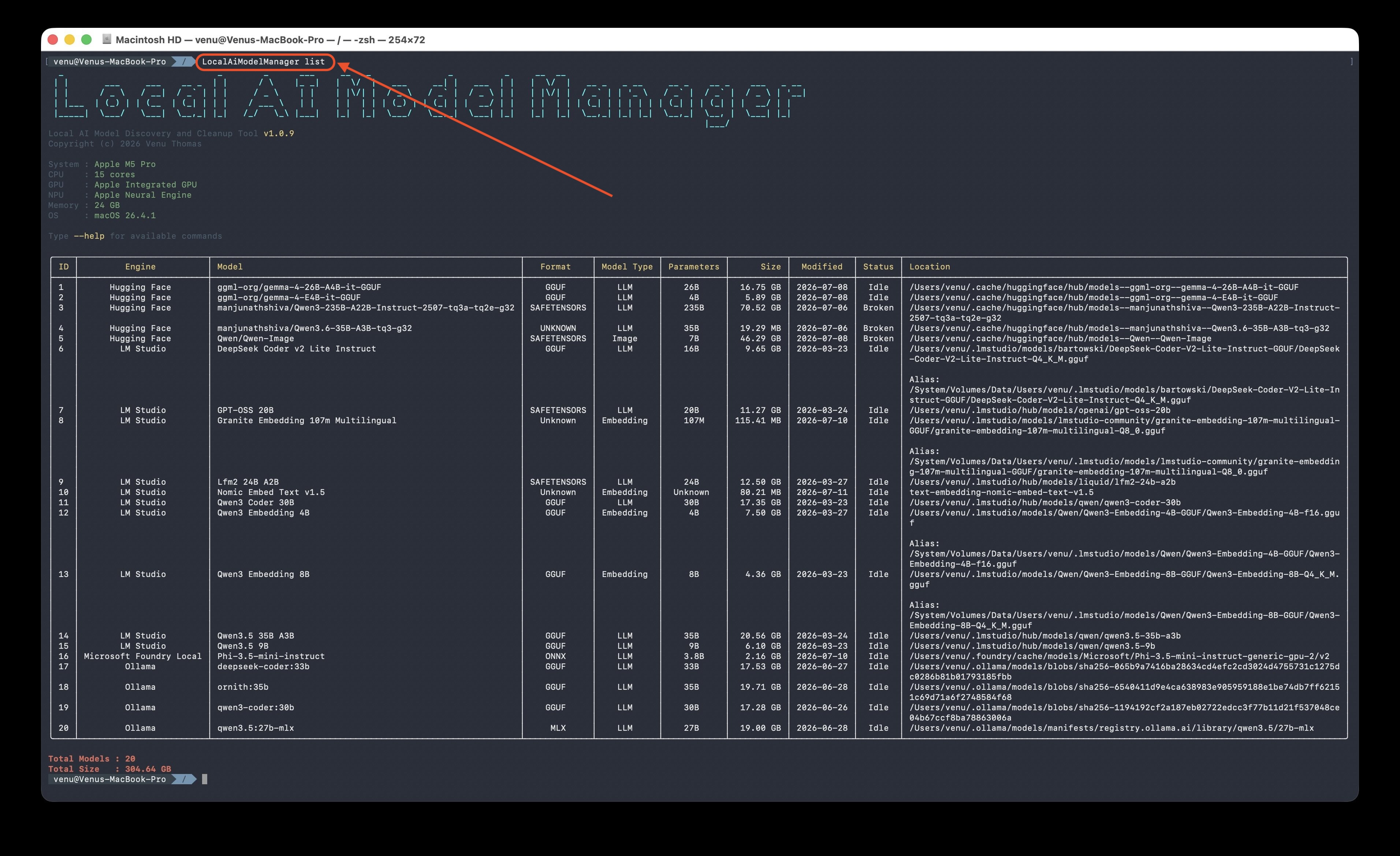
That's all most people need. The tool finds everything automatically — no setup, no config.
✨ Why use this?
| Without this tool | With this tool |
|---|---|
| ❌ No idea how many models are on your disk | ✅ One table shows every model |
| ❌ Every tool stores files in a different place | ✅ All locations scanned automatically |
| ❌ Can't tell which models are duplicates | ✅ Duplicates identified and grouped |
| ❌ Broken downloads waste space silently | ✅ Broken models flagged for easy cleanup |
| ❌ Deleting feels risky — what if it's in use? | ✅ Running models are protected from deletion |
| ❌ No idea what's taking the most space | ✅ Summary view shows biggest/oldest models |
📋 Commands
summary — Where is your space going? ⭐
The fastest way to understand your disk usage. Shows a storage breakdown instead of a long list.
localaimodelmanager summary
localaimodelmanager summary --engine Ollama    # scope to one tool
The summary shows three things:
- By engine — how many models and how much space each tool uses
- Top 5 by size — the biggest models on your system
- Oldest 5 — models you haven't touched in months (shown with "days ago")
list — Show all models
Lists every AI model in a clean table — with format, type, parameters, size, date, status, and location.
localaimodelmanager list
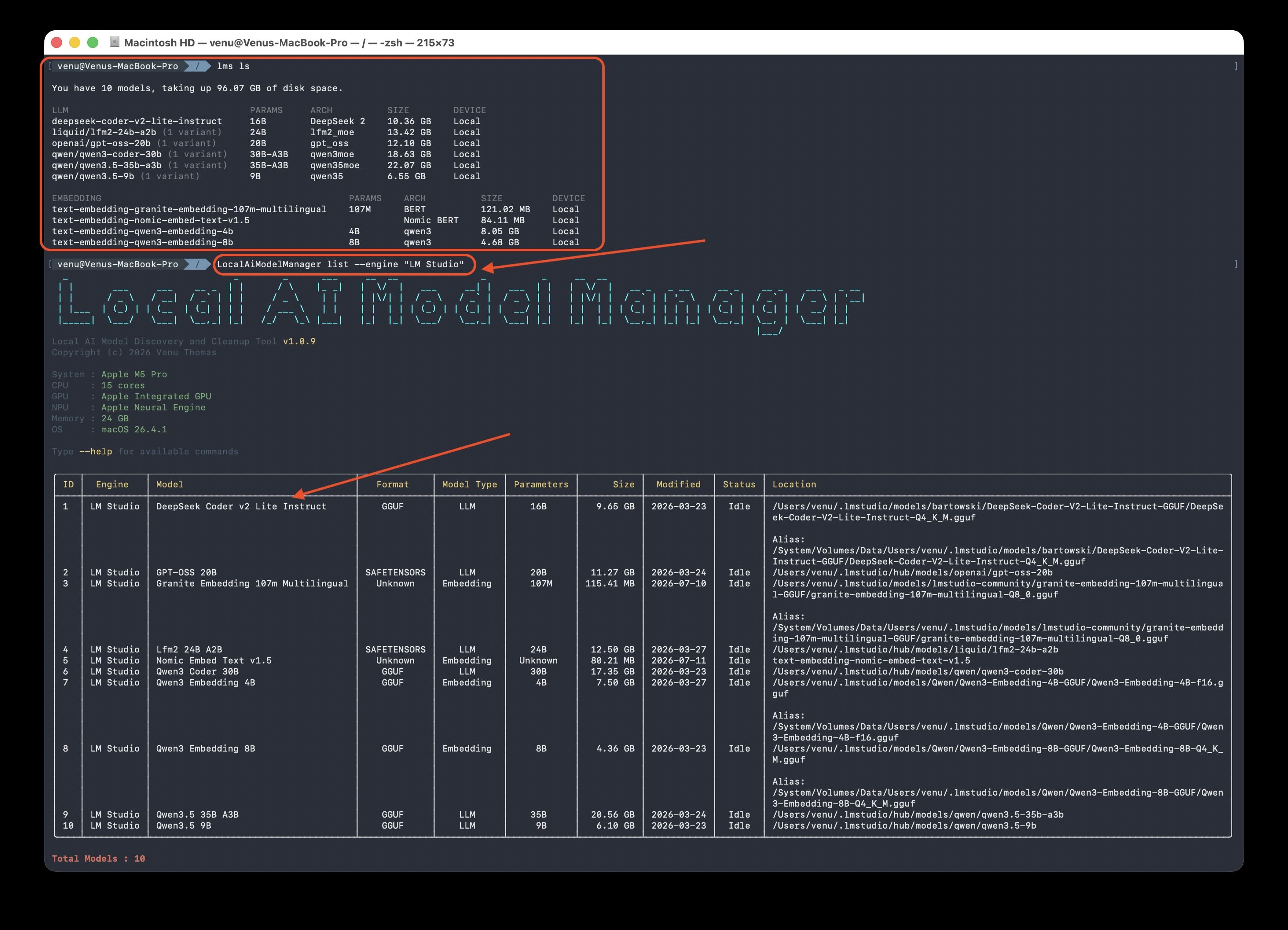
Filters
| Option | What it does | Example |
|---|---|---|
--engine <name> |
Show only one tool's models | --engine Ollama |
--format <name> |
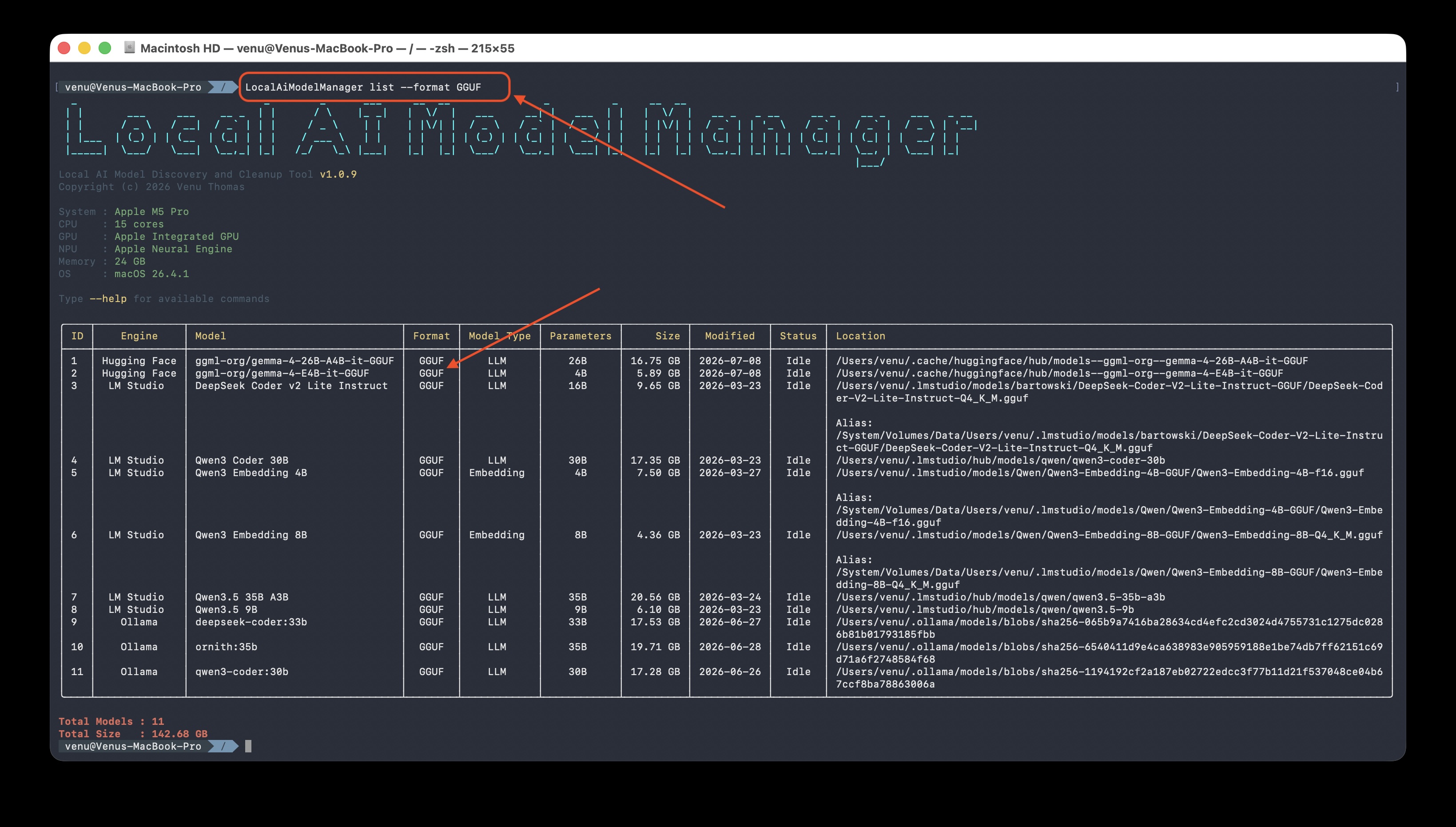
Show only one file format | --format GGUF |
--name <keyword> |
Search by model name | --name llama |
--type <type> |
Show only one model type | --type LLM |
--sort <key> |
Sort the results | --sort size |
--deletable |
Show only deletable models | --deletable |
Model types: LLM · Embedding · Vision · Multimodal · Audio · Image
Sort keys: engine (default) · name · size · date
Examples
localaimodelmanager list --engine Ollama              # only Ollama models
localaimodelmanager list --format GGUF --sort size    # GGUF files, biggest first
localaimodelmanager list --name llama --type LLM      # find Llama LLMs
localaimodelmanager list --sort date                  # oldest first (find stale models)
delete — Remove models you don't need
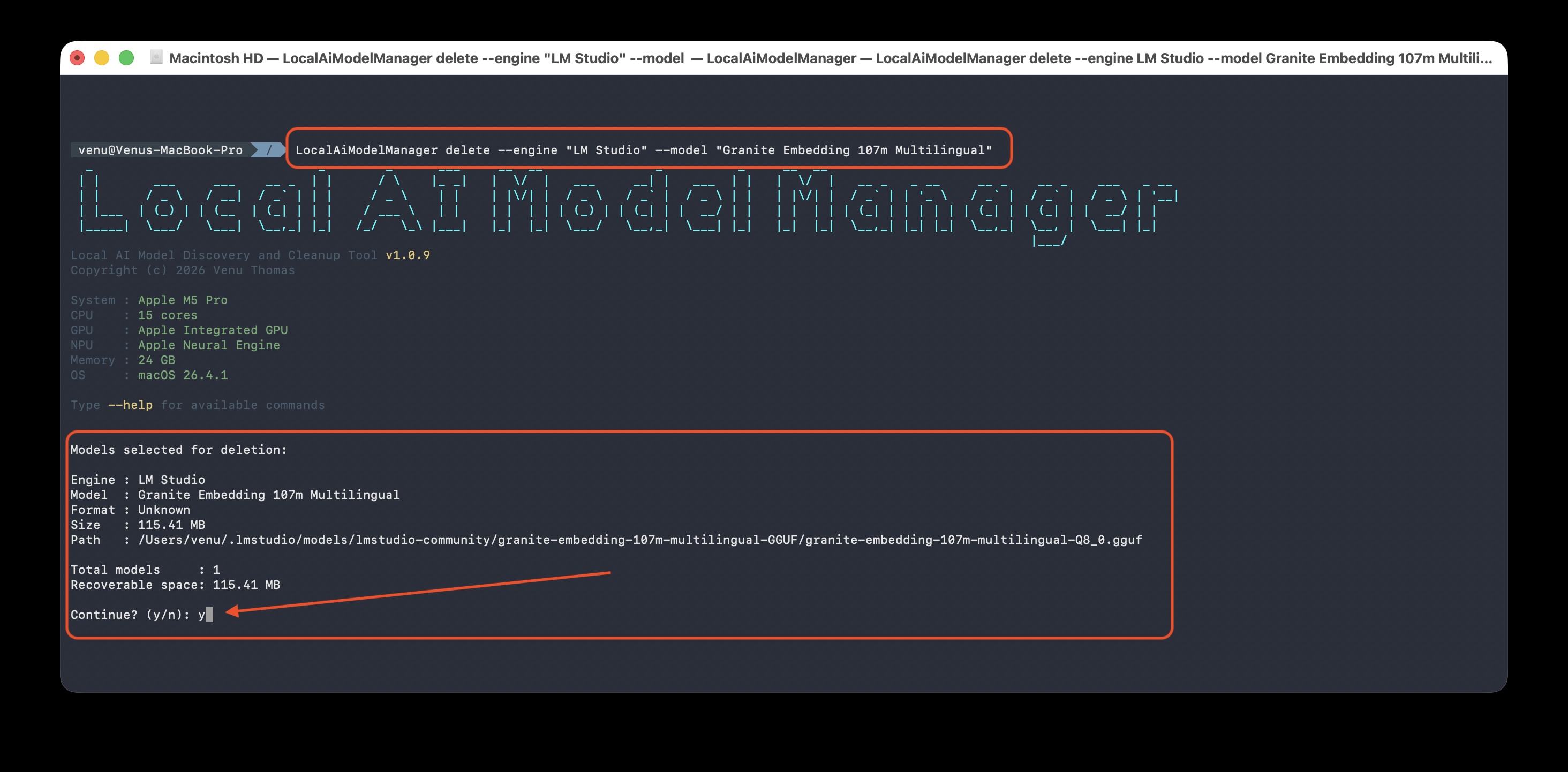
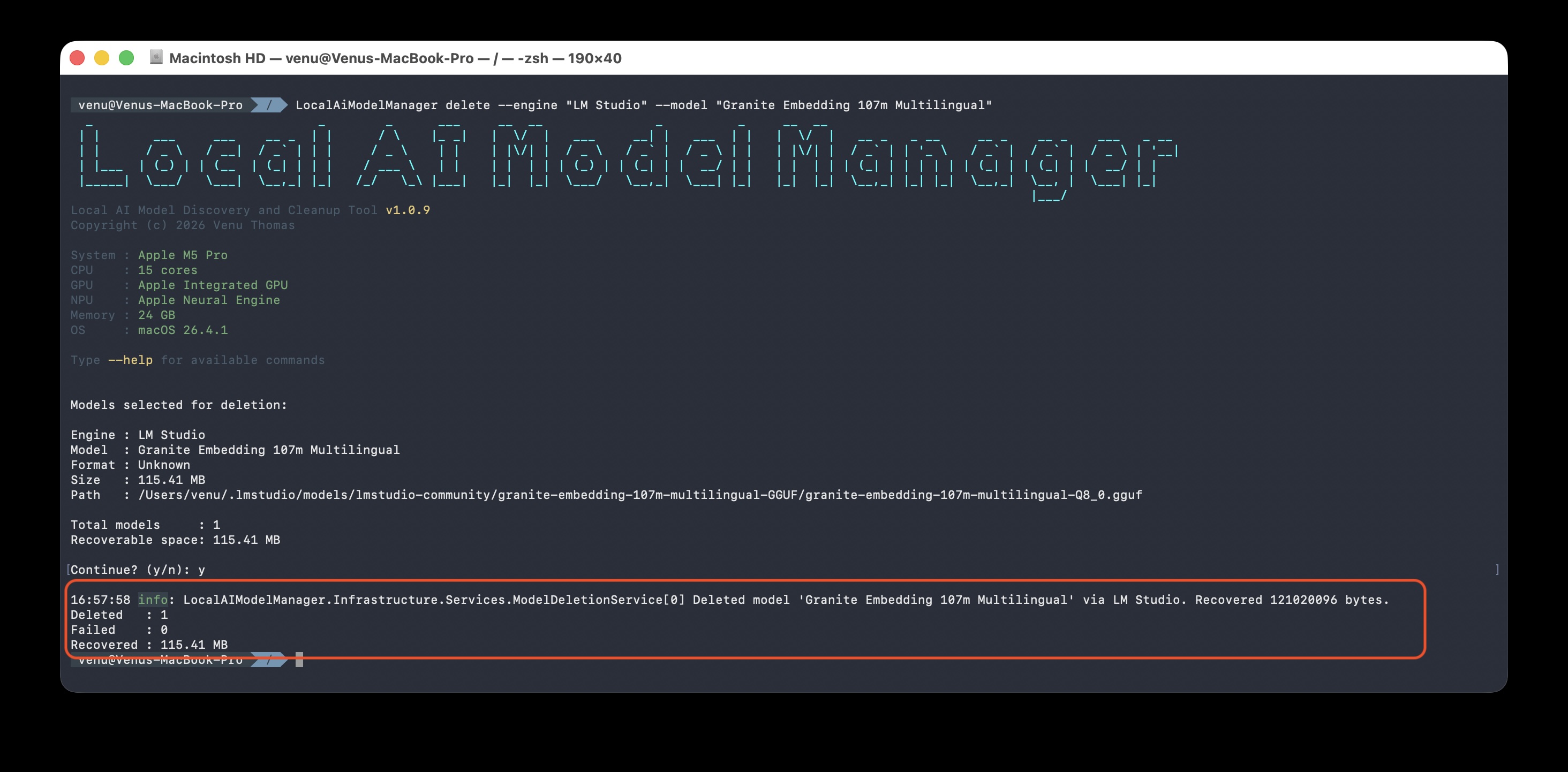
Deletes models matching your filters. Always asks for confirmation before removing anything.
localaimodelmanager delete --engine Ollama --model "gemma4:e4b"
Options
| Option | What it does |
|---|---|
--engine <name> |
Delete only under this tool |
--model <name> |
Delete models whose name matches |
--format <name> |
Delete only this format |
--all |
Confirm deletion without further filters |
⚠️ You must provide at least one filter. The tool will never delete everything by accident.
Examples
localaimodelmanager delete --engine Ollama --model "gemma4:e4b"   # one specific model
localaimodelmanager delete --engine Ollama --all                  # all Ollama models (be careful)
After confirming, the tool reports how many models were removed and how much space was recovered.
help — Show usage
localaimodelmanager help
⚡ Quick Reference
| Command | What it does |
|---|---|
localaimodelmanager |
List all models (same as list) |
localaimodelmanager summary |
Storage breakdown by engine |
localaimodelmanager list --engine <name> |
Filter by tool |
localaimodelmanager list --sort size |
Biggest models first |
localaimodelmanager list --sort date |
Oldest models first |
localaimodelmanager delete --engine <name> --model "<name>" |
Delete one model |
🧠 What it detects
The tool automatically finds models from all these tools and formats — no setup required:
AI tools: Ollama · LM Studio · Microsoft Foundry Local · Hugging Face · GPT4All · Jan · llama.cpp · MLX (Apple Silicon) · AI Toolkit
Model formats: GGUF · ONNX · SafeTensors · PyTorch · TensorFlow / Keras
🔍 The tool also detects broken downloads — if a download was interrupted, it's marked as
Brokenso you know it's safe to delete and reclaim the space.
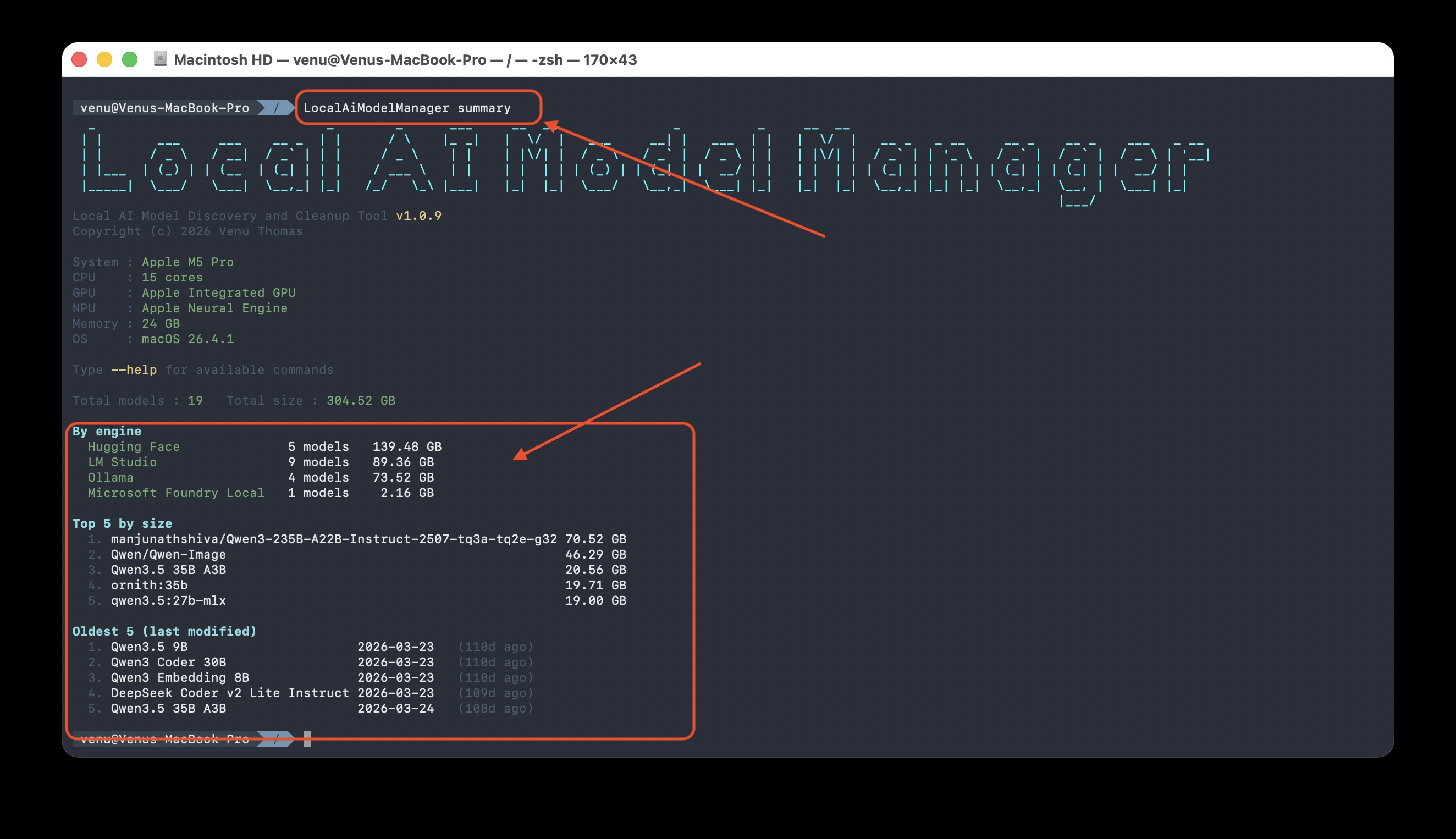
📊 Understanding the table
| Column | Meaning |
|---|---|
| ID | Row number (for reference) |
| Engine | Which tool or format the model belongs to |
| Model | The model name |
| Format | File format (GGUF, ONNX, SafeTensors, etc.) |
| Model Type | LLM, Embedding, Vision, Multimodal, Audio, Image |
| Parameters | Model size in parameters (7B, 13B, 70B, etc.) |
| Size | Actual disk space used |
| Modified | Last modified date |
| Status | Idle, InUse, Broken, Orphaned |
| Location | Full path to the model on your disk |
On macOS, the same file can sometimes be reached through two paths. When that happens, the alias is shown in grey below the main path — it's the same physical file, not a second copy, so the size is only counted once.
🖥️ Cross-platform
The same tool runs identically on Windows, macOS, and Linux. It detects CPU, GPU, NPU, cores, and memory on every platform.
📸 All Screenshots
1. System info and full model list — your system details, then every model found.
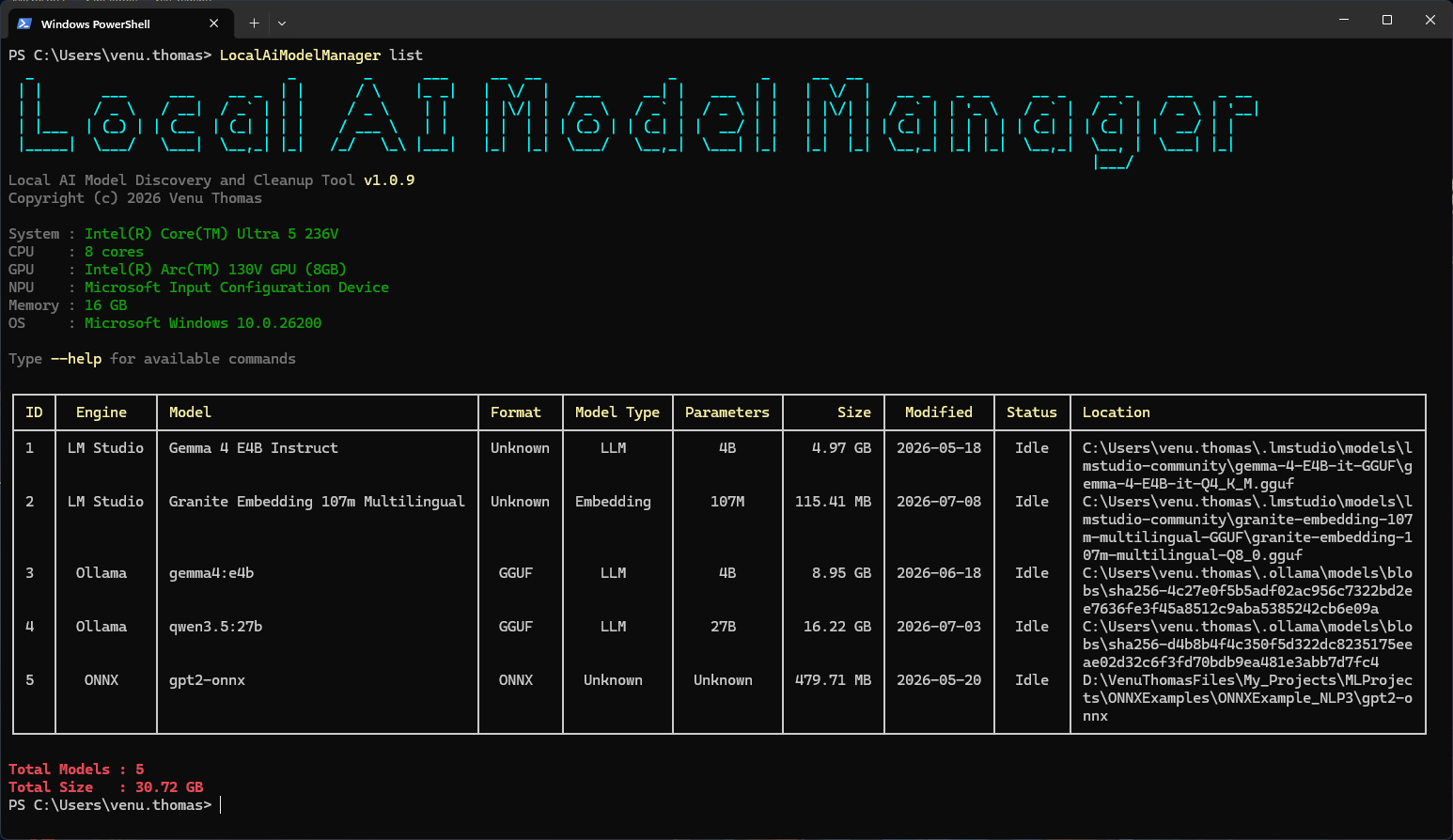
2. Models grouped by engine — each model with format, type, parameters, size, date, status, and path.
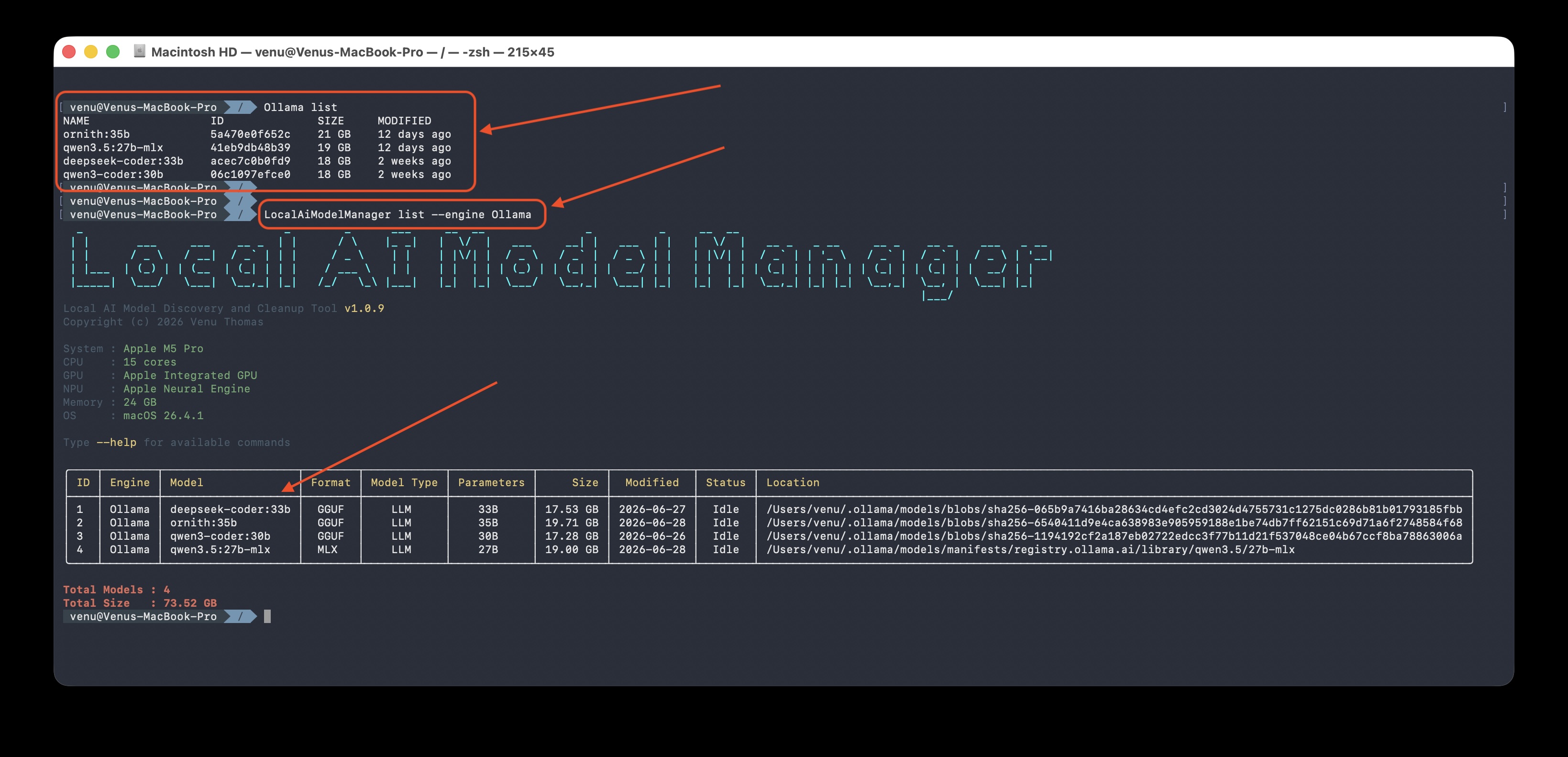
3. Summary view — storage usage broken down by engine, with the biggest and oldest models.
4. List with filters — narrow down by engine, format, name, type, or sort.
5. Delete confirmation — review before anything is removed.
6. Space recovered — how much was freed after deletion.
7. Broken downloads flagged — interrupted downloads marked for easy cleanup.
8. Running on Windows — same commands, same output.
❓ FAQ
Does this delete anything automatically?
No. The delete command always asks for confirmation first. list and summary only read — they never change anything.
Will it find models in custom folders? The tool scans the default locations each AI tool uses (Ollama, LM Studio, Hugging Face, GPT4All, Jan, and more). For most users, that's everything — no setup needed.
Is it safe? The tool only deletes what you tell it to, after confirmation. Models that are currently running (loaded by Ollama or Foundry) are protected — the tool won't let you delete a model that's in use.
Does it need admin rights? No. It runs as your normal user account.
Why are some models shown as Broken?
That usually means a download didn't finish (common with large Hugging Face models). The weights are incomplete — safe to delete to reclaim space.
What does Status mean?
Idle— model is on disk but not currently loadedInUse— model is currently running (protected from deletion)Broken— download was interrupted; incomplete and unusableOrphaned— cache entry with no manifest
💡 Tips
- Start with
summaryto see where your space is going, then uselistto dig in. - Sort by date (
list --sort date) to find models you haven't touched in months. - Filter by engine before deleting — safer than deleting across all tools at once.
- Broken = free space — any model showing
Brokenis reclaimable disk space from a failed download.
👨💻 Author
Venu Thomas — from Kerala, India 🇮🇳
Copyright © 2026 Venu Thomas. All rights reserved.
| Product | Versions Compatible and additional computed target framework versions. |
|---|---|
| .NET | net10.0 is compatible. net10.0-android was computed. net10.0-browser was computed. net10.0-ios was computed. net10.0-maccatalyst was computed. net10.0-macos was computed. net10.0-tvos was computed. net10.0-windows was computed. |
This package has no dependencies.
| Version | Downloads | Last Updated |
|---|---|---|
| 1.0.10 | 161 | 7/11/2026 |