DotMake.SvgSprite
2.0.0
dotnet add package DotMake.SvgSprite --version 2.0.0
NuGet\Install-Package DotMake.SvgSprite -Version 2.0.0
<PackageReference Include="DotMake.SvgSprite" Version="2.0.0" />
<PackageVersion Include="DotMake.SvgSprite" Version="2.0.0" />
<PackageReference Include="DotMake.SvgSprite" />
paket add DotMake.SvgSprite --version 2.0.0
#r "nuget: DotMake.SvgSprite, 2.0.0"
#:package DotMake.SvgSprite@2.0.0
#addin nuget:?package=DotMake.SvgSprite&version=2.0.0
#tool nuget:?package=DotMake.SvgSprite&version=2.0.0

DotMake Svg-Sprite Library
A dotnet library for building or extracting of an SVG sprite, i.e. a .svg file with child <symbol> tags.
We also offer a dotnet tool svg-sprite for same purpose.
There was no proper tool for .NET (there are some for npm) for handling SVG sprites so this tool is created. It could be useful in MSBuild targets or build scripts, especially for web applications.
Getting started
Install the dotnet library from NuGet.
In your project directory, via dotnet cli:
dotnet add package DotMake.SvgSprite
Prerequisites
- .NET Standard 2.0 and later project.
Note that .NET Framework 4.7.2+ or .NET Core 2.0+ or .NET 5.0+ projects can reference our netstandard2.0 target (automatic in nuget).
Usage
Refer to DotMake Svg-Sprite API Reference for more details.
Use SvgSpriteBuilder.AddSymbol() method to build an SVG sprite file from input SVG files:
//Build an SVG sprite file from input SVG files

var svgDocument = new SvgDocument();
var svgSpriteBuilder = new SvgSpriteBuilder(svgDocument);

foreach (var file in Directory.EnumerateFiles(@"inputs\", "*.svg"))
{
    var svgDocumentToAdd = new SvgDocument(file);
    var symbolId = Path.GetFileNameWithoutExtension(file);

    svgSpriteBuilder.AddSymbol(svgDocumentToAdd, symbolId);
}

svgDocument.Save(@"sprite.svg");
//Build an SVG sprite file from input SVG files with custom options

var svgDocument = new SvgDocument();
var svgSpriteBuilder = new SvgSpriteBuilder(svgDocument);
var svgSymbolOptions = new SvgSymbolOptions
{
    //These are default values for options
    AttributesToPreserve = new[] { "id", "viewBox", "class", "style", "fill", "stroke", "opacity", "transform" },
    ElementsToPreserve = new[] { "*" },
    IdForMissing = "symbol",
    IdReplacementChar = '-',
    IdLowerCased = true
};

foreach (var file in Directory.EnumerateFiles(@"inputs\", "*.svg"))
{
    var svgDocumentToAdd = new SvgDocument(file);
    var symbolId = Path.GetFileNameWithoutExtension(file);

    svgSpriteBuilder.AddSymbol(svgDocumentToAdd, symbolId, svgSymbolOptions);
}

svgDocument.Save(@"sprite.svg");
Use SvgSpriteBuilder.ExtractSymbol() method to extract symbols from an SVG sprite file to individual SVG files:
//Extract symbols from an SVG sprite file to individual SVG files

var svgDocument = new SvgDocument(@"sprite.svg");
var svgSpriteBuilder = new SvgSpriteBuilder(svgDocument);
var outputDirectory = @"outputs\";

foreach (var symbolId in svgSpriteBuilder.GetSymbolIds())
{
    var svgDocumentToExtract = svgSpriteBuilder.ExtractSymbol(symbolId);
    var svgFile = Path.Combine(outputDirectory, Path.ChangeExtension(symbolId, ".svg"));

    Directory.CreateDirectory(outputDirectory);
    svgDocumentToExtract.Save(svgFile);
}
//Extract symbols from an SVG sprite file to individual SVG files with custom options

var svgDocument = new SvgDocument(@"sprite.svg");
var svgSpriteBuilder = new SvgSpriteBuilder(svgDocument);
var svgSymbolOptions = new SvgSymbolOptions
{
    //These are default values for options
    AttributesToPreserve = new[] { "id", "viewBox", "class", "style", "fill", "stroke", "opacity", "transform" },
    ElementsToPreserve = new[] { "*" },
    IdForMissing = "symbol",
    IdReplacementChar = '-',
    IdLowerCased = true
};
var outputDirectory = @"outputs\";

foreach (var symbolId in svgSpriteBuilder.GetSymbolIds())
{
    var svgDocumentToExtract = svgSpriteBuilder.ExtractSymbol(symbolId, svgSymbolOptions);
    var svgFile = Path.Combine(outputDirectory, Path.ChangeExtension(symbolId, ".svg"));

    Directory.CreateDirectory(outputDirectory);
    svgDocumentToExtract.Save(svgFile);
}
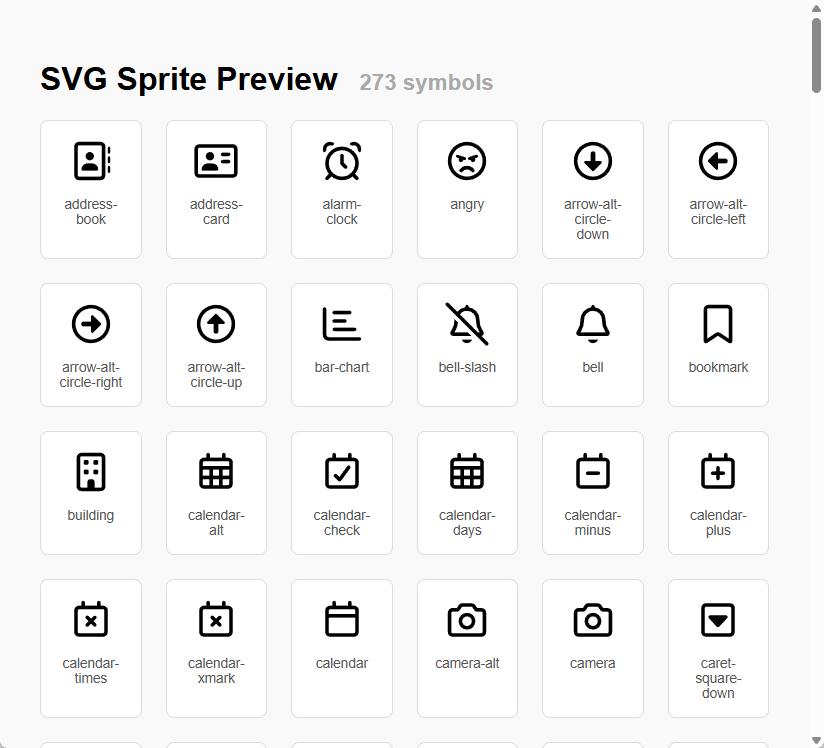
Use SvgSpriteBuilder.CreatePreviewPage() method to create an HTML page for previewing the symbols inside the SVG sprite:
//Create an HTML page for previewing the symbols inside the SVG sprite

var svgDocument = new SvgDocument(@"sprite.svg");
var svgSpriteBuilder = new SvgSpriteBuilder(svgDocument);

var html = svgSpriteBuilder.CreatePreviewPage();
File.WriteAllText(@"preview.html", html);
Note that <use> tag does not work cross-origin, including local HTML files (when not viewed from a web server),
so we put/inline the SVG sprite into HTML for the preview page.
Using SVG sprites
Once you have an SVG sprite, for example sprite.svg like this:
<svg xmlns="http://www.w3.org/2000/svg">

  <symbol viewBox="0 0 640 640" id="address-book">
    <path fill="currentColor" d="M448 112C456.8 112 464 119.2 464 128L464 512C464 520.8 456.8 528 448 528L160 528C151.2 528 144 520.8 144 512L144 128C144 119.2 151.2 112 160 112L448 112zM160 64C124.7 64 96 92.7 96 128L96 512C96 547.3 124.7 576 160 576L448 576C483.3 576 512 547.3 512 512L512 128C512 92.7 483.3 64 448 64L160 64zM304 312C334.9 312 360 286.9 360 256C360 225.1 334.9 200 304 200C273.1 200 248 225.1 248 256C248 286.9 273.1 312 304 312zM272 352C227.8 352 192 387.8 192 432C192 440.8 199.2 448 208 448L400 448C408.8 448 416 440.8 416 432C416 387.8 380.2 352 336 352L272 352zM576 144C576 135.2 568.8 128 560 128C551.2 128 544 135.2 544 144L544 208C544 216.8 551.2 224 560 224C568.8 224 576 216.8 576 208L576 144zM560 256C551.2 256 544 263.2 544 272L544 336C544 344.8 551.2 352 560 352C568.8 352 576 344.8 576 336L576 272C576 263.2 568.8 256 560 256zM576 400C576 391.2 568.8 384 560 384C551.2 384 544 391.2 544 400L544 464C544 472.8 551.2 480 560 480C568.8 480 576 472.8 576 464L576 400z" />
  </symbol>

  <symbol viewBox="0 0 640 640" id="alarm-clock">
    <path fill="currentColor" d="M466.6 114.2C461.2 115.9 455.3 116 450.4 113.3C444.6 110.1 438.6 107.1 432.6 104.4C422.2 99.7 418.9 86.1 428.5 79.8C443.5 69.9 461.5 64.1 480.8 64.1C533.4 64.1 576 106.7 576 159.3C576 172.5 573.3 185.1 568.4 196.6C563.9 207.1 550 206.4 543.5 197C539.7 191.5 535.7 186.2 531.5 181C528 176.6 527 170.8 527.7 165.2C527.9 163.3 528.1 161.3 528.1 159.3C528.1 133.2 506.9 112.1 480.9 112.1C476 112.1 471.2 112.9 466.7 114.3zM96.5 196.9C90 206.3 76 207 71.6 196.5C66.7 185 64 172.4 64 159.2C64 106.6 106.6 64 159.2 64C178.5 64 196.5 69.8 211.5 79.7C221.1 86 217.8 99.6 207.4 104.3C201.3 107.1 195.4 110 189.6 113.2C184.7 115.9 178.7 115.8 173.4 114.1C168.9 112.7 164.2 111.9 159.2 111.9C133.1 111.9 112 133.1 112 159.1C112 161.1 112.1 163.1 112.4 165C113.1 170.6 112.1 176.4 108.6 180.8C104.4 186 100.4 191.3 96.6 196.8zM496 352C496 254.8 417.2 176 320 176C222.8 176 144 254.8 144 352C144 449.2 222.8 528 320 528C417.2 528 496 449.2 496 352zM460.5 526.5C422.1 557.4 373.2 576 320 576C266.8 576 217.9 557.4 179.5 526.5L137 569C127.6 578.4 112.4 578.4 103.1 569C93.8 559.6 93.7 544.4 103.1 535.1L145.6 492.6C114.6 454.1 96 405.2 96 352C96 228.3 196.3 128 320 128C443.7 128 544 228.3 544 352C544 405.2 525.4 454.1 494.5 492.5L537 535C546.4 544.4 546.4 559.6 537 568.9C527.6 578.2 512.4 578.3 503.1 568.9L460.6 526.4zM344 248L344 342.1L385 383.1C394.4 392.5 394.4 407.7 385 417C375.6 426.3 360.4 426.4 351.1 417L303.1 369C298.6 364.5 296.1 358.4 296.1 352L296.1 248C296.1 234.7 306.8 224 320.1 224C333.4 224 344.1 234.7 344.1 248z" />
  </symbol>

</svg>
You can use symbols from this sprite in your HTML pages like this:
<svg>
  <use href="sprite.svg#address-book" />
</svg>

<svg style="width: 48px; height: 48px;">
  <use href="sprite.svg#alarm-clock" />
</svg>
Note that <use> tag does not work cross-origin, including local HTML files (when not viewed from a web server),
so in that case you should put/inline the SVG sprite into your HTML page and
then you should only include the URL fragment in href attribute:
<svg>
  <use href="#address-book" />
</svg>

<svg style="width: 48px; height: 48px;">
  <use href="#alarm-clock" />
</svg>
Note that for <use> tag, the old attribute xlink:href is deprecated and the attribute href is used since browser
versions released from 2016-2019.
Links
Additional documentation
| Product | Versions Compatible and additional computed target framework versions. |
|---|---|
| .NET | net5.0 was computed. net5.0-windows was computed. net6.0 was computed. net6.0-android was computed. net6.0-ios was computed. net6.0-maccatalyst was computed. net6.0-macos was computed. net6.0-tvos was computed. net6.0-windows was computed. net7.0 was computed. net7.0-android was computed. net7.0-ios was computed. net7.0-maccatalyst was computed. net7.0-macos was computed. net7.0-tvos was computed. net7.0-windows was computed. net8.0 is compatible. net8.0-android was computed. net8.0-browser was computed. net8.0-ios was computed. net8.0-maccatalyst was computed. net8.0-macos was computed. net8.0-tvos was computed. net8.0-windows was computed. net9.0 was computed. net9.0-android was computed. net9.0-browser was computed. net9.0-ios was computed. net9.0-maccatalyst was computed. net9.0-macos was computed. net9.0-tvos was computed. net9.0-windows was computed. net10.0 was computed. net10.0-android was computed. net10.0-browser was computed. net10.0-ios was computed. net10.0-maccatalyst was computed. net10.0-macos was computed. net10.0-tvos was computed. net10.0-windows was computed. |
| .NET Core | netcoreapp2.0 was computed. netcoreapp2.1 was computed. netcoreapp2.2 was computed. netcoreapp3.0 was computed. netcoreapp3.1 was computed. |
| .NET Standard | netstandard2.0 is compatible. netstandard2.1 was computed. |
| .NET Framework | net461 was computed. net462 was computed. net463 was computed. net47 was computed. net471 was computed. net472 was computed. net48 was computed. net481 was computed. |
| MonoAndroid | monoandroid was computed. |
| MonoMac | monomac was computed. |
| MonoTouch | monotouch was computed. |
| Tizen | tizen40 was computed. tizen60 was computed. |
| Xamarin.iOS | xamarinios was computed. |
| Xamarin.Mac | xamarinmac was computed. |
| Xamarin.TVOS | xamarintvos was computed. |
| Xamarin.WatchOS | xamarinwatchos was computed. |
-
.NETStandard 2.0
- No dependencies.
-
net8.0
- No dependencies.
NuGet packages
This package is not used by any NuGet packages.
GitHub repositories
This package is not used by any popular GitHub repositories.
- **Improved:** Added `net8.0` as additional target framework to the library.
- **Improved:** Strong name sign the DLLs for NuGet package. Signing will be done only when `DotMake.snk` exists,
it's not committed to this repository.