ClrKernel.Core
0.8.0
dotnet add package ClrKernel.Core --version 0.8.0
NuGet\Install-Package ClrKernel.Core -Version 0.8.0
<PackageReference Include="ClrKernel.Core" Version="0.8.0" />
<PackageVersion Include="ClrKernel.Core" Version="0.8.0" />
<PackageReference Include="ClrKernel.Core" />
paket add ClrKernel.Core --version 0.8.0
#r "nuget: ClrKernel.Core, 0.8.0"
#:package ClrKernel.Core@0.8.0
#addin nuget:?package=ClrKernel.Core&version=0.8.0
#tool nuget:?package=ClrKernel.Core&version=0.8.0


ClrKernel
A Jupyter kernel for .NET. C# cells are evaluated with Roslyn's scripting engine
(Microsoft.CodeAnalysis.CSharp.Scripting),
with more CLR languages (PowerShell, F#) on the roadmap. Notebooks run
interactively in JupyterLab / VS Code (Jupyter extension) and headlessly via
nbconvert or papermill — including from schedulers like SQL Server Agent.
ClrKernel is a maintained fork of
SciSharp/ICSharpCore, created after
Microsoft deprecated .NET Interactive / Polyglot Notebooks (April 2026).
Relative to upstream it adds: correct headless execution under
nbclient/papermill, full output capture for async/await cells, control
channel + heartbeat + graceful shutdown_request handling, patched vulnerable
dependencies, and the kernelspec shipped inside the NuGet package.
Install
dotnet tool install --global ClrKernel
jupyter kernelspec install "$(clrkernel --kernel-spec-path)" --user --name clrkernel
jupyter kernelspec list   # should show: clrkernel
Requires a .NET 8+ runtime (RollForward=Major: newer majors work) and Jupyter.
Use
Pick the ClrKernel (C#) kernel in JupyterLab or VS Code. Cells support
#r "nuget: Package, Version" and #r "path/to/local.dll" references, with
REPL-style state persisting across cells.
Importing shared libraries
#!import loads C# code from another file into the session — use it to share
helper libraries between notebooks, no .NET Interactive required:
#!import "../lib/jobbooks.dib"
Supports .dib (C# sections run; markdown and other-language sections are
skipped), .ipynb (code cells run), and .csx/.cs (whole file). Relative
paths resolve against the notebook's directory, and nested #!imports inside
a library resolve relative to that library's own file. Each resolved file runs
once per session — re-importing is a no-op unless you pass --force
(#!import --force "lib.dib"), which is handy while iterating on the library
itself. Imported files can use #r directives, including #r "nuget: ...",
and can #!import further files.
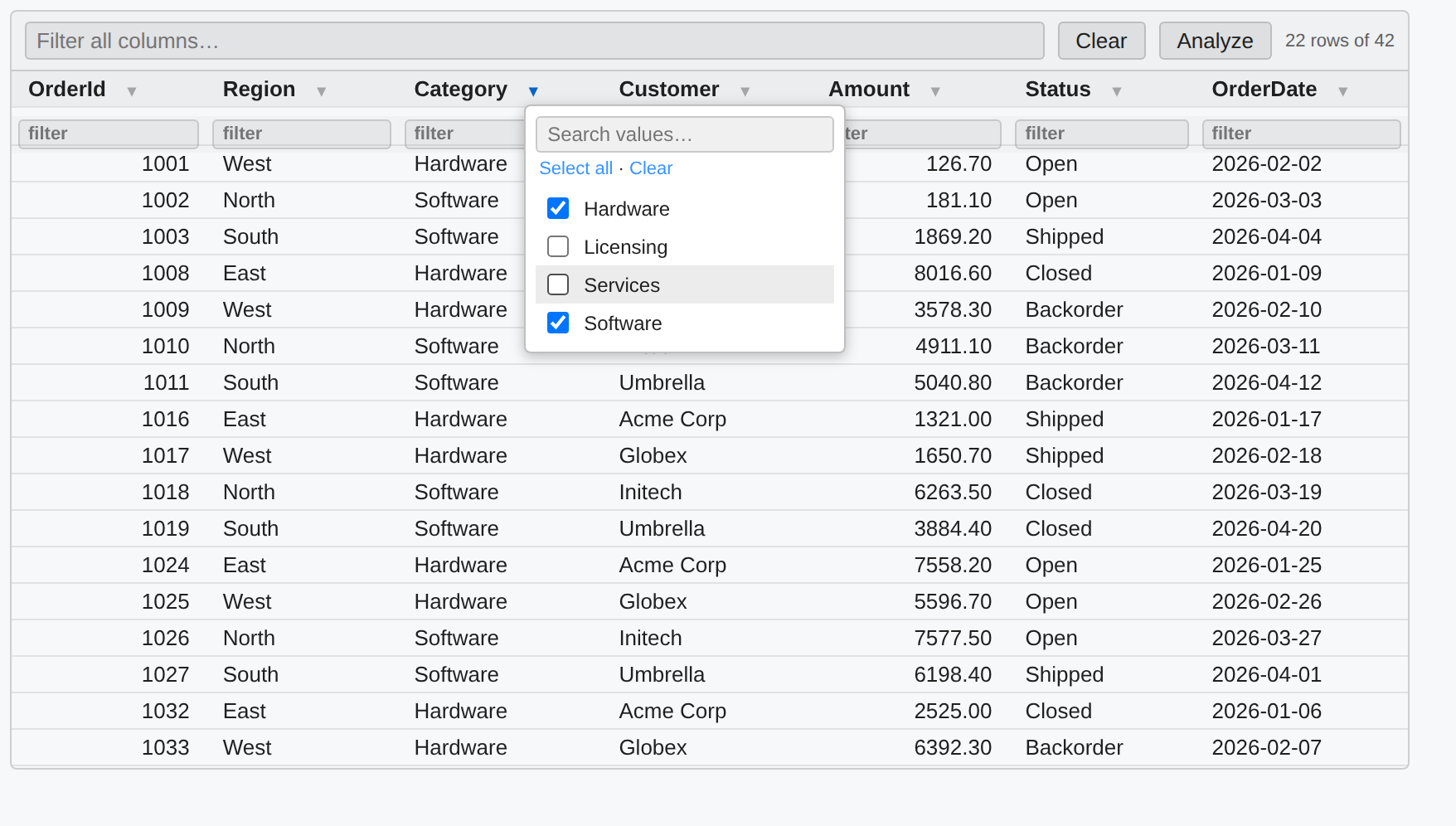
SQL cells
Set a cell's language to SQL (or start it with #!sql) to run T-SQL against
Microsoft SQL Server. You get T-SQL highlighting, live syntax checking,
keyword/function completion, and results as the same interactive grid (sort, a
global filter, per-column filters and value pickers that combine, and Analyze)
that C# query results use.
Connections are named and secret-free — passwords never go in the
notebook. Define them with #!sql-connect, or use the connection button next to
the cell's language picker, which prompts for credentials and stores the
password in your OS credential store (macOS Keychain, Windows Credential Manager,
Linux libsecret):
#!sql-connect --name analytics --server sql-warehouse --database reports --auth integrated --default
--auth integrated is Windows Integrated auth on Windows and Microsoft Entra
(Azure AD) sign-in on macOS/Linux; --auth sql --user <u> is a SQL login whose
password comes from the secret store (or the CLRKERNEL_SECRET_SQL_<NAME> env
var for headless runs). A cell targets the default connection, or one named with
a leading -- connections <name> comment. Multiple connections can be used
across cells in one notebook. A #!sql-connect --name analytics also binds a C#
variable analytics (when the name is a valid identifier) so C# cells can query
it straight away; use --var <name> for a custom variable or --no-var to skip.
See samples/Sql.nb.md.
Querying from C#
C# cells get an ergonomic query API on Sql — no #!sql-connect needed for
ad-hoc work. Sql.Connection(server, database) opens a connection (Integrated
Security by default), and .Query(sql).Results() returns rows that render as
the interactive grid and are enumerable as dynamic rows in the same object:
var dw = Sql.Connection("dw.db.local", "datawarehouse");

var orders = dw.Query("select * from dbo.Orders").Results();  // grid when shown…
foreach (var o in orders) Console.WriteLine($"{o.OrderId}: {o.Total}");  // …rows in code
.Results<T>() maps rows to a record or class; .Query(sql, new { id }) binds
parameters; .Scalar<T>(sql) and .Execute(sql) cover single values and
non-queries. A .Table(name) reads as a source and writes as a bulk-copy target
(createIfMissing builds it from the source schema), and .Transaction() scopes
a unit of work:
var recent = dw.Query("select * from dbo.Orders where Year = @y", new { y = 2026 }).Results<Order>();
dw.Table("stg.Orders").BulkCopyFrom(dw.Query("select * from dbo.Orders"), createIfMissing: true);
record Order(int OrderId, string Customer, decimal Total);
For a SQL login use Sql.Connection(server, db, user, "sql:secretRef") (password
from the secret store); Sql.AzureConnection(...) for Entra, or
Sql.Database("analytics") to reuse a registered #!sql-connect connection. See
samples/SqlQuery.nb.md.
Bulk copy & MERGE (ETL)
SQL cells can also move and upsert data, as cell magics or a C# API (both share
the same connections). #!sql-bulk streams a query's rows into a table (with a
live progress bar); #!sql-merge upserts a source into a target on key columns
and reports inserted/updated/deleted counts:
#!sql-bulk  --from analytics --query "SELECT * FROM dbo.Orders" --to warehouse --table stg.Orders --truncate
#!sql-merge --connection warehouse --target dbo.Customers --source stg.Customers --on Id
From C# cells, Sql bulk-loads any collection (POCOs, dictionaries, scalar
arrays) and runs MERGEs — Sql.BulkCopy("warehouse", "dbo.Items", rows),
Sql.Merge("warehouse", new MergeSpec { Target = "dbo.Customers", Source = "stg.Customers", KeyColumns = new[] { "Id" } }). See
samples/SqlEtl.nb.md.
Pipelines & deployment
Annotate SQL cells with -- step <name> and -- needs <a, b> to build an ETL
pipeline. #!sql-run executes the steps as a dependency DAG — independent steps
run in parallel, a failure skips everything downstream, and a live status board
tracks each step. #!sql-deploy --path <folder> deploys a folder of .sql
definitions idempotently (CREATE OR ALTER, retried across passes to resolve
cross-file dependencies). The -- step / -- needs directives and every
#!sql-* magic and flag autocomplete (Ctrl+Space) — -- needs even completes
step names from your other cells. See
samples/SqlPipeline.nb.md.
Other databases (Oracle, ODBC, JDBC)
The fluent query API isn't SQL-Server-only. Opt-in provider packages give the exact
same Query(sql).Results() experience — interactive grid + dynamic rows, typed
.Results<T>(), .Table(), .Transaction() — against other engines. Load a
provider per notebook with #r "nuget: …" so its driver isn't pulled unless you use
it:
#r "nuget: ClrKernel.Data.Oracle"
using ClrKernel.Data.Oracle;
var erp = Oracle.Connect("orahost", 1521, "ORCL", "scott", "oracle:erp");   // password from the secret store
erp.Query("select * from emp").Results()
#r "nuget: ClrKernel.Data.Odbc"
using ClrKernel.Data.Odbc;
var db = Odbc.FromConnectionString("Driver={PostgreSQL Unicode};Server=host;Database=app;");
db.Query("select * from public.orders").Results<Order>();
ClrKernel.Data.Jdbc (experimental) runs Java JDBC drivers via IKVM, including an
OpenEdge helper — you supply the driver assembly; validate on Windows before
relying on it.
Config-file connections. Keep connection settings out of notebooks in a
connections.json (searched up the folder tree; $type selects the provider,
passwords are secret references resolved from the OS store / env var):
{
  "erp": { "$type": "Oracle", "server": "orahost", "port": 1521,
           "serviceName": "ORCL", "userId": "scott",
           "password": { "secret": "oracle:erp" } }
}
var erp = Oracle.FromConfig("erp"); // Odbc.FromConfig(...) too
All providers share the ClrKernel.Data core (the same secret store and result grid
as #!sql cells). See samples/MultiProvider.nb.md.
Analysis Services (SSAS / Fabric)
C# cells can drive Tabular models — on-prem SQL Server Analysis Services, Azure
Analysis Services, or Microsoft Fabric / Power BI semantic models — via the Ssas
helper: query with DAX, read table/partition metadata, and process the model.
var cube = Ssas.Connect("ssas.db.local", "DataWarehouse");   // Integrated auth
cube.Query("EVALUATE TOPN(100, 'Sales')");                   // DAX → interactive grid
cube.Tables().DisplayTable();                                // model metadata
cube.ProcessPartitions(new[] { ("Sales", "2026") });         // refresh a partition
cube.Recalculate();
Ssas.ConnectFabric("Workspace", "Model") connects to a Fabric/Power BI semantic
model with Entra auth. On-prem SSAS + Integrated auth + processing generally run
on Windows (e.g. SQL Server Agent). See
samples/AnalysisServices.nb.md.
DAX cells
Set a cell's language to DAX (or start it with #!dax) to run DAX against a
cube, results in an interactive grid. Define cubes with #!dax-connect (the
default, or --connections <name> per cell); the #!dax-* magics/flags, cube
names, and DAX keywords/functions autocomplete.
#!dax-connect --name analytics --server ssas.db.local --database DataWarehouse --default
EVALUATE TOPN(100, SUMMARIZECOLUMNS('Date'[Year], "Revenue", [Total Sales]), [Revenue], DESC)
#!dax-connect --fabric --workspace W --model M targets a Fabric / Power BI
semantic model. See samples/Dax.nb.md.
Fabric warehouse writes
C# cells can write to Microsoft Fabric Warehouse tables via the Fabric
helper (ClrKernel.Fabric). It bulk-inserts a data reader by staging Parquet to a
lakehouse in OneLake and loading it with OPENROWSET — the fast path for large
loads — and it can create the target table from the reader's schema using
Fabric-supported types (UTF-8 varchar, datetime2 — never nvarchar). All auth
is Microsoft Entra; no passwords are handled.
var wh = Fabric.Connect()                       // interactive / default Entra sign-in
    .Workspace("Analytics")
    .Warehouse("SalesDW")
    .WithStaging("Lakehouse_Staging");          // a lakehouse in the same workspace

// Bulk-insert any IDataReader (e.g. a SQL Server query via ClrKernel.Sql):
using var conn = Sql.OpenConnection("analytics");
using var cmd = new SqlCommand("SELECT * FROM dbo.Orders", conn);
using var reader = cmd.ExecuteReader();
wh.BulkInsert(reader, "dbo.Orders", createIfMissing: true);
The reload-batch wrapper deletes a segment and reloads it for a set of tables in parallel — each table gets a fresh source reader from your factory:
var requests = new[] {
    new FabricReloadRequest { TableName = "FactSales", SegmentFilter = "Year = 2026" },
    new FabricReloadRequest { TableName = "FactReturns", SegmentFilter = "Year = 2026" },
};
var results = wh.ReloadBatch(
    requests,
    req => {
        var c = Sql.OpenConnection("analytics");
        var q = new SqlCommand($"SELECT * FROM {req.TableName} WHERE {req.SegmentFilter}", c);
        return q.ExecuteReader(CommandBehavior.CloseConnection); // reader owns/closes the connection
    },
    maxParallelism: 4);
results.DisplayTable();
For a service principal, use Fabric.ClientSecret(tenantId, clientId, secret). See
samples/FabricWarehouse.nb.md. (Fabric execution
needs a live tenant, so validate against your own workspace.)
Headless / scheduled execution:
jupyter nbconvert --to notebook --execute --output out.ipynb etl.ipynb
papermill etl.ipynb runs/etl_out.ipynb -k clrkernel --language .net-csharp -p run_date 2026-08-04
A failing cell exits non-zero (job schedulers see the failure); papermill also persists the partially-executed output notebook as a diagnostic artifact.
Build & test
A cross-platform task runner (built on Nuke) drives build,
test, format, and the VS Code extension. It needs only the .NET SDK — no extra
tools to install. Use ./build.sh on macOS/Linux, .\build.ps1 (or
build.cmd) on Windows.
./build.sh --help                        # list all targets and flags
./build.sh                               # default: restore + build + test the solution
./build.sh Build                         # build the whole solution
./build.sh Test                          # run all unit tests
./build.sh Build --project ClrKernel.Http   # build one project (searches src/ then test/)
./build.sh Test  --filter Mermaid           # run a subset of tests (dotnet test --filter)
./build.sh Format                        # verify formatting  (Format --apply to fix)
./build.sh Extension                     # build the VS Code extension (npm install + tsc)
./build.sh All                           # solution build + test AND the extension
./build.sh Clean                         # delete bin/obj and the extension's out/
./build.sh --configuration Debug Build   # any target accepts --configuration
Targets chain their dependencies automatically (e.g. Test builds first), so a
bare ./build.sh restores, builds, and tests in one go.
Develop
./scripts/install-dev-kernel.sh    # kernel 'clrkernel-dev' running from bin/ output
                                   # iterate: dotnet build + restart kernel
./scripts/install-local-tool.sh    # pack + install the global tool from a local
                                   # feed; tests the full packaged experience
clrkernel --kernel-spec-details    # show which kernelspec the binary resolves
License
Apache 2.0, preserving the upstream license. Original work © SciSharp (Kerry Jiang, Haiping Chen, and contributors); fork maintained by ClrKernel.
| Product | Versions Compatible and additional computed target framework versions. |
|---|---|
| .NET | net8.0 is compatible. net8.0-android was computed. net8.0-browser was computed. net8.0-ios was computed. net8.0-maccatalyst was computed. net8.0-macos was computed. net8.0-tvos was computed. net8.0-windows was computed. net9.0 was computed. net9.0-android was computed. net9.0-browser was computed. net9.0-ios was computed. net9.0-maccatalyst was computed. net9.0-macos was computed. net9.0-tvos was computed. net9.0-windows was computed. net10.0 was computed. net10.0-android was computed. net10.0-browser was computed. net10.0-ios was computed. net10.0-maccatalyst was computed. net10.0-macos was computed. net10.0-tvos was computed. net10.0-windows was computed. |
-
net8.0
- ClrKernel.AnalysisServices (>= 0.8.0)
- ClrKernel.Fabric (>= 0.8.0)
- ClrKernel.Http (>= 0.8.0)
- ClrKernel.Mermaid (>= 0.8.0)
- ClrKernel.PowerShell (>= 0.8.0)
- ClrKernel.Primitives (>= 0.8.0)
- ClrKernel.Sql (>= 0.8.0)
- Dotnet.Script.DependencyModel (>= 2.0.1)
- Dotnet.Script.DependencyModel.NuGet (>= 2.0.1)
- Microsoft.CodeAnalysis.CSharp.Scripting (>= 5.6.0)
- Microsoft.Extensions.Logging.Abstractions (>= 10.0.10)
- NuGet.Packaging (>= 7.6.0)
- NuGet.Protocol (>= 7.6.0)
- System.Security.Cryptography.Xml (>= 10.0.10)
NuGet packages (4)
Showing the top 4 NuGet packages that depend on ClrKernel.Core:
| Package | Downloads |
|---|---|
|
ClrKernel.Server
JSON-RPC-over-stdio notebook host for ClrKernel: executes C# cells via ClrKernel.Core for editor integrations (VS Code notebooks) — no Python or Jupyter required. Hosted by the ClrKernel CLI (`clrkernel serve`) and embeddable by other clients. |
|
|
ClrKernel.LanguageServices
C# script language services for ClrKernel: Roslyn-powered completion, hover (quick info), and signature help that reflect a live notebook session — prior-cell symbols, #r "nuget:" types, and imports. Editor-neutral; drives the ClrKernel LSP server and Jupyter complete_request/inspect_request. |
|
|
ClrKernel.Runner
Headless runner for ClrKernel notebooks: parses and executes .nb.md (executable markdown), .dib, .ipynb, and .csx files with papermill-style parameterization (-p/-r/-f/-y) and executed .ipynb output (-o). Built on ClrKernel.Core; no Jupyter or Python required. |
|
|
ClrKernel.Jupyter
Jupyter kernel implementation for ClrKernel: the ZeroMQ wire protocol, message handlers, and kernel event loop that host ClrKernel.Core over the Jupyter messaging protocol. Used by the ClrKernel CLI tool and embeddable by other hosts. |
GitHub repositories
This package is not used by any popular GitHub repositories.