AvalonLog 0.21.0
dotnet add package AvalonLog --version 0.21.0
NuGet\Install-Package AvalonLog -Version 0.21.0
<PackageReference Include="AvalonLog" Version="0.21.0" />
<PackageVersion Include="AvalonLog" Version="0.21.0" />
<PackageReference Include="AvalonLog" />
paket add AvalonLog --version 0.21.0
#r "nuget: AvalonLog, 0.21.0"
#:package AvalonLog@0.21.0
#addin nuget:?package=AvalonLog&version=0.21.0
#tool nuget:?package=AvalonLog&version=0.21.0

AvalonLog



AvalonLog is a fast and thread-safe WPF text log viewer for colored text. Including F# printf formatting. Based on AvalonEditB. Works on .NET Framework 4.7.2 and .NET 7.0+
Thread-safe means that it can be called from any thread. A print call never waits for the UI thread.
Fast means
it buffers repeated print calls and updates the view at most 20 times per second (see
PrintInterval). see sourceAvalonedit is fast, the view is virtualized. It can easily handle thousands of lines.
Use with F#
Here an short example for F# interactive in .NET Framework. (for net5 or higher you would have to use it in a project)
#r "PresentationCore"
#r "PresentationFramework"
#r "WindowsBase"

#r "nuget: AvalonLog"

open System.Windows

let log = new AvalonLog.AvalonLog() // The main class wrapping an Avalonedit TextEditor as append only log.

// create some printing functions by partial application:
let red   = log.printfColor 255 0 0  // without newline
let blue  = log.printfnColor 0 0 255 // with newline
let green = log.printfnColor 0 155 0 // with newline

// print to log using F# printf formatting
red   "Hello, "
blue  "World!"
red   "The answer"
green " is %d." (40 + 2)

Application().Run(Window(Content=log))  // show WPF window
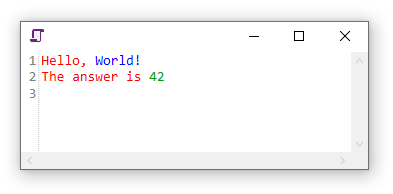
this will produce
Use in C#
public void AppendWithBrush(SolidColorBrush br, string s)
and similar functions on the AvalonLog instance.
When used from C# add a reference to FSharp.Core 6.0.7 or higher.
Full API Documentation
Download
AvalonLog is available as NuGet package.
How to build
Just run dotnet build
How to test
Run dotnet test. The tests in Tests run on .NET Framework 4.7.2 and .NET 8, they need Windows (WPF).
Changelog
see CHANGELOG.md
License
Logo by LovePik
| Product | Versions Compatible and additional computed target framework versions. |
|---|---|
| .NET | net7.0-windows7.0 is compatible. net8.0-windows was computed. net9.0-windows was computed. net10.0-windows was computed. |
| .NET Framework | net472 is compatible. net48 was computed. net481 was computed. |
-
.NETFramework 4.7.2
- AvalonEditB (>= 2.5.0)
-
net7.0-windows7.0
- AvalonEditB (>= 2.5.0)
NuGet packages (1)
Showing the top 1 NuGet packages that depend on AvalonLog:
| Package | Downloads |
|---|---|
|
Fesh
A hostable fsharp scripting editor for Windows based on Avalonedit |
GitHub repositories
This package is not used by any popular GitHub repositories.
| Version | Downloads | Last Updated | |
|---|---|---|---|
| 0.21.0 | 65 | 10/10/2026 | |
| 0.20.0 | 4,923 | 3/19/2025 | |
| 0.19.0 | 411 | 3/18/2025 | |
| 0.18.0 | 629 | 2/15/2025 | |
| 0.17.0 | 1,051 | 11/18/2024 | |
| 0.16.0 | 355 | 11/6/2024 | |
| 0.15.8 | 311 | 11/3/2024 | |
| 0.15.0 | 282 | 11/3/2024 | |
| 0.14.0 | 369 | 9/11/2024 | |
| 0.13.0 | 329 | 6/10/2024 | |
| 0.12.0 | 481 | 10/29/2023 | |
| 0.11.0 | 331 | 9/10/2023 | |
| 0.10.0 | 344 | 7/27/2023 | |
| 0.9.3 | 346 | 5/29/2023 | |
| 0.9.2 | 457 | 5/29/2023 | |
| 0.9.1 | 381 | 4/29/2023 | |
| 0.9.0 | 381 | 4/23/2023 | |
| 0.8.3 | 529 | 1/8/2023 | |
| 0.8.2 | 501 | 12/17/2022 | |
| 0.8.1 | 527 | 12/17/2022 |
### Added
- Tests (xunit), run them with `dotnet test`
- `SelectedTextHighlighter.ClearHighlight()` to remove the highlights of all occurrences of the selected text
### Changed
- Highlights of all occurrences of the selected text now stay until Escape is pressed in the log (after closing the search panel, if open) or a new text is selected
- Selected text is never highlighted by the `SelectedTextHighlighter`, also within multi-line and rectangular selections, because the selection has its own highlighting
- `OnHighlightChanged` is also raised when the text changes, to keep the count up to date while a highlight is shown
- Update AvalonEditB to 2.5.0
- New text only scrolls the view to the end if it was already at the end. So you can scroll up and read while text is printed. Scrolling back to the end resumes following.
- Text printed with the default color (`Append`, `AppendLine`) now always uses the current `Foreground` of the editor, so it follows theme changes. Before, it was a copy of the Foreground at creation (or at the last `Clear()`).
- Printing never blocks the printing thread. One shared timer posts the text to the UI thread, at most every `PrintInterval` (50 ms). A single printfn now updates the screen once instead of twice. Printing 200k lines via `Console.Out` is about 10x faster.
### Fixed
- `SelectedTextHighlighter`: the background count search is delayed by 100 ms and only raises `OnHighlightChanged` if no newer search or clearing happened, so results can no longer arrive out of order or after `OnHighlightCleared`. Disabling via `IsEnabled` no longer raises `OnHighlightCleared` twice. Setting `ColorHighlighting` redraws immediately
- TextWriter: `Write(char)`, `Write(char[])`, `Write(ReadOnlySpan<char>)` and `Write(StringBuilder)` were silently dropped
- Printing a null string threw a NullReferenceException, now it prints nothing
- The undo stack kept a copy of all printed text, it is disabled now
- An exception while sending text to the UI thread from a background timer could terminate the host process. Printing also stops by itself once the UI Dispatcher shuts down
- When `MaximumCharacterAllowance` was reached by several threads at once, the stop message could get printed more than once. A single print that is longer than the remaining allowance now gets cut off at the maximum, so it cannot freeze the UI
- Printing with a color from two threads at once could print a line in the other thread's color. Printing with the same RGB color no longer creates a new brush each time
- `AppendWithBrush`, `AppendLineWithBrush`, `printfBrush` and `printfnBrush` did not freeze the brush, so an unfrozen brush created on a worker thread crashed the rendering on the UI thread
- On .NET Framework the editor and the TextWriter reported the ANSI code page as encoding, now UTF-8 (without BOM), like on .NET Core
- Selecting text crashed the process when there is no WPF `Application` object (e.g. in a plugin of a non WPF host). The selection highlighter now uses the Dispatcher of the editor
- Clearing the log while another thread was printing made that thread's text lose its color
- A color change in the middle of a line split the rest of the line into one element per character, making its redraw up to 100x slower